
Thermal label printers produce crisp, scannable labels without a single drop of ink. They don’t use cartridges, toner, and ribbons in the basic version. Just heat, applied with precision to the right spots on a label surface.
That sounds like a magic trick. It is not. The mechanism is grounded in straightforward chemistry, and understanding it takes about ten minutes. Once you understand it, choosing between the two types of thermal printing becomes obvious instead of confusing.
This guide explains both methods from the mechanism up: what happens inside the printer, what the label chemistry does, why one type fades and the other does not, and which one belongs in your operation.
How Does a Thermal Label Printer Work Without Ink?
Every thermal printer, regardless of type, uses a thermal printhead: a row of tiny resistive heating elements arranged across the print width, one element per dot column. At 203 DPI, that means 203 heating elements per inch of print width. At 300 DPI, 300 per inch. A 4-inch printer at 203 DPI has 812 individual heating elements firing in coordinated microsecond bursts.
A microprocessor reads incoming label data and determines which elements to activate. Those elements heat to between 60°C and 90°C at precisely targeted points as the label media feeds past the printhead on a rubber platen roller. The platen roller maintains consistent pressure between the printhead and the media. The entire sequence, from data signal to printed dot, takes milliseconds.
That is the hardware side. The chemistry side is what makes thermal printing genuinely interesting.
What Actually Happens on the Label Surface?
In direct thermal printing, the label is coated with a thermochromic layer containing two key ingredients: a leuco dye and an acid developer compound. At room temperature, the leuco dye sits in its colorless form. The acid developer sits in a solid state. The two are mixed into the coating but do not react until heat is applied.
When the printhead’s heating element activates above the label, the acid developer melts. It reacts with the leuco dye. The dye undergoes a molecular restructuring, shifting from its colorless form to a visible dark color, typically black. That reaction happens within milliseconds and produces a stable, visible image in the heated area. Unheated areas remain white.
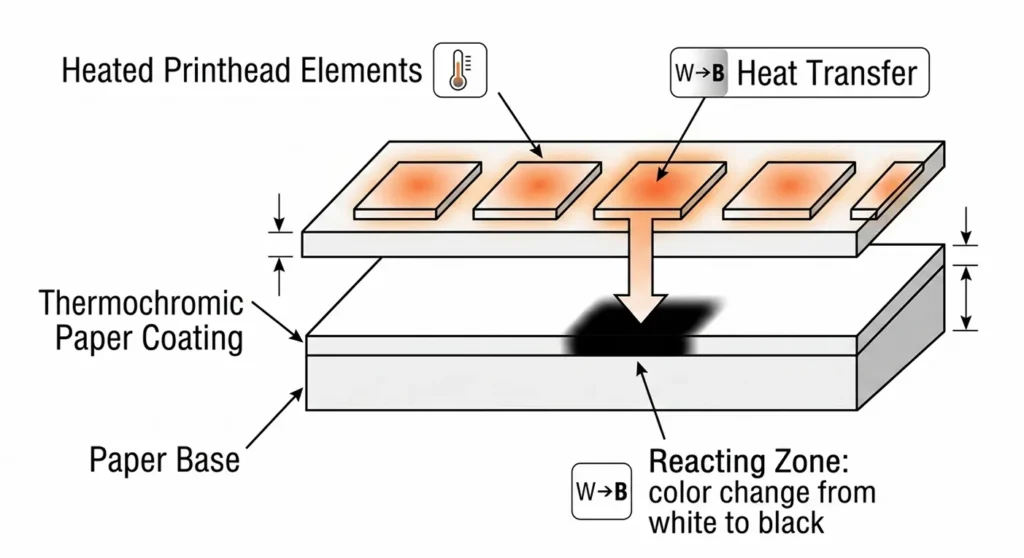
This process has a formal name: thermochromism. It is the same property that makes thermochromic mood rings work, applied at printing resolution.
The specific leuco dye used in most thermal paper is fluoran leuco dye, paired with an acid developer such as octadecylphosphonic acid. These chemical entities appear in zero competitor pages on this topic. They matter because they explain both the printing mechanism and the fading problem: the molecular shift that creates the image is reversible. Apply enough heat or UV light later, and the image shifts state again. That is why direct thermal labels fade.
Do Thermal Label Printers Need Special Paper?
Yes. Direct thermal printers require label media with the leuco dye coating built in. Standard office paper contains no thermochromic chemistry and produces nothing when exposed to the printhead’s heat. You cannot put plain copy paper in a direct thermal printer and expect output.
Thermal transfer printers work differently. The ink comes from the ribbon, not the media. So thermal transfer printers accept a wide range of label substrates: paper, polypropylene, polyester, PVC, and other synthetic materials. The media does not need any special coating because the printhead never touches it directly.
How Does Thermal Transfer Printing Work Differently?
Thermal transfer printing uses the same printhead hardware and the same heat mechanism, but the heat touches a ribbon instead of the label surface.
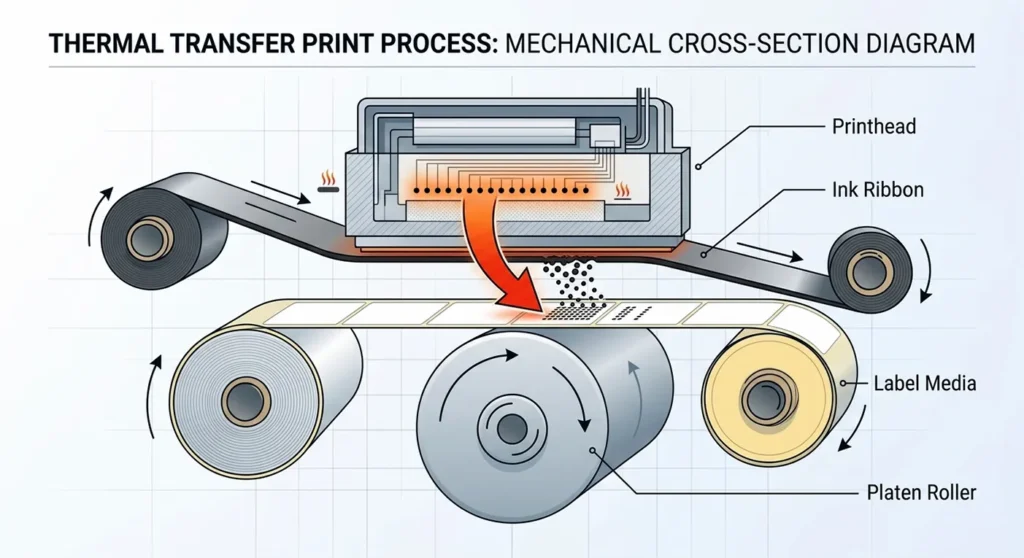
The ribbon is a thin polyester base film coated with solid ink: wax, wax-resin, or full resin depending on the ribbon type. The ribbon sits between the printhead and the label media as both feed through the printer. When the heating elements activate, they melt the solid ink from the ribbon at specific points and transfer it onto the label substrate below. The ink bonds to the label surface at a molecular level as it cools and solidifies in under a second.
The image on a thermal transfer label is a physical deposit of solidified ink on the label surface. It is not a chemical state change in the media. That distinction is everything when it comes to durability: a physical ink deposit does not reverse when exposed to heat or UV light. It does not fade because there is no reversible chemistry involved. The ink is simply there, fused into the label.
Zebra describes this well in their technical FAQ: thermal transfer printed labels are “the most durable available” because the ink is absorbed into the media rather than sitting on a reactive coating surface.
Three Types of Thermal Transfer Ribbons
The ribbon type determines how durable the final label is. Each type serves a different range of applications.
- Wax ribbons use a wax-based solid ink layer with a small resin addition. They melt at lower temperatures, roughly 140°F to 160°F, which keeps printhead stress low and printing fast. Wax ribbons produce economic, clean labels for paper stock in ambient indoor conditions. Suitable for shipping labels, retail price tags, and basic barcode labels with a lifespan of 1 to 2 years indoors.
- Wax-resin ribbons combine wax and resin in higher proportions. They handle moderate heat, humidity, and physical handling better than pure wax. This is the standard ribbon type for warehouse barcode labels, inventory labels, and pallet IDs. Printhead temperature requirements sit higher than wax, and the labels last 2 to 5 years under normal warehouse conditions.
- Resin ribbons use a full-resin solid ink. They require the highest printhead temperatures and produce labels that resist chemicals, prolonged outdoor UV exposure, extreme cold, and abrasion. Resin ribbon on polyester label stock produces labels rated for 10 or more years in harsh environments. These are used for chemical drum labels, cryogenic specimen labels, outdoor asset tags, and GHS compliance labels.
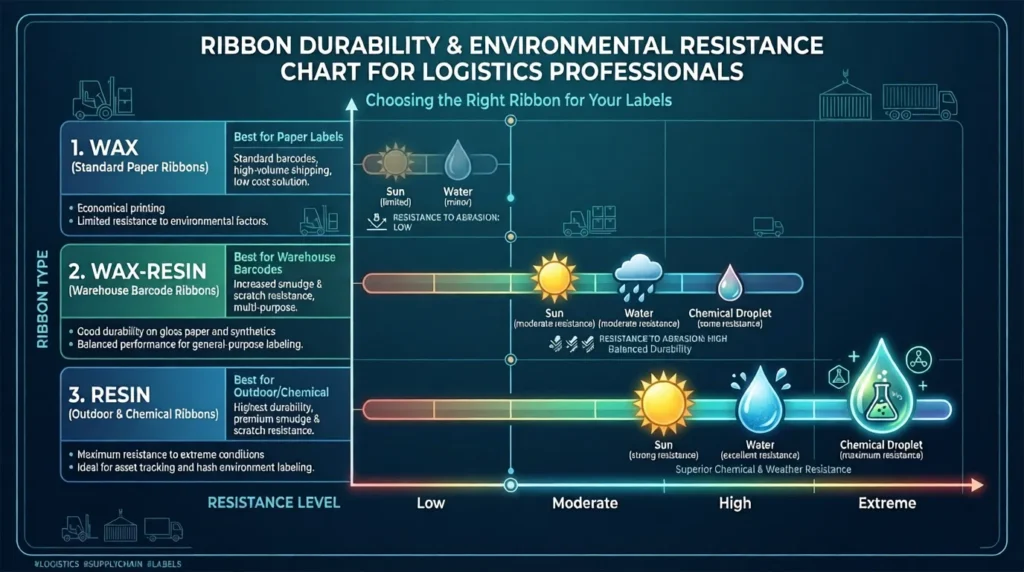
One critical rule: the ribbon type must match the label substrate. A wax ribbon on polyester will not adhere properly and will produce poor print quality. A resin ribbon on plain paper wastes the ribbon’s durability advantage. Matching ribbon to media is not optional, it is the foundation of label performance.
SATO’s technical white paper on thermal transfer explains the printhead implications of this matching requirement: using media that requires higher heat than the ribbon supports degrades print quality and shortens printhead life simultaneously.
Direct Thermal vs Thermal Transfer: What Is the Real Difference?
Both technologies print high-quality barcodes, text, and graphics. Both print at speeds between 4 and 14 inches per second. Both serve industries from retail to logistics to healthcare. The differences are about what happens to the label after it prints.
Here is the comparison across the dimensions that actually affect buying decisions:
| Dimension | Direct Thermal | Thermal Transfer |
|---|---|---|
| Ink or ribbon required | No | Ribbon only (no liquid ink) |
| Label media | Heat-sensitive coated paper | Paper, PP, PET, PVC, synthetic |
| Label lifespan | 6 to 12 months typical | 2 to 35+ years depending on ribbon |
| Printhead lifespan | Shorter (direct contact with media) | Longer (ribbon acts as buffer) |
| Media cost | $9 to $12 per 1,000 labels | $3 to $8 per 1,000 + ribbon cost |
| Color printing | No (monochrome black only) | Yes (one solid color per ribbon) |
| Best application | Shipping labels, receipts, short-term use | Inventory, asset tracking, compliance labels |
When to Choose Direct Thermal
Direct thermal is the right choice when:
Your labels travel on parcels and get discarded within 30 days. USPS, UPS, FedEx, and DHL shipping labels all fall into this category. Your workplace is climate-controlled and labels never face heat above 140°F, prolonged sunlight, or chemical exposure. You want the simplest setup possible with the lowest ongoing consumable overhead. Rollo, DYMO LabelWriter, and entry-level Zebra desktop models all run direct thermal for exactly this reason.
When to Choose Thermal Transfer
Thermal transfer is the right choice when:
Your labels need to stay legible and scannable for more than 6 months. Your labels face any combination of heat, moisture, UV exposure, or chemical contact. You label inventory bins, pallet locations, or storage racks that do not move frequently. You operate in healthcare, pharmaceuticals, manufacturing, or any regulated industry where label readability is a compliance requirement. You need labels for outdoor assets, cold chain tracking, or GHS chemical identification.
For a complete side-by-side with use-case examples and cost calculations, read our guide on direct thermal vs thermal transfer printers and which one fits your label type.
Do Thermal Printers Need Ink, Toner, or Cartridges?
No. Neither direct thermal nor thermal transfer printers use liquid ink, ink cartridges, or toner powder. This is the most common source of buyer confusion when someone purchases a thermal printer for the first time.
Direct thermal printers have exactly one consumable: the label roll. That is it. No cartridges to order, no toner to replace, no ribbons to load. The only other maintenance item is a printhead cleaning card, which costs $5 to $10 for a pack of 10 and takes 30 seconds to use each time you swap a label roll.
Thermal transfer printers have two consumables: the label roll and the ribbon. The ribbon is a solid-state film, not a liquid cartridge. Buyers sometimes search for ink refills for their thermal transfer printer and come up empty because the product they need is a ribbon roll, not ink. A standard 450-meter ribbon roll prints approximately 2,800 six-inch labels before requiring replacement.
What About BPA in Thermal Paper
There is one chemical consideration worth knowing for direct thermal users. Thermal paper historically used bisphenol A (BPA) as the acid developer that activates the leuco dye reaction. Following health concerns about BPA exposure, most current manufacturers shifted to bisphenol S (BPS) as the replacement developer.
A peer-reviewed study published in Science Direct analyzed 220 thermal paper samples collected across 39 countries. All samples from the United States contained BPS as the primary developer rather than BPA. For shipping labels that travel on the outside of a package and get discarded after delivery, this is not a practical concern. For workers who handle large volumes of thermal paper labels daily without gloves, it is worth knowing.
For a full breakdown of what thermal label printers do and do not consume, including running cost calculations, read our guide on whether thermal label printers need ink cartridges, toner, or ribbons.
How Long Do Thermal Label Printers Last?
This question conflates two different things: the hardware lifespan and the label lifespan. Separating them gives you a much clearer picture.
How Long Does the Printer Hardware Last?
A thermal printer chassis, whether desktop or industrial, typically lasts 7 to 10 years under normal operating conditions. The limiting component is the printhead, not the chassis. Printhead life is measured in linear inches of media printed, not calendar time, because a printer used heavily wears faster than one used lightly.
HPRT’s published lifespan data puts printhead mileage at 50 to 150 kilometers of media depending on the model and print conditions. Translate that to label counts: at 4 inches (about 100mm) per label, 100 kilometers of media equals approximately one million labels before significant printhead degradation.
The print technology matters here. SATO’s technical analysis documents that direct thermal printheads wear at 2 to 4 times the rate of thermal transfer printheads under equivalent print volumes. The reason is physical: in direct thermal, the printhead contacts abrasive label media directly on every print. In thermal transfer, the ribbon sits between the printhead and the media, acting as a protective buffer that reduces friction and heat stress on the printhead’s heating elements.
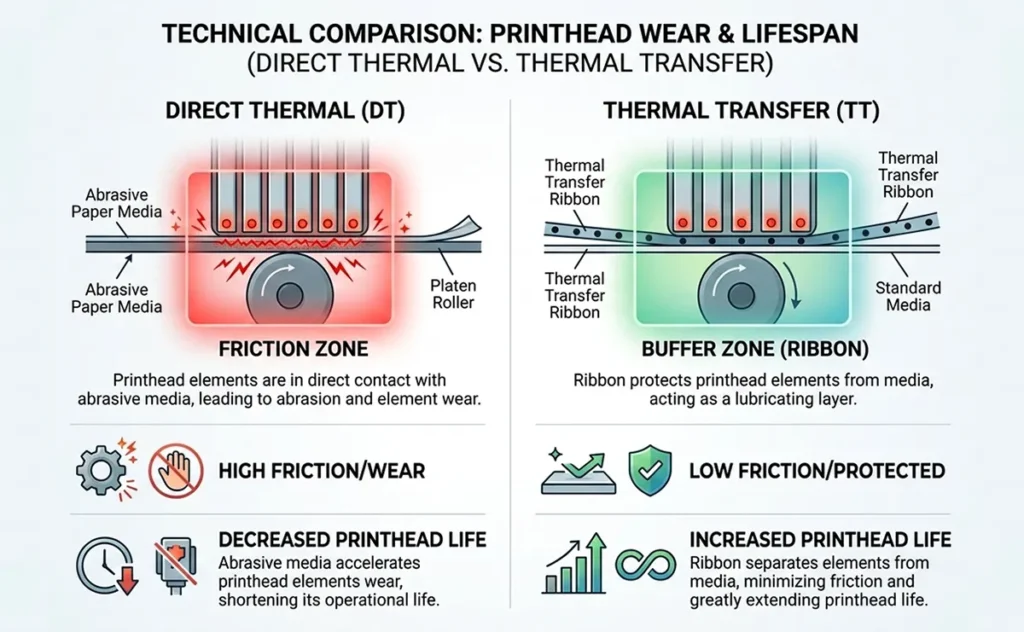
In practical terms, a thermal transfer printer running equivalent volume lasts significantly longer before requiring a printhead replacement.
How Long Do the Labels Last?
Direct thermal labels in standard indoor conditions last 6 to 12 months before fading begins. In cool, dry, UV-free storage they can last up to 2 years. Exposed to heat above 140°F, extended fluorescent lighting, sunlight, or moisture, they degrade faster.
Thermal transfer labels on paper with wax ribbon last 1 to 2 years. On paper with wax-resin ribbon, 2 to 5 years. On synthetic stock (polypropylene or polyester) with resin ribbon, 10 or more years. HPRT’s longevity testing indicates that resin ribbon labels on polyester can remain scannable and legible for up to 25 years under ideal storage.
What Shortens a Thermal Printer’s Life?
Five things accelerate wear on any thermal printer:
- Abrasive or low-quality media acts like sandpaper on the heating elements. Always use media rated for your printer model.
- Excessive heat settings stress the heating elements unnecessarily. Use the minimum darkness setting that produces a clean, scannable barcode. Printing darker than needed does not improve quality, it only increases printhead wear.
- Dust and debris in the paper path cause jams and contaminate the printhead coating. In dusty warehouse environments, weekly cleaning is appropriate.
- Infrequent printhead cleaning allows residue from label adhesive and paper dust to build up on the heating elements, causing uneven heat distribution and white streak voids in labels.
- Mismatched ribbon and media in thermal transfer forces the printhead to run at higher temperatures to compensate for poor ink transfer, accelerating wear.
The maintenance rule is simple: clean the printhead with an isopropyl alcohol cleaning card every time you change a label roll or ribbon. It takes 30 seconds and extends printhead life significantly.
Can Thermal Label Printers Print in Color?
Standard thermal label printers print in one color: black. This covers the vast majority of label applications because shipping labels, inventory barcodes, and compliance labels all function perfectly in black on white.
Direct thermal printing is monochrome by design. The leuco dye chemistry produces a dark image on a light background. Some specialty direct thermal papers use different dye-developer combinations to produce blue or red output at specific temperatures, but these are rare and not compatible with standard printers.
Thermal transfer printing supports color through colored ribbons. Load a red ribbon and the entire label prints in red. Load a blue ribbon and it prints in blue. This works well for color-coded label systems: red labels for returns, green for inventory, blue for quality holds. The limitation is that each ribbon prints one solid color across the whole label. You cannot print a multicolor label with a standard thermal transfer printer.
For full-color label printing with logos, photos, or multicolor graphics, a completely different technology is required. Epson’s ColorWorks series uses a multi-pass color thermal transfer process that functions similarly to inkjet but with solid ink ribbons. These printers carry a significantly higher price point than standard thermal label printers.
Read our full guide on whether thermal label printers can print in color and what your options are before committing to a specialty color model.
Thermal Printer vs Normal Printer: What Is the Difference?
Normal printer in most buyers’ mental model means an inkjet or laser printer. Here is how thermal printing differs across the five dimensions that matter for label applications.
Print speed. Thermal printers produce a label in under 2 seconds at speeds of 4 to 14 inches per second, with zero warm-up time and no drying period. An inkjet printer producing a 4×6 label on a cut-sheet label sheet takes 15 to 30 seconds. For operations printing 200 labels per day, that speed gap costs hours per week.
Cost per label. An inkjet running on pre-cut label sheets costs $0.05 to $0.20 per label in ink alone. A direct thermal printer costs $0.01 to $0.05 per label with no ink overhead. Thermal transfer adds ribbon cost but the combined label-plus-ribbon cost stays competitive with inkjet at most volumes.
Media flexibility. Inkjet and laser printers use cut-sheet label paper in fixed pre-cut sizes on standard letter sheets. Thermal printers accept continuous roll media in custom widths and variable lengths. No wasted labels from partial sheets. No size constraints from pre-cut formats.
Durability. Inkjet labels smear when wet. Laser labels can peel from heat and curl from humidity. Thermal transfer labels on synthetic stock with resin ribbon outperform both on durability across essentially every environmental condition.
Maintenance. Inkjet printers require cartridge replacement, periodic printhead purging cycles, and nozzle cleaning. Laser printers require toner replacement and drum maintenance. Thermal printers require only media or ribbon replacement and occasional printhead cleaning with an isopropyl alcohol card. Fewer moving parts and no liquid ink system means fewer failure points and lower maintenance frequency.
Brother’s support documentation puts the average thermal printhead lifespan at around 10 years under normal use, compared to inkjet printheads that require replacement or professional cleaning every 1 to 3 years depending on usage frequency.
What Are Thermal Label Printers Used For?
Thermal label printers appear in more industries than most buyers realize when they first search for one. Each use case maps to a specific printer type and ribbon combination.
Shipping and e-commerce. The dominant use case for direct thermal printing. USPS, UPS, FedEx, DHL, and every major carrier accepts 4×6 direct thermal shipping labels. Rollo, DYMO LabelWriter, and Zebra ZD-series desktop printers cover this use case for sellers from Shopify stores to small 3PL operations.
Warehouse inventory management. Bin location labels, pallet ID tags, and receiving labels all require thermal transfer on synthetic stock. These labels stay on shelving, racking, and pallets for years and must remain scannable throughout. Direct thermal is unsuitable for this application.
Etsy and small-business sellers. Compact direct thermal desktop printers handle the label volume of most handmade product sellers. Label costs stay low, setup is simple, and compatibility with Etsy’s shipping integration is straightforward.
Healthcare and laboratories. Patient identification wristbands, pharmacy dispensing labels, and lab specimen tube labels all require thermal transfer. Labels must survive repeated contact with alcohol wipes, cleaning agents, and disinfectants. Direct thermal labels degrade on contact with many of these chemicals.
Manufacturing and compliance. GHS chemical labels, OSHA safety signage, work-in-process tracking labels, and pharmaceutical serialization labels all use thermal transfer with resin ribbons. Compliance requires labels that remain legible throughout the product lifecycle, which can span years.
Retail. Price tags, product barcodes, and shelf edge labels use either method depending on the required lifespan. Short-term retail price tags work fine with direct thermal. Permanent asset or equipment labels require thermal transfer.
For shipping-specific printer comparisons, read our guide on thermal label printers for shipping compared by print speed and carrier compatibility. For warehouse and logistics operations printing at high volume, read our comparison of Industrial thermal label printers for warehouses and logistics operations.
How to Choose Between Direct Thermal and Thermal Transfer: The Label Lifespan Test
Most buying guides present this choice as a complex matrix of considerations. It does not need to be. One question cuts through everything.
How long does this label need to stay readable?
That single question drives the decision. Here is the framework:
Under 30 days: Direct thermal. Your label ships on a parcel, gets scanned at a few facilities, arrives at a door, and gets discarded. No ribbon needed. Lowest setup cost. Simplest operation. Buy a Rollo, a DYMO, or a Zebra ZD-series and get started in ten minutes.
30 days to 6 months: Either method works, depending on environment. Direct thermal survives 6 months indoors in cool, dry conditions away from direct light. If the label faces any outdoor exposure, heat above 100°F, moisture, or chemical contact, choose thermal transfer with a wax or wax-resin ribbon on paper stock.
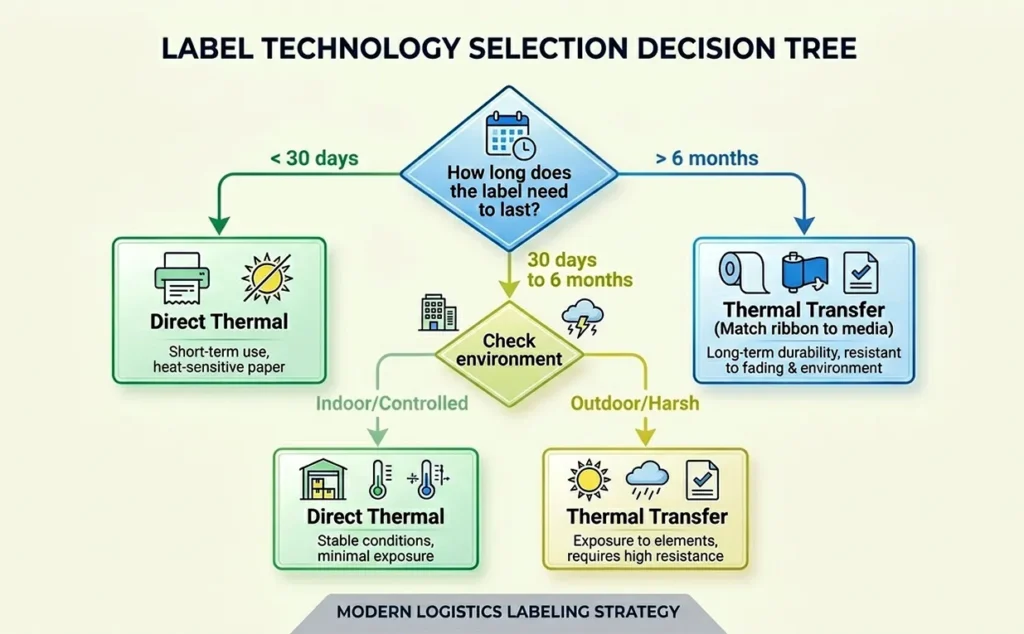
Over 6 months: Thermal transfer only. Match the ribbon type to the environment:
- Wax ribbon on paper for standard indoor labels in ambient warehouse conditions.
- Wax-resin ribbon on paper or polypropylene for warehouse barcode labels, pallet IDs, and inventory tags.
- Resin ribbon on polyester for outdoor assets, cold chain compliance labels, chemical drums, and any label requiring 5 or more years of readability.
This is the Label Lifespan Test. Apply it before every label buying decision and the correct technology becomes clear immediately.
There is a practical reason the entire shipping industry standardized on thermal printing rather than inkjet or laser. To understand the economics and logistics behind that choice, read our explainer on why shipping carriers require thermal printers for label printing and what changes operationally if you try to use a regular inkjet instead.
Summary of Key Facts
Before purchasing any thermal label printer, confirm these points:
The two types of thermal printing are direct thermal, which requires chemically coated label media and no ribbon, and thermal transfer, which uses a ribbon on standard substrates and produces durable long-lasting labels.
Direct thermal labels last 6 to 12 months under normal conditions. Thermal transfer labels with resin ribbon on synthetic stock last a decade or more.
Neither type uses liquid ink, ink cartridges, or toner. Direct thermal uses no consumables except label rolls. Thermal transfer uses label rolls plus ribbon rolls.
The printhead lifespan in direct thermal printing is 2 to 4 times shorter than thermal transfer under equivalent print volumes, because the ribbon in thermal transfer acts as a buffer between the printhead and abrasive media.
Standard thermal label printers print in black only. Colored ribbons for thermal transfer support single-color printing. Full-color label printing requires specialty color thermal transfer hardware at a higher cost.
Cleaning the printhead with an isopropyl alcohol card at every media or ribbon change is the single most effective maintenance action for extending printer lifespan.