
Standard thermal label printers do not print in color. They produce black-only output. The heat-reaction process behind direct thermal printing and the single-ribbon design of thermal transfer printing do not support the CMYK color model that full-color printing requires.
Several methods give you limited or full color output from thermal-based workflows. We cover all of them below, with honest specs and a clear decision guide by use case.
To understand why color is limited at the technology level, our guide on how thermal label printers work covers the heat-reaction mechanism behind both direct thermal and thermal transfer printing.
What Standard Thermal Label Printers Can and Cannot Do
Standard thermal label printers produce monochrome output. Every model from Zebra, DYMO, Rollo, and NIIMBOT operates this way. The print color is black. The label background is whatever color the media stock is, typically white.
You cannot change this by adjusting printer settings. The limitation is not software. It is physics.
Here is a quick overview before we go deeper:
| Method | Color Output | Example Products | Typical Use Case | Cost vs Standard Thermal |
|---|---|---|---|---|
| Direct thermal | Black only | Rollo, DYMO, Zebra ZD-series | Shipping labels, receipts | Baseline |
| Thermal transfer + colored ribbon | One solid color per print job | Zebra ZT-series, HPRT printers | Retail price tags, color-coded inventory | Low (ribbon cost only) |
| Dual-color thermal paper | Two colors (e.g., black + red) | Brother QL-800, MUNBYN 405B | Pharmacy labels, retail price tags | Low to moderate |
| ZINK technology | Full color (with limits) | Brother VC-500W | Small product labels, food labels | Higher per label |
| Pre-printed stock + thermal overprint | Full brand color + variable data | Any thermal printer | GHS labels, branded product labels | Moderate setup cost |
Why Standard Thermal Printing Is Monochrome
How Direct Thermal Printing Works (and Why Color Is Not Possible)
Direct thermal printers produce output by heating thermal paper. The paper has a thermochromic coating with a leuco dye layer and an acid developer compound. When the thermal print head applies heat above a threshold temperature, the acid melts and reacts with the leuco dye. The dye shifts from colorless to dark, forming a black mark.
There is no ink, pigment, and CMYK dye set. The chemistry produces one color: black. You cannot swap the paper for a different-colored version and get a different output color. The marks are always black, regardless of the paper stock color underneath.
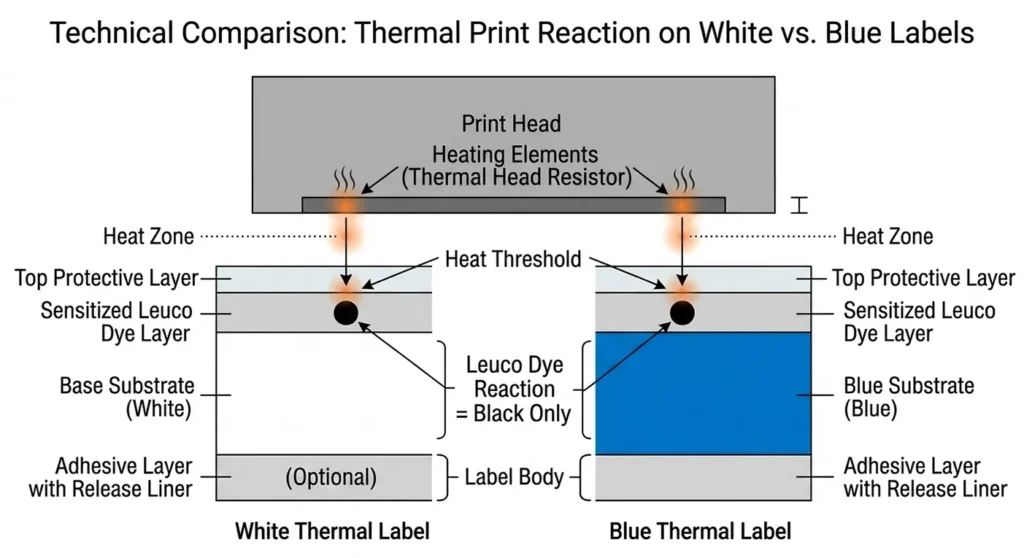
Colored thermal paper does exist, but it is a misunderstood product. If we load blue thermal paper, the background appears blue and the printed marks are still black. We have not printed in blue. We have printed black marks on a blue background.
How Thermal Transfer Works (and What Limited Color Options Exist)
Thermal transfer printing adds a ribbon between the print head and the label media. The ribbon carries solid ink, typically wax, wax-resin, or resin. The print head melts the ink from the ribbon surface and bonds it to the label.
Standard ribbons use black ink. That is the default output. But thermal transfer printers accept ribbons in other colors: red, blue, green, and gold are all available. Swap the ribbon and the print color changes.
The limitation: one ribbon prints one color. We cannot load a red ribbon and print both red text and black barcodes in a single pass. A standard thermal transfer printer produces one solid color per print job. That is limited color, not full color.
The choice between direct thermal and thermal transfer also determines your color options. Our breakdown of direct thermal vs thermal transfer printing explains both methods side by side with real cost comparisons.
Color Options That Do Work with Thermal Label Printers
Dual-Color Thermal Printing (Black + Red or Black + Blue)
Dual-color thermal printing is the most practical upgrade for buyers who want a second color without adding ribbons or changing workflows.
It uses two-layer thermal paper. The two layers respond to different heat levels. At a lower temperature, one layer activates and produces one color, typically red or blue. At a higher temperature, the second layer activates and produces black. The thermal print head applies heat at different intensities for different elements on the label, producing two colors in a single print pass.
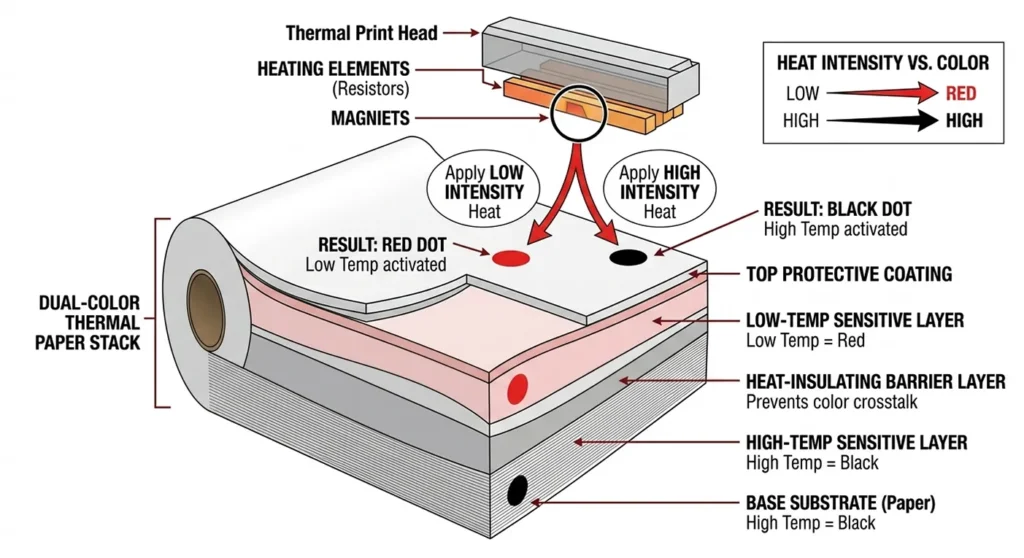
No extra ribbons and extra passes. Just specialized two-layer thermal paper and a compatible printer.
Compatible printers:
The Brother QL-800 prints black and red in dual-color mode at 93 labels per minute via USB. It uses Brother’s DK-22251 die-cut continuous label tape, which is the two-layer thermal media required for dual-color output.
The MUNBYN RealWriter 405B supports both black + red and black + blue dual-color printing, switching based on which two-layer paper stock we load.
Dual-color thermal works well for pharmacy labels, retail price tags, and inventory labels where a second color signals urgency, category, or status. It does not produce full CMYK color.
Colored Thermal Transfer Ribbons (One Color Per Print Job)
Any thermal transfer printer that accepts standard ribbon spools accepts colored ribbons. Wax ribbons and resin ribbons are both available in red, blue, green, and gold from third-party ribbon suppliers.
The workflow is simple. We swap out the black ribbon and load a red ribbon. Every print job comes out red. We use this for color-coded label systems: red labels for return shipments, blue labels for fragile items, green labels for ready-to-ship.
The constraint is one color per print job. We need to reload a different ribbon to switch colors. For operations running dedicated label stations with fixed color assignments, this is a practical, low-cost solution.
Colored wax and resin ribbons are available in red, blue, green, and gold for most Zebra and HPRT thermal transfer printers. Our guide to thermal transfer ribbons and label types covers ribbon chemistry, media compatibility, and cost-per-label calculations.
Pre-Printed Color Labels with Thermal Variable Data Overprint
This is the method most professional label operations use when they need full color branding on thermal labels.
The workflow has three steps:
- Order color-printed label rolls from a label manufacturer. The rolls arrive with brand colors, logos, product photography, GHS pictograms, or compliance borders already printed using commercial offset or digital printing.
- Load the pre-printed color label rolls into a standard thermal label printer.
- Print only the variable data: barcodes, serial numbers, expiration dates, batch codes, or shipping information. The thermal printer adds black variable data on top of the pre-printed color elements.
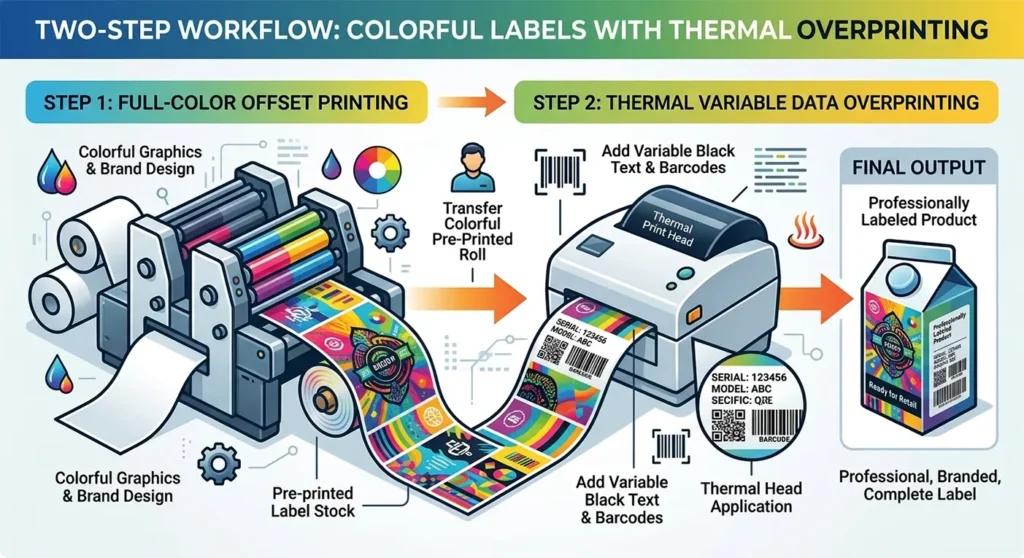
The thermal printer prints nothing in color. It only adds the variable black data. The color comes from the pre-manufactured label stock.
This is the standard workflow for GHS hazardous material labels, food and beverage product labels, and branded retail packaging labels. The GHS label compliance requirement for specific colored pictograms, red borders, and warning diamonds is met through the pre-printed label stock. The thermal printer adds the product-specific chemical data on top.
The minimum order quantity for pre-printed label rolls adds cost for small businesses. But at moderate volumes, it produces the most professional full-color result available from a standard thermal printer workflow.
ZINK Technology: Full Color from a Thermal Process (With Real Limits)
ZINK (Zero Ink) is a genuine thermal full-color printing technology. ZINK paper contains embedded cyan, magenta, and yellow dye crystals throughout the paper layer. The thermal print head activates these crystals at different temperatures to produce different colors. Mixing the three activated dye outputs produces a full-color image.
The Brother VC-500W uses ZINK technology and prints full-color labels at home or in small offices.
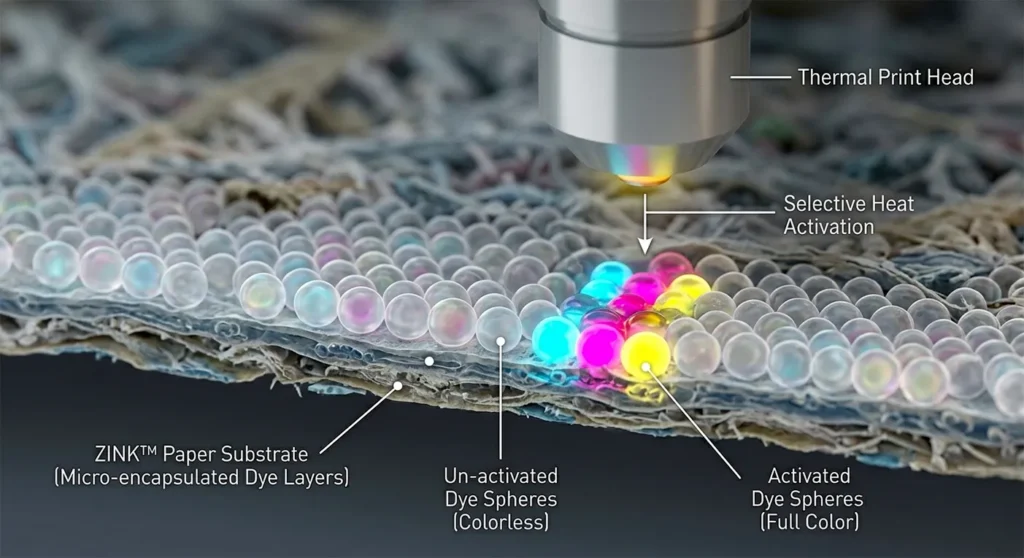
Confirmed specs:
- Print resolution: 313 DPI
- Maximum label width: 2 inches (50mm)
- Print speed: 0.3 inches per second (7.5mm per second)
- Connectivity: Wi-Fi
- Compatible media: Brother CZ and CK ZINK paper rolls
ZINK limitations (important before buying):
The 2-inch maximum label width rules the Brother VC-500W out for standard 4×6 shipping labels. It is not compatible with USPS, UPS, FedEx, or DHL label formats. The print speed at 0.3 inches per second is significantly slower than standard thermal printers at 4 to 6 inches per second. ZINK paper costs more per label than standard thermal paper. And at 313 DPI, fine text and complex logos print at lower resolution than a standard 300 DPI thermal label.
ZINK suits small product labels, food container labels, and short-run branding labels for handmade or Etsy products. It does not suit high-volume shipping or warehouse label operations.
Thermal transfer printers use ribbons, not ink cartridges. If we are evaluating the full range of thermal consumables, our article on whether thermal label printers use ink breaks down exactly what each printer type requires and what the real running costs are.
When to Skip Thermal and Use an Inkjet Color Label Printer
Some use cases require full-color output at standard label widths and reasonable speeds. No thermal method covers all three simultaneously. When that is the requirement, we move to inkjet.
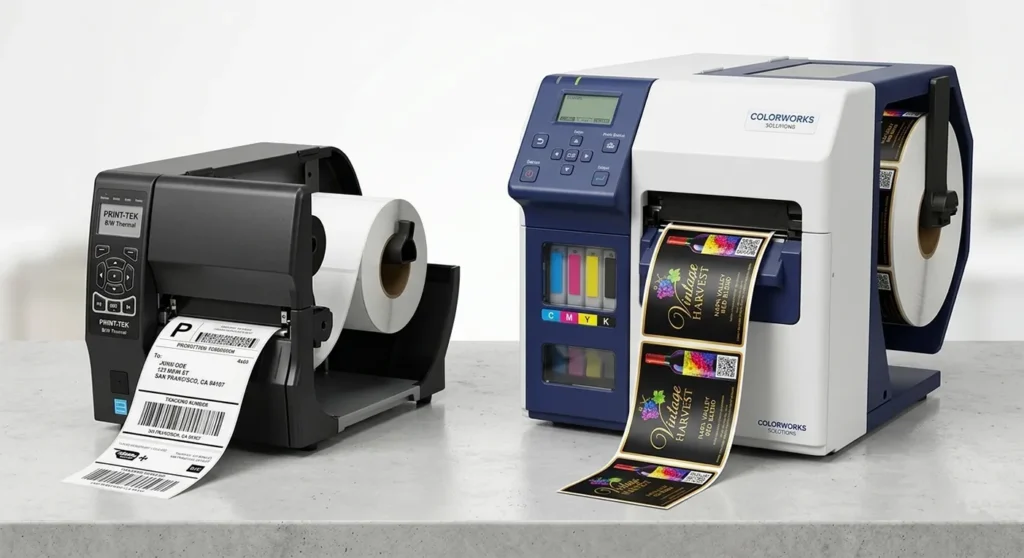
Epson ColorWorks CW-C6000 is an inkjet label printer, not a thermal printer. It prints full CMYK color at up to 4 inches per second on roll-fed label stock with GHS-compliant pigment-based inks. It suits chemical labeling, pharmaceutical packaging, and compliance labels that require color at higher volumes.
Primera LX500 is a dye-based inkjet label printer at 4800 DPI maximum resolution. It handles short-run full-color product labels for food, beverage, and retail. Maximum label width is 4 inches.
Neither product is a thermal printer. We mention them here because they are the correct answer when thermal color workarounds are insufficient.
Color Thermal Label Printing: Which Method Fits Your Use Case
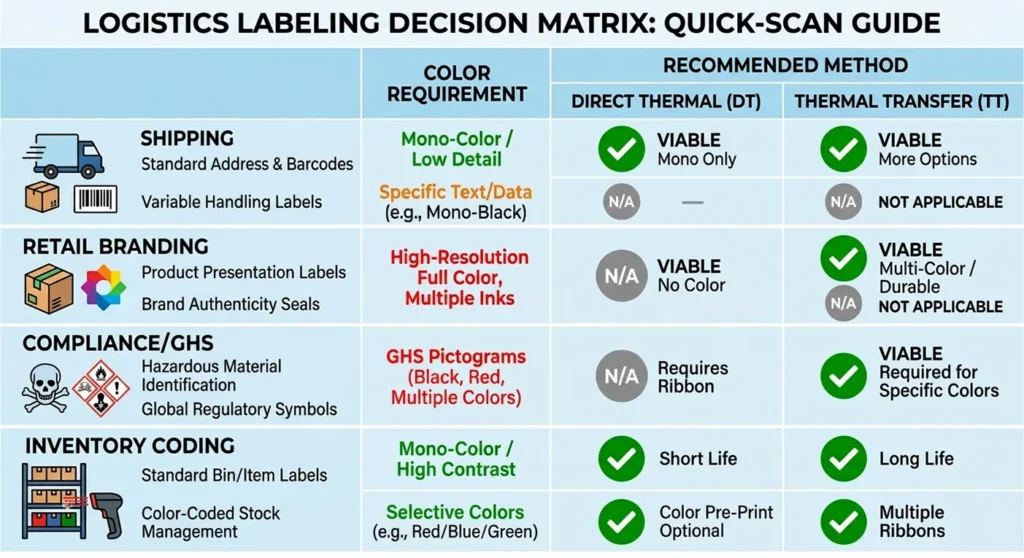
| Use Case | Color Need | Best Method | Notes |
|---|---|---|---|
| Shipping labels (USPS, UPS, FedEx, DHL) | None | Standard direct thermal | Black on white is the carrier requirement |
| Retail product labels with branding | Full color | Pre-printed stock + thermal overprint | Most cost-effective at volume; needs MOQ planning |
| GHS / hazardous material compliance labels | Specific regulated colors | Pre-printed stock + thermal overprint | Red borders and pictograms must meet GHS spec |
| Retail price tags with color coding | Two colors | Dual-color thermal (Brother QL-800 or MUNBYN 405B) | Black + red or black + blue; no inkjet needed |
| Small food or Etsy product labels (full color) | Full color at small size | ZINK (Brother VC-500W) | Max 2-inch width; slow; not for high volume |
| Color-coded warehouse inventory labels | Single accent color | Colored thermal transfer ribbon | Swap ribbon per color; low cost per label |
| Medical and pharmacy labels | Two colors | Dual-color thermal | Red + black coding common in pharmacy workflows |
Frequently Asked Questions
Can direct thermal printers print in color?
No. Direct thermal printers produce black-only output. The thermochromic coating on thermal paper reacts to heat by producing a dark mark. There is no CMYK dye system, no ink, and no mechanism for generating color. The only color variable we control is the paper stock background color, and that does not affect the print color.
What is dual-color thermal printing?
Dual-color thermal printing uses two-layer thermal paper with two separate heat-sensitive dye layers built into the coating. The thermal print head applies different heat intensities to activate each layer independently. Lower heat activates one layer and produces one color, typically red or blue. Higher heat activates the second layer and produces black. The result is a label with two colors printed in a single pass, with no extra ribbons. The Brother QL-800 and MUNBYN RealWriter 405B both support this method.
Can thermal transfer printers print full color?
No, not in a standard single-pass setup. A thermal transfer printer with a colored ribbon prints that one ribbon color across the full label. It does not produce full CMYK color in one pass. Some industrial multi-head thermal transfer systems combine multiple ribbon colors in sequence, but these are not standard label printers and are not practical for most business use cases. For full CMYK color output on roll-fed labels, an inkjet label printer is the correct tool.
Is the Brother VC-500W a thermal printer?
Yes. The Brother VC-500W uses ZINK (Zero Ink) thermal technology. ZINK paper contains embedded cyan, magenta, and yellow dye crystals that the thermal print head activates at different temperatures to produce full color. The printer requires no ink cartridges or ribbons. Its confirmed specs are 313 DPI resolution, a maximum label width of 2 inches, and a print speed of 0.3 inches per second. It is not compatible with standard 4×6 shipping label formats.
What printer should I use for full-color product labels?
We recommend an inkjet label printer for full-color product labels at standard label widths (4 inches or wider). The Epson ColorWorks CW-C6000 uses GHS-compliant pigment-based inks on roll-fed label stock. The Primera LX500 uses dye-based inkjet at 4800 DPI for short-run product labels. Neither is a thermal printer. If full color at small label sizes is acceptable, the Brother VC-500W (ZINK, max 2-inch width) is the only true thermal full-color option in the consumer market.
How do brands print color logos on thermal labels?
Brands print color logos on thermal labels through a pre-printed label workflow. A commercial label printer manufactures rolls with the brand colors, logos, and fixed design elements already printed. We load those pre-printed rolls into a standard thermal printer. The thermal printer adds only the variable data: barcodes, serial numbers, expiration dates, and shipping information. The color comes from the manufacturing process, not from the thermal printer.
Affiliate Disclosure: GadgetsChamp earns a commission on purchases made through links on this page, at no extra cost to you. We recommend only products we have researched thoroughly.