
The most common ribbon mistake I see is not picking the wrong type. It is loading the right ribbon in the wrong direction and spending an hour troubleshooting a printer that was never broken. This article covers both problems, plus the width math and core size specs that nobody puts in one place.
Thermal transfer ribbons come in three types: wax, wax-resin, and resin. Choosing between them takes one decision: how long does the label need to stay readable, and what environment does it face? The ribbon type determines that answer. Everything else, wind direction, width, and core size, determines whether the ribbon physically fits your printer and feeds correctly.
We cover all four decisions in order. Get through this page and you will not order the wrong ribbon again.
3 Types of Thermal Transfer Ribbons
The ribbon type determines label durability. Pick wrong and the label either costs more than it needs to or fails before the product does.
| Ribbon Type | Best For | Label Substrate | Lifespan | Cost Per Roll | Max Print Speed |
|---|---|---|---|---|---|
| Wax | Shipping labels, retail tags, carton labels | Uncoated and coated paper | 1 to 2 years indoor | Lowest | Up to 14 IPS |
| Wax-resin | Warehouse barcode labels, inventory, product labels | Coated paper, semi-gloss, polypropylene | 2 to 5 years | Mid-range | 8 to 10 IPS |
| Full resin | Pharma, GHS, asset tags, outdoor labels, cold chain | Polyester (PET), vinyl, nylon, PP | 10+ years | Highest | 4 to 6 IPS |
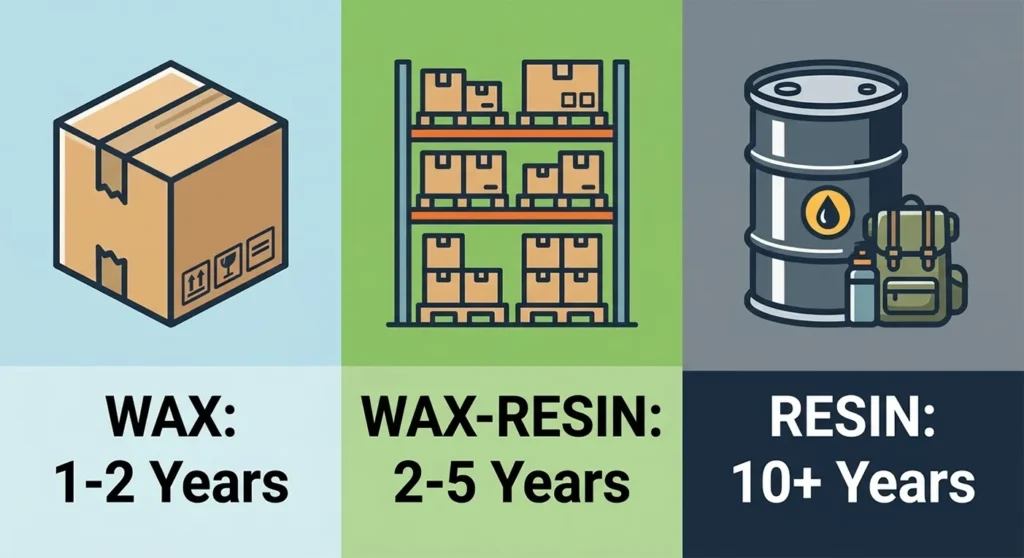
Wax Ribbon
Wax ribbons use a wax-based ink, are best suited for paper material due to their lower smudge resistance, and offer the lowest price of thermal ribbons, making them ideal for high-volume printing applications including barcodes, labels, and shipping applications.
Wax ribbon suits any label that ships a package and gets discarded within a few weeks. USPS, UPS, and FedEx shipping labels all work on wax ribbon and paper stock. The printed barcode scans correctly. The label survives transit. It fades and smears over time, but the delivery happens in days, not months, so the fading never matters.
Do not use wax ribbon on synthetic substrates. Wax ink does not bond to polypropylene or polyester. The ink sits on the surface and smears under contact.
Wax-Resin Ribbon
Wax-resin ribbons combine the easy printing capabilities of wax and the enhanced durability of resin, require a bit more heat than wax to transfer ink, and offer a stronger bond with the printed media, making them suitable for applications where the label needs to withstand a moderate amount of contact, abrasion, or exposure to chemicals and UV light.
Wax-resin is the standard for warehouse operations. Bin location labels, pallet IDs, and product barcode labels stay on shelving and equipment for months or years. They get handled daily. Wax ribbon fades and smears under that exposure. Wax-resin does not. The label stays scannable through the full inventory cycle.
Wax-resin also works on semi-gloss coated paper and polypropylene label stock, which wax ribbon cannot reliably bond to.
Full Resin Ribbon
Full resin thermal transfer ribbons are made of pure resin that melts at a much higher temperature, dissolving into the material on which they are printed, and the result is extreme durability that can endure indoor use, moisture, handling, scratching, abrasion, sunlight, extreme temperature changes, water, chemicals, medical machinery, outdoors, and UV exposure.
Resin ribbon belongs on any label that needs to outlast the product it is on. Pharmaceutical serialization labels must survive two to ten years in a supply chain. GHS chemical labels on industrial drums face splash from the chemical inside. Asset tags on outdoor equipment face UV, rain, and temperature swings for a decade. Wax and wax-resin fail all three. Full resin does not.
Full resin requires the highest printhead temperature setting and the lowest print speed. Running resin ribbon at wax speed settings produces streaky, incomplete ink transfer. Running it at resin settings on a wax-compatible paper label wastes the ribbon’s durability at roughly triple the cost.
The Smear Test: How to Confirm Your Ribbon Type
You received a ribbon roll with no label on the box. Or you need to confirm what is already loaded in your printer. Here is the test.
Print a label. Let it cool for 30 seconds. Scratch the printed surface firmly with your fingernail.
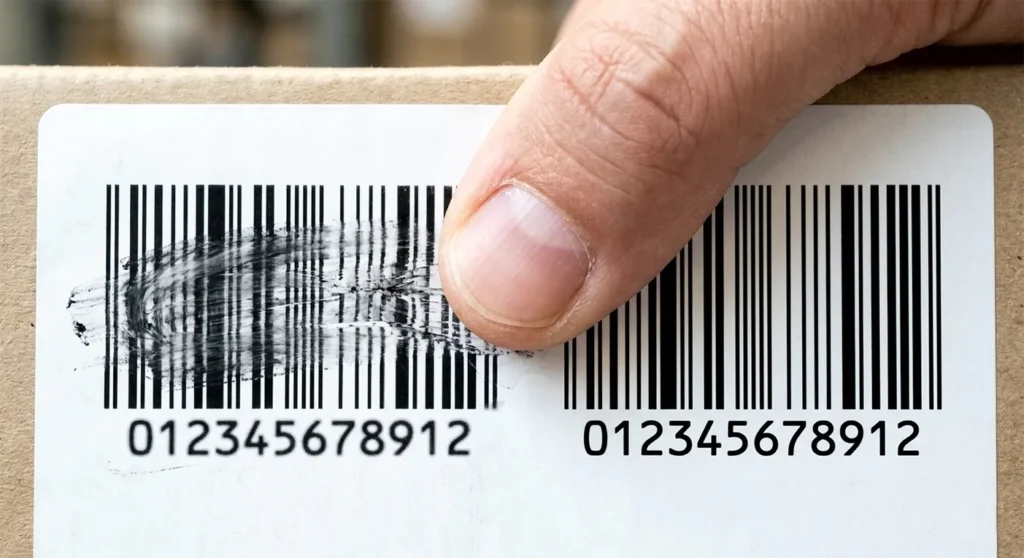
Wax: The ink smears and scratches off under moderate fingernail pressure. Wax-resin: The ink resists light scratching but smears under firm sustained pressure. Full resin: The ink resists firm scratching and does not smear. The label surface feels permanently fused.
This test takes 60 seconds. It confirms the ribbon formulation without any documentation.
CSO vs CSI: The Ribbon Direction Problem Nobody Explains
This is the blank-label problem. The right ribbon type, loaded in the wrong direction, produces nothing. The printer feeds the ribbon through correctly. The printhead applies heat. The ink never contacts the label because the ink side faces away from the label surface.
Thermal transfer printing depends on the waxed side of the printing ribbon coming in direct contact with the label so that when heat from the printhead is applied to the back of the ribbon, it transfers an image to the label. Printers like Zebra and TSC use the popular format of CSO, meaning the waxed side faces the outside of the roll, while other printers like Datamax or Sato use CSI ribbons wound in the opposite direction.
Here is the brand-specific reference:
| Printer Brand | Ribbon Wind Direction | Ribbon Feeds From |
|---|---|---|
| Zebra (all models) | CSO: coated side out | Bottom of roll |
| TSC Auto ID | CSO: coated side out | Bottom of roll |
| Intermec (Honeywell) | CSO: coated side out | Bottom of roll |
| Printronix | CSO: coated side out | Bottom of roll |
| Datamax (Honeywell) | CSI: coated side in | Top of roll |
| SATO | CSI: coated side in | Top of roll |
| HPRT | CSO: coated side out | Bottom of roll |
| iDPRT | CSO: coated side out | Bottom of roll |
If you are unsure which wind direction your existing ribbon uses, press a label firmly against the outside of the ribbon roll. Peel it off. If ink transferred to the label, the ribbon is CSO. If nothing transferred, the ribbon is CSI.
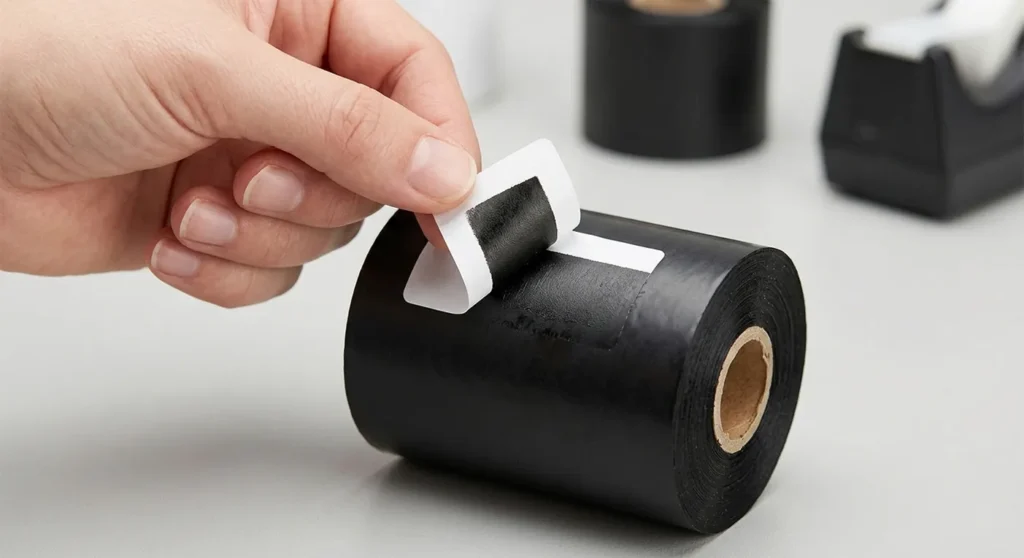
Loading a CSI ribbon into a Zebra printer produces blank labels. Loading a CSO ribbon into a Datamax printer produces the same result. The printer has not malfunctioned. The ribbon direction is wrong. Flip the ribbon to the correct orientation, run a test label, done.
The Width Rule: How to Pick the Right Ribbon Width
Most guides say “the ribbon should be slightly wider than your label.” None of them say what “slightly wider” means. Here is the number.
Your ribbon must be at least 0.33 inches (8mm) wider than your label.
A 4-inch (102mm) label requires at least a 4.33-inch (110mm) ribbon. A 2-inch (51mm) label requires at least a 2.36-inch (60mm) ribbon. A 3-inch (76mm) label requires at least a 3.15-inch (80mm) ribbon.
Running a ribbon narrower than the label leaves a blank stripe along the edge of every label. That stripe causes barcode scan failures if it falls within the barcode quiet zone. It causes incomplete ingredient text if it falls within the label’s content area.
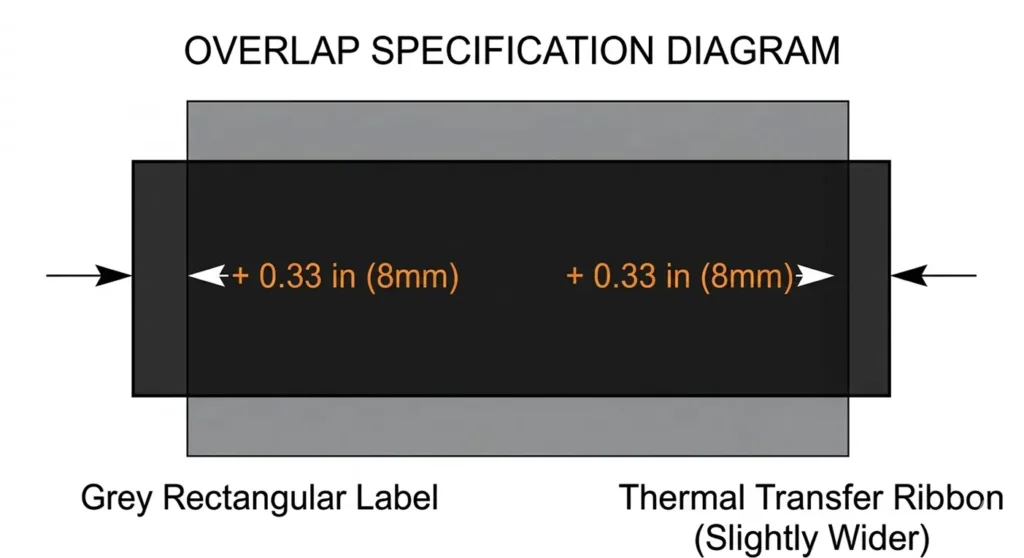
If your label printing area is only 2 inches wide, you can use a 2.36-inch ribbon instead of a 4.06-inch ribbon, which costs more per roll. Using a ribbon precisely matched to the label width rather than the maximum printer width reduces ribbon cost without affecting print quality.
This matters on cost. If you print 2-inch wide labels on a 4-inch wide printer and order 4.33-inch ribbons, you waste 2.33 inches of ribbon width on every meter of ribbon. The same print job on 2.36-inch ribbons uses 55 percent less ribbon per label. At industrial volumes, that gap costs real money per year.
Ribbon Core Size: Desktop vs Industrial
Ribbon core size determines whether the roll physically seats in the printer’s ribbon spool. Two standards exist.
0.5-inch core (12.7mm): Desktop thermal transfer printers. Zebra ZD421 in thermal transfer mode, Zebra ZD621 TT, HPRT XT300 desktop. These printers hold shorter ribbon rolls, typically 74m to 300m per roll, because the media compartment is smaller.
1-inch core (25.4mm): Industrial thermal transfer printers. Zebra ZT411, Zebra ZT610, Honeywell PM43, SATO CL4NX Plus, TSC MX240P. Industrial printers hold 300m to 600m rolls, reducing changeover frequency on high-volume dock stations.
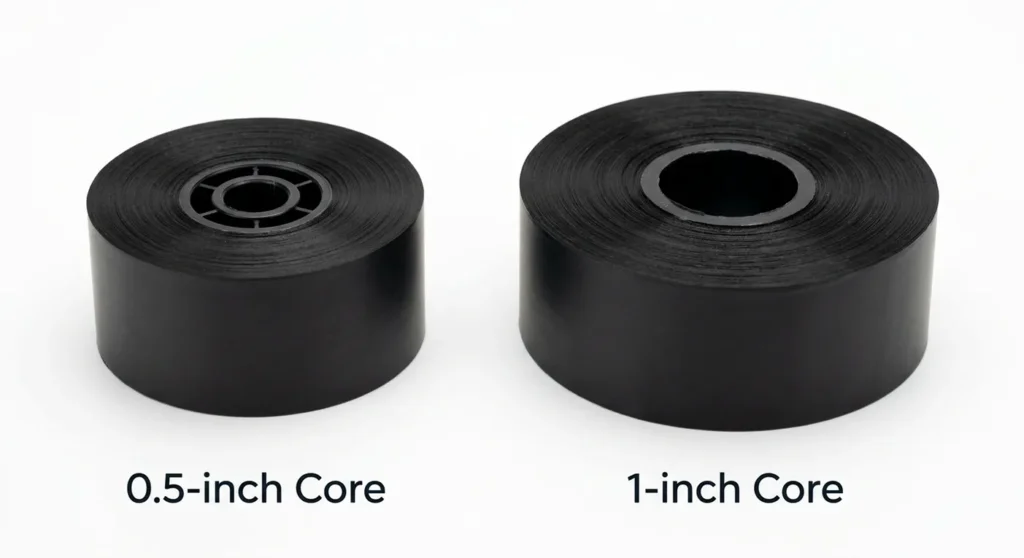
Ribbon rolls use different inner diameters for industrial-grade and desktop printers: 1-inch core inner diameter for most industrial-grade printers and 0.5-inch core inner diameter for most desktop printers.
A 1-inch core industrial ribbon roll does not seat correctly in a desktop printer’s 0.5-inch spool. The roll sits loose, the ribbon path misaligns, and feed errors begin immediately. The roll must match the printer’s spool diameter before any other spec matters.
Ribbon length by application:
| Operation Type | Recommended Roll Length | Reason |
|---|---|---|
| Low volume (under 200 labels/day) | 74m to 150m | Shorter rolls at lower cost; fewer storage concerns |
| Mid-volume (200 to 500/day) | 300m | Fewer changeovers without tying up capital in excess ribbon inventory |
| High volume (500+/day, industrial) | 450m to 600m | Maximum changeover interval; industrial ribbon pricing at volume |
Print Speed and Darkness Settings by Ribbon Type
The most common cause of streaky thermal transfer output is not a defective ribbon. It is a darkness (heat) setting mismatched to the ribbon type loaded.
Each ribbon type has a specific melt temperature range. The printhead must apply enough heat to melt the ink from the ribbon and bond it to the label. Too little heat and the ink transfers incompletely, producing streaks or light spots in the barcode. Too much heat and the ribbon burns through, leaving residue on the printhead and accelerating wear on the heating elements.
Wax ribbon: Melts at approximately 60°C to 70°C. Prints at speeds up to 14 IPS. Requires the lowest darkness setting. Running wax ribbon at high darkness settings burns the ribbon film and deposits residue on the printhead.
Wax-resin ribbon: Melts at approximately 70°C to 85°C. Prints at 8 to 10 IPS. Requires a medium darkness setting. Running wax-resin at wax settings (too low) produces streaky output. Running it at resin settings (too high) stresses the printhead unnecessarily.
Full resin ribbon: Melts at approximately 85°C to 100°C. Prints at 4 to 6 IPS. Requires the highest darkness setting. Running resin ribbon at wax darkness settings produces faint, unscannable barcodes. This is the most common reason pharmaceutical or GHS labels fail barcode verification scans.
Practical calibration process:
- Load the ribbon and label stock
- Start darkness at the middle setting (typically 10 on a 0 to 30 scale)
- Print a test label and run the smear test (see above)
- Increase darkness by 2 increments if ink smears under fingernail pressure
- Decrease darkness by 2 increments if the ribbon shows burn marks or the backside shows through
- Stop when the smear test produces the result matching your ribbon type
This process takes under 5 minutes on any Zebra, SATO, or HPRT printer.
Ribbon Cost and Where to Buy
OEM ribbons from Zebra, SATO, and Honeywell carry a brand premium. Third-party ribbons from Smith Corona, Able Label, Blanco Labels, and TechBarco produce equivalent output at lower cost per meter when the ribbon backcoating quality is verified.
Cost comparison at typical industrial volumes (4.33-inch x 450m wax-resin roll):
| Source | Approximate Price Per Roll | Cost Per Meter |
|---|---|---|
| Zebra OEM (R2844 wax-resin) | $18 to $25 | $0.04 to $0.055 |
| Smith Corona third-party | $10 to $15 | $0.022 to $0.033 |
| Blanco V4085plus | $12 to $16 | $0.027 to $0.036 |
| Uline branded | $14 to $18 | $0.031 to $0.040 |
At 10,000 labels per year at 6 inches per label, you consume approximately 152 meters of ribbon annually. At Zebra OEM pricing, that costs approximately $6 to $8.40 per year. At Smith Corona pricing, approximately $3.40 to $5. The savings are modest at low volume. At 100,000 labels per year, the gap is $60 to $84 annually versus $34 to $50, which adds up across a multi-printer facility.
The backcoating quality matters more than brand at high volume. Ribbons without proper backcoating deposit residue on the printhead faster and require cleaning more frequently. Check the ribbon spec sheet for a confirmed backcoating layer before buying based on price alone.
Where to Buy Thermal Transfer Ribbon
Amazon: Widest selection of Zebra-compatible CSO wax and wax-resin ribbons. TechBarco, Blanco Labels, and BETCKEY ribbons are Prime-eligible. Best for desktop quantities (74m to 300m rolls).
Uline: Stocks Zebra-compatible wax and wax-resin ribbons in bulk with same-day shipping from regional warehouses. No minimum order. Best for operations that already order from Uline for other packaging supplies.
Able Label: CSO and CSI ribbons stocked for Zebra, Datamax, and SATO printers. Industrial roll lengths (300m to 600m) at competitive pricing. Best for operations with Datamax or SATO printers needing CSI format.
Smith Corona: Wide ribbon selection at competitive pricing. Explicit CSO/CSI confirmation on every product page. Ships same or next business day.
Weber Packaging: Go-Mark 100 wax, Cleanmark resin-enhanced wax, Easimark III wax-resin, and Ultraplate II UL-recognized resin ribbons. Best for operations needing UL/cUL certification on resin ribbons for GHS or pharmaceutical applications.
Office Depot and Staples: Carry limited ribbon stock, primarily Zebra-branded OEM rolls for desktop models. Suitable for emergency same-day purchases. Not cost-effective for regular orders.
For the full label material reference covering which ribbon type matches each substrate, including polypropylene, polyester, clear PET, and specialty materials, our guide on which label material works with each ribbon type, from paper to polypropylene to clear polyester covers every substrate and ribbon combination.
Frequently Asked Questions
What ribbon do I need for a Zebra printer?
All Zebra thermal transfer printers use CSO (coated side out) ribbons. The ribbon must be wound with the ink side facing the outside of the roll and feeds from the bottom of the roll. For ribbon type: wax for paper shipping and carton labels, wax-resin for warehouse inventory and product barcode labels, full resin for synthetic substrates (PP, PET) or any label requiring chemical resistance.
What is the difference between wax and wax-resin ribbon?
Wax ribbon uses a wax-based ink with a small resin addition for basic durability. It prints at up to 14 IPS and costs the least per roll. It smears under moisture and friction after 1 to 2 years. Wax-resin uses a higher resin content and resists scratching, moisture, and light chemical contact. It prints at 8 to 10 IPS and costs more per roll. It lasts 2 to 5 years on paper labels in warehouse conditions. Use wax for short-term labels. Use wax-resin for labels that need to stay readable for months or years.
Why is my thermal transfer ribbon printing blank labels?
Two causes cover almost all cases. First, the ribbon is loaded in the wrong wind direction. Zebra printers need CSO ribbon (feeds from bottom). Datamax and SATO printers need CSI ribbon (feeds from top). Loading a CSI ribbon into a Zebra printer produces blank output because the ink side never contacts the label. Second, the darkness setting is too low for the ribbon type loaded. Resin ribbon at wax darkness settings transfers insufficient ink. Increase the darkness setting and run a test label.
What ribbon do I use for polyester or polypropylene labels?
Full resin ribbon for polyester (PET). Wax-resin for indoor polypropylene (PP). Do not use wax ribbon on either substrate. Wax ink does not bond to the smooth, non-porous surface of synthetic label materials. The ink sits on the surface and smears off under contact.
How wide does my ribbon need to be?
The ribbon needs to be at least 0.33 inches (8mm) wider than your label. A 4-inch label requires a 4.33-inch minimum ribbon. A 2-inch label requires a 2.36-inch minimum ribbon. Using a ribbon narrower than the label leaves a blank stripe at the edge that causes barcode scan failures.
What is the difference between CSO and CSI ribbon?
CSO means coated side out: the ink faces the outside of the roll. CSI means coated side in: the ink faces the inside. Zebra, TSC, Intermec, and Printronix printers use CSO. Datamax and SATO printers use CSI. Loading the wrong wind direction produces blank labels because the ink side faces away from the label surface during printing. The confirmation test: press a label against the outside of the roll. If ink transfers, the ribbon is CSO.
Can I use a third-party ribbon in a Zebra printer?
Yes. Third-party CSO ribbons from Smith Corona, Blanco Labels, Able Label, and TechBarco work in Zebra printers when the backcoating quality is confirmed. The backcoating protects the printhead from heat stress and residue buildup. Low-quality ribbons without proper backcoating accelerate printhead wear. Zebra OEM ribbons guarantee backcoating quality. Reputable third-party suppliers confirm it in their spec sheets.
The Decision: Which Ribbon Suits your Situation
Three scenarios. Three ribbons. No hedging.
You print shipping labels, carton labels, or retail price tags on paper that travel a short distance and get discarded: Wax ribbon. CSO for Zebra/TSC, CSI for Datamax/SATO. Lowest cost per roll. Prints at up to 14 IPS. Done.
You print warehouse barcode labels, bin location tags, or product identification labels on coated paper or polypropylene that need to stay scannable for 2 to 5 years: Wax-resin ribbon. Match the wind direction to your printer brand. Order the correct width (label width plus 0.33 inches minimum). Match core size to your printer (0.5-inch for desktop Zebra, 1-inch for industrial).
You print pharmaceutical labels, GHS chemical labels, asset tracking tags, or outdoor labels on polyester or vinyl that must survive heat, chemicals, UV, or years of exposure: Full resin ribbon. Confirm UL/cUL recognition if your application requires it. Set darkness higher than wax or wax-resin settings. Print at 4 to 6 IPS maximum. Accept the higher cost per roll. The label outlasting the product justifies it.
For clear label applications where resin ribbon pairs with transparent PET or PP substrates, our guide on clear labels for thermal printers and the ribbon and sensor settings they require covers the black mark sensing setup and substrate matching that makes that combination work.
About the Author
Kamran Asghar Founder, GadgetsChamp.com
Kamran Asghar founded GadgetsChamp to cut through the noise in consumer tech buying guides. He covers thermal label printers, smartwatches, and wearable health technology with a focus on real-world specs, total cost of ownership, and honest verdicts. He does not list ten products and call all of them great. He picks one, explains exactly why, and tells you where it falls short.
His work on thermal label printing has covered label compatibility, ribbon chemistry, WMS integration, and the total cost gap between open-format and proprietary label systems. His smartwatch coverage focuses on battery life, health sensor accuracy, and the difference between a device that tracks data and one that measures it.