
Most buyers searching for a thermal barcode label printer already own a printer that prints shipping labels. The problem is that a shipping label printer and a barcode label printer are not the same tool. The Rollo prints a Code 128 at 203 DPI onto a 4×6 label. It cannot print a pharmaceutical DataMatrix at 300 DPI onto a 1×1-inch synthetic label that passes GS1 compliance scanning. Understanding which printer handles which barcode job takes about five minutes. This page covers exactly that.
Affiliate disclosure: GadgetsChamp earns a commission on qualifying purchases at no extra cost to you.
A shipping label printer uses 203 DPI and prints one barcode type on one label size. A thermal barcode label printer handles four barcode symbologies, three DPI options, multiple label sizes, and in some cases verifies each barcode immediately after printing. The use case determines which one you need, not the brand.
Start with the barcode format. Then match the printer to it.
What Separates a Barcode Label Printer from a Shipping Label Printer
A shipping label printer, like the Rollo X1040 or DYMO 5XL, is optimized for one job: printing 4×6 Code 128 barcodes on direct thermal paper at 203 DPI for carrier scanning. That job it does correctly and cheaply.
A barcode label printer handles a broader range of barcode symbologies, smaller label formats, higher DPI options, and often thermal transfer capability for durable synthetic substrates. As Shopify’s guide notes, a barcode label printer often means industrial or mid-range units that create smaller, high-precision barcodes for inventory, shelf, or asset tags and often support higher resolutions and more durable ribbon materials.
The distinction is practical. Code 128 on a 4×6 label needs 203 DPI. A QR code on a 1×1-inch inventory tag needs 300 DPI. A DataMatrix on a pharmaceutical unit-dose blister pack needs 600 DPI. The same 203 DPI desktop printer that handles all your shipping labels fails on the second job and cannot attempt the third.
The print technology also separates them. Shipping label printers are almost universally direct thermal only. Barcode label printers for inventory, assets, and compliance work are thermal transfer, because those labels need to stay readable for years, not days.
For a deeper breakdown of how print modes differ and what that means for label lifespan, our guide on how thermal label printers work and what the print mode difference means for barcode quality covers the full mechanism.
The DPI Rule: Which Barcode Type Needs Which Resolution
This is the decision that determines your printer tier. Get it wrong and the printer you buy cannot produce scannable output for your use case.
| DPI | Barcode Types | Use Case | Printer Category |
|---|---|---|---|
| 203 DPI | Code 128, Code 39, UPC-A, EAN-13, QR (large format) | 4×6 shipping labels, retail shelf tags, warehouse bin labels (large) | Desktop direct thermal or TT |
| 300 DPI | QR code (small, 1-inch), DataMatrix (standard), PDF417, GS1-128 (dense) | Small product barcodes, inventory tags, pharma (non-unit-dose), asset tags | Desktop TT or industrial |
| 600 DPI | DataMatrix (unit dose), GS1-128 (high density), micro-labels under 1 inch | Pharmaceutical serialization (FDA DSCSA), PCB electronics labels, lab specimen tubes | Industrial only |
The practical consequence at each tier:
203 DPI produces clean, scan-reliable output for standard 1D barcodes on labels 2 inches wide or larger. A Code 128 at 203 DPI on a 4×6 label scans at every carrier facility. The same 203 DPI printer producing a QR code on a 1×1-inch label produces output that fails AIDC scanner testing below 70 percent scan reliability.
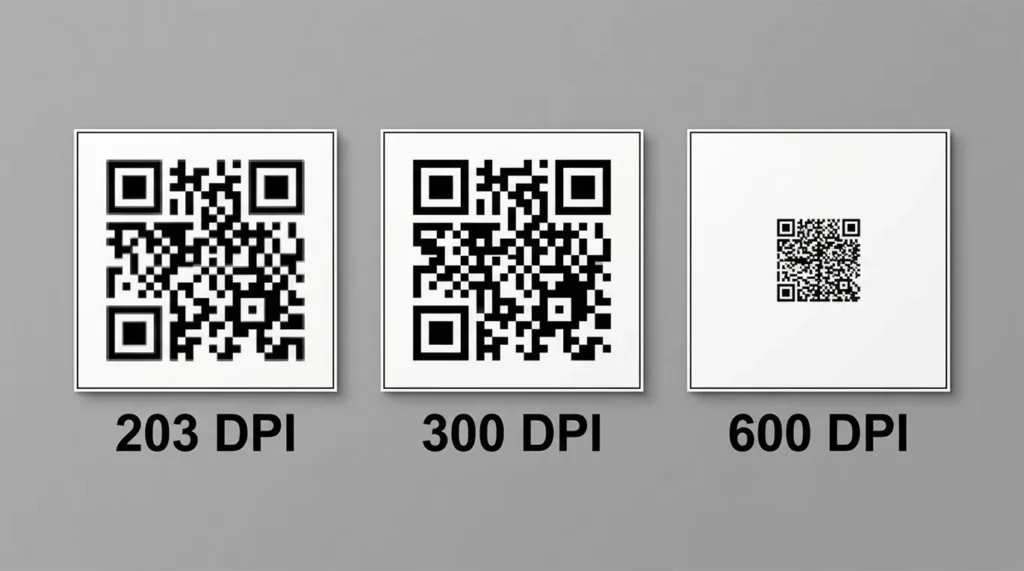
300 DPI doubles the dot density. Small QR codes, DataMatrix codes, and dense 2D barcodes scan correctly at 300 DPI on labels as small as 0.75 inches wide. Most mid-range desktop and industrial thermal transfer printers offer 300 DPI as a configuration option.
600 DPI is for applications where the label is smaller than the barcode needs to be. Pharmaceutical unit-dose packaging requires a DataMatrix code on a label that fits on a blister cell or vial cap measuring under 0.5 inches. Only industrial printers at this resolution tier (Zebra ZT411 600 DPI, Zebra ZT610, HPRT Gala) produce scan-compliant output at that density.
Thermal Barcode Label Printers by Operation Type
Desktop Barcode Label Printers (50 to 500 Labels Per Day)
The pick: Zebra ZD421
The ZD421 is the most widely deployed desktop barcode label printer in small to mid-size operations. It covers 203 and 300 DPI, runs in direct thermal and thermal transfer modes, prints at 6 IPS, and supports every major barcode symbology including Code 128, Code 39, UPC-A, EAN-13, QR Code, DataMatrix, PDF417, Aztec, and MaxiCode. Connectivity covers USB standard with optional Ethernet, Wi-Fi 802.11ac, and Bluetooth 4.1.
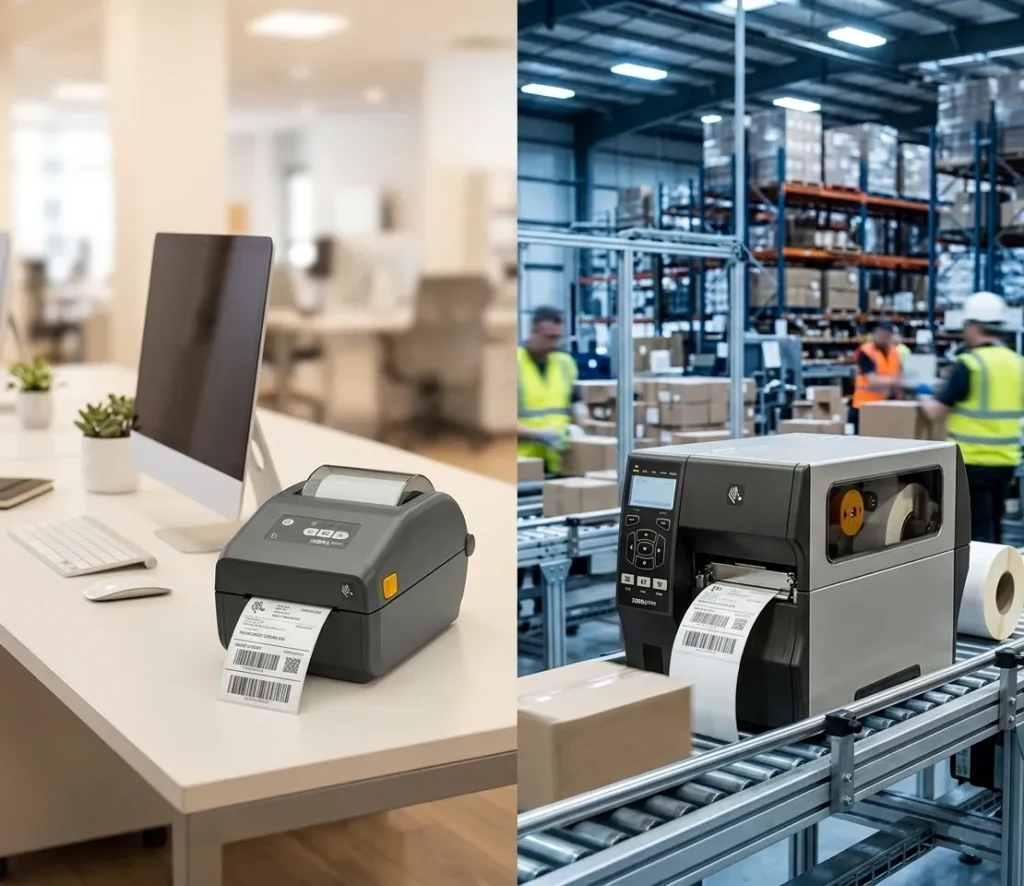
The ZD421 supports ZPL II and EPL2 programming languages. Every major WMS platform including SAP, Oracle, and Shopify sends ZPL commands to it without additional middleware. Field-upgradeable wireless means the base USB model expands to Wi-Fi later without buying a new printer.
See current Zebra ZD421 pricing on Amazon
At $450 to $695, the ZD421 costs $250 to $495 more than a Rollo X1040. The difference buys 300 DPI, thermal transfer capability for synthetic labels, full barcode symbology support, and WMS integration. For an Etsy seller printing shipping labels, that gap buys nothing. For a warehouse manager printing 2×1 inventory barcodes that need to stay scannable for three years, it buys exactly what the job requires.
Budget alternative: HPRT HT300
The HPRT HT300 delivers 203 and 300 DPI, 5 IPS, 300m ribbon capacity, and USB/Ethernet/Wi-Fi/BT connectivity at a lower price point than the ZD421. It supports ZPL, DPL, EPL, and TSPL command languages. For operations that do not need Zebra’s Print DNA ecosystem or ZD421’s field-upgradeable wireless, the HT300 produces equivalent barcode output at a lower hardware cost.
See current HPRT HT300 pricing on Amazon.
Who desktop barcode printers suit: Retail operations printing price tags and shelf labels, small warehouse teams labeling incoming inventory, Shopify and Amazon sellers labeling product SKUs, and healthcare clinic supply rooms printing asset tags.
Who should move up: Any operation printing more than 500 labels per day across multiple stations. Desktop printers are not rated for continuous multi-shift use. The printhead and mechanism fatigue faster under that load than an industrial unit.
Industrial Barcode Label Printers (500+ Labels Per Day, 24/7)
The pick: Zebra ZT411
The ZT411 is the correct answer for continuous high-volume barcode label printing. It prints at 14 IPS at 203 DPI with resolution options up to 600 DPI. The all-metal ZT4-Series chassis handles 24/7 multi-shift operation without thermal throttling. Standard connectivity covers USB, Ethernet, Serial, Bluetooth 4.1, and dual USB Host with optional 802.11ac Wi-Fi. RFID encoding is factory-installed or field-installable, which matters for operations moving toward retail compliance mandates from Walmart or Amazon.
The ZT411’s 600 DPI option is the specification that separates it from every other industrial printer in the $900-1,200 price range. Pharmaceutical operations printing DataMatrix for FDA DSCSA unit-dose compliance require 600 DPI. No mid-range industrial printer matches this without jumping to Zebra’s premium ZT610 tier.
See current Zebra ZT411 pricing on Amazon.
Value alternative: TSC MX240P
The TSC MX240P prints at 14 IPS, offers 203/300/600 DPI, and uses ZPL-II emulation. In a Zebra WMS environment, the MX240P accepts ZPL commands without reprogramming the WMS or label templates. The 3-year standard warranty beats Zebra’s base warranty tier. At significantly lower cost than the ZT411, the MX240P is the right answer for operations where ZPL compatibility is required but Zebra’s price point is not.
See current TSC MX240P pricing.
Who industrial barcode printers suit: Warehouses with multiple label stations, manufacturing lines with continuous duty requirements, pharmaceutical operations, 3PL facilities, and Amazon FBA prep centers printing thousands of FNSKU and carton labels daily.
For detailed industrial model comparisons with WMS integration specs and duty cycle data, our comparison of high-volume industrial thermal label printers for warehouses printing 500 or more labels per day covers ZT411, Honeywell PM43, and TSC MX240P side by side.
Portable Barcode Label Printers (Field Service, Retail Floor, Mobile)
The pick: Zebra ZQ520
The Zebra ZQ520 is the correct tool when the label must be printed where the asset or product is, not at a fixed station. It prints 4-inch wide labels at 203 DPI via Bluetooth and Wi-Fi, carries an IP54 rating for dust and water resistance, and survives a 6-foot drop onto concrete. The belt clip and lightweight design allow a field technician, retail floor associate, or warehouse picker to carry it through a full shift.
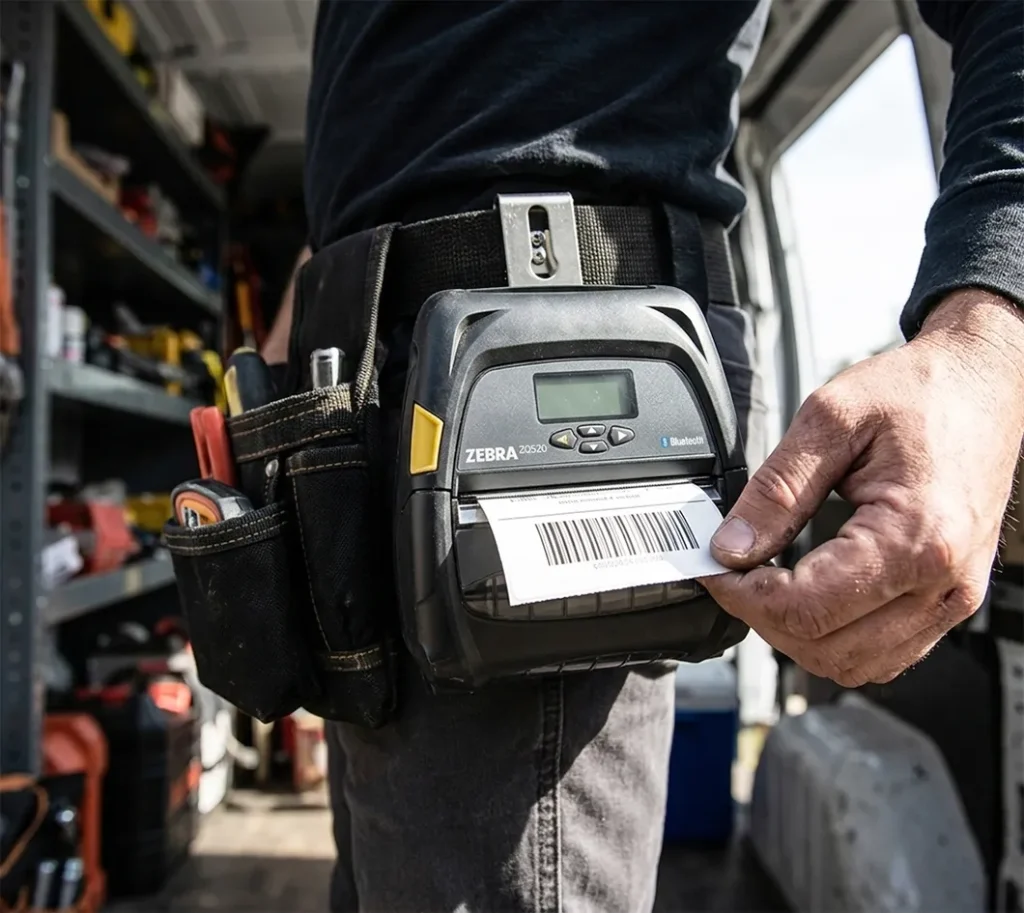
Retail operations use portable printers to print shelf labels in-aisle without returning to a print station. Field service teams print asset tags at customer sites without connecting to a network. Delivery drivers print scan-on-demand barcode labels for proof-of-delivery workflows.
See current Zebra ZQ520 pricing on Amazon
Portable barcode printers are not substitutes for desktop or industrial models in fixed station printing. Print speed on portable models runs at 2 to 4 IPS, compared to 6 IPS on the ZD421 and 14 IPS on the ZT411. Battery life limits continuous print runs. The portable printer wins on location flexibility, not throughput.
Budget alternative: iDPRT HM-T300 PRO
The iDPRT HM-T300 PRO covers 3-inch labels at 203 DPI via Bluetooth 4.0 and optional Wi-Fi. It suits warehouse pickers and retail floor associates who do not need 4-inch label width. Battery capacity handles a full shift under normal mobile use.
See current iDPRT HM-T300 PRO pricing on Amazon
Who portable barcode printers suit: Field service engineers labeling equipment at customer sites, retail floor staff printing shelf labels in-aisle, delivery drivers printing proof-of-delivery labels, and warehouse pickers printing bin labels during cycle counts.
Who should stay with desktop: Anyone printing more than 150 labels per session at a fixed station. Portable print speeds make them inefficient for batch printing jobs that take seconds on a desktop unit.
Barcode Verification Printing: Pharmaceutical and Manufacturing
Some operations cannot accept a misprinted barcode. A pharmaceutical serialization label with a failed DataMatrix does not just fail a scan. It triggers a regulatory compliance event, product recall risk, or manufacturing line stoppage.
Two printers solve this with built-in barcode verification.
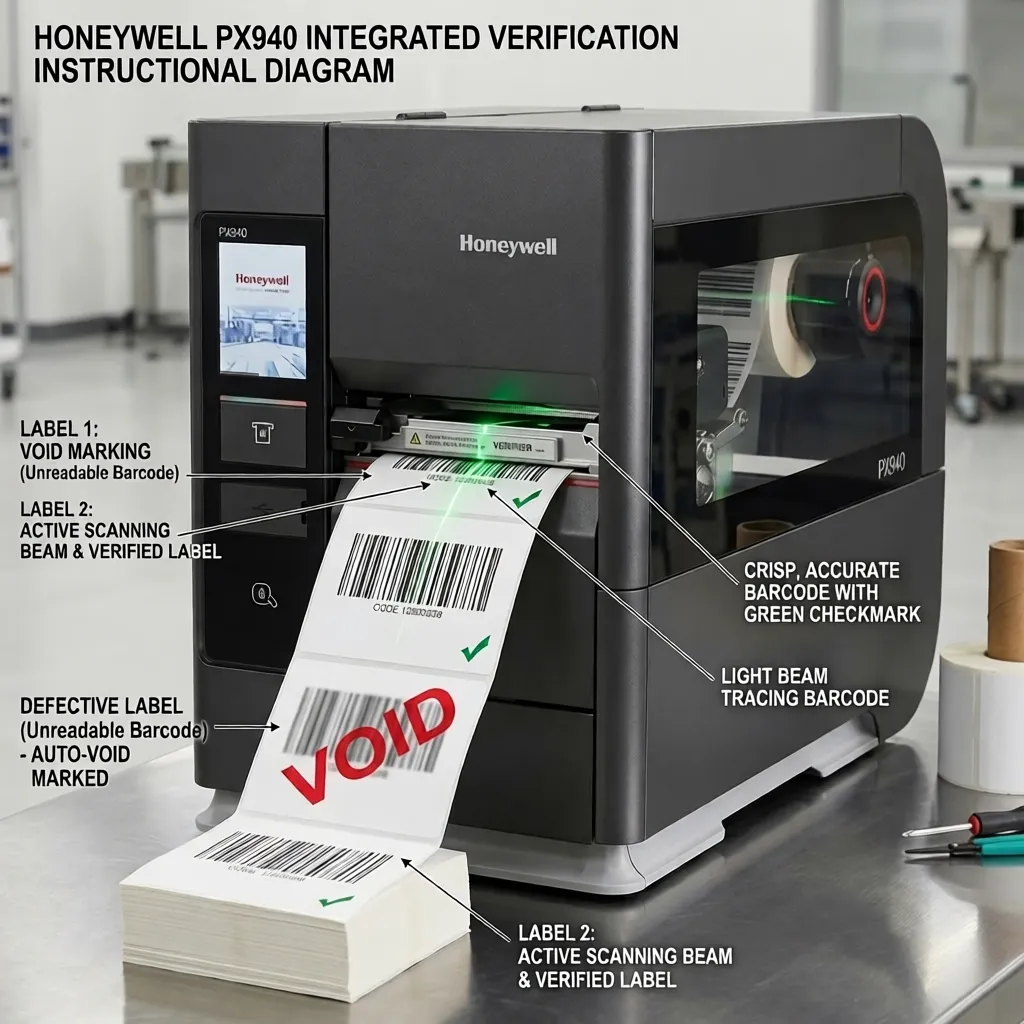
Honeywell PX940: The PX940 includes an integrated barcode scanner that reads every label immediately after printing. It compares the scanned data against the intended data. On a failed scan, it marks the label void, reprints, and flags the event in the print log. This is the only desktop-adjacent industrial printer with inline verification as a standard feature.
Printronix Auto ID T8000: Printronix Auto ID industrial thermal printers include barcode inspection technology that reads each barcode as it prints, rejects faulty ones, and reprints new labels. The T8000 integrates with the TSC product line following Printronix’s merger with TSC Auto ID.
Neither printer is appropriate for a small business setup. Both are required in FDA-regulated pharmaceutical packaging lines, automotive quality control stations, and ISO-certified manufacturing environments where label defects carry regulatory or safety consequences.
ZPL Emulation: Can You Use a Non-Zebra Printer in Your Existing WMS?
Yes. This is the question operations teams ask when they see the Zebra ZT411’s price and look for alternatives.
ZPL (Zebra Programming Language) is the standard command language for barcode label printers across most WMS, ERP, and warehouse automation platforms. SAP, Oracle, Manhattan Associates, and Blue Yonder all send print jobs as ZPL. Every Zebra printer accepts ZPL natively.
TSC MX240P, HPRT HT800, iDPRT iX4P, and Brother TD-4 series printers support ZPL-II emulation. The WMS sends a ZPL command. The non-Zebra printer interprets it and prints the correct label. No WMS reprogramming. No label template reconstruction. The printer simply replaces the Zebra unit on the same network port.
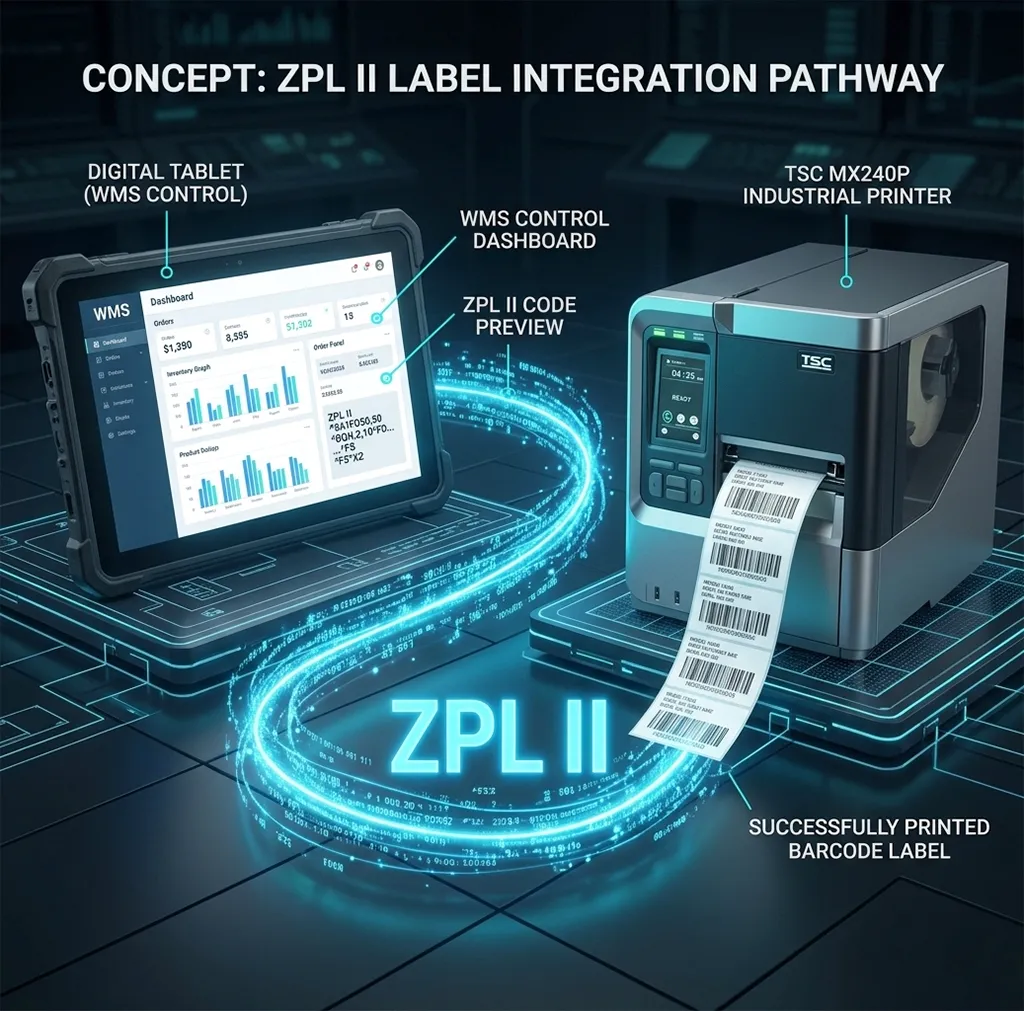
The limitation: ZPL-II emulation covers approximately 95 percent of standard ZPL barcode commands. Zebra-specific extensions within Print DNA, certain security features, and some RFID encoding functions are not emulated. For operations using standard barcode labels without RFID or security features, ZPL-II emulation on TSC or HPRT hardware is a fully functional Zebra alternative at a lower cost.
Which Thermal Barcode Label Printer Fits Your Operation
Four scenarios. Four answers.
You print retail shelf labels, inventory bin tags, and product barcodes at 50 to 500 per day from a fixed station: Zebra ZD421 at 300 DPI in thermal transfer mode with wax-resin ribbon on coated paper labels. $450-695. Every barcode symbology, both DT and TT modes, WMS-ready. This is the desktop barcode printer benchmark.
You print 500+ barcode labels per day across multiple shifts in a warehouse or manufacturing facility: Zebra ZT411 at 203 or 300 DPI, or TSC MX240P for the ZPL-compatible budget option. Both run 24/7. Both handle industrial label volumes. The ZT411 wins on 600 DPI availability and Zebra’s service ecosystem. The MX240P wins on three-year warranty and hardware cost.
You print barcode labels in the field, on the retail floor, or during delivery without a fixed station: Zebra ZQ520 with IP54 protection and 4-inch label width. The iDPRT HM-T300 PRO for 3-inch labels on a tighter budget. Portable means location flexibility at lower throughput.
You print pharmaceutical, automotive, or compliance barcode labels where scan failures trigger regulatory consequences: Honeywell PX940 with inline barcode verification. Accept no substitute for this use case.
For barcode label material selection including paper, polypropylene, polyester, and clear substrates, our guide on thermal label sizes, materials, and core specs that fit each printer category covers every substrate-to-printer combination. For ribbon matching across those substrates, our guide on thermal transfer ribbon types and which ribbon matches your barcode label material covers wax, wax-resin, and resin with specific durability data.
Frequently Asked Questions
What DPI do I need for barcode labels?
203 DPI handles Code 128, Code 39, UPC-A, and EAN-13 barcodes on labels 2 inches wide or larger. 300 DPI is required for QR codes on small labels under 1.5 inches, DataMatrix for standard pharmaceutical labels, and PDF417. 600 DPI is required for pharmaceutical unit-dose DataMatrix codes and micro-labels under 0.75 inches wide. Match the DPI to the barcode type and label size, not the other way around.
Can a Rollo print barcode labels?
Yes, for Code 128 at 203 DPI on 4×6 direct thermal labels. The Rollo X1040 prints carrier-compliant shipping barcodes correctly. It cannot print at 300 DPI, it does not support thermal transfer for durable synthetic labels, and it does not handle small-format barcode labels for inventory or asset tagging. For those use cases, a thermal transfer printer at 300 DPI minimum is required.
What is the best barcode printer for small business inventory?
The Zebra ZD421 at 203 or 300 DPI in thermal transfer mode is the right answer for small business inventory barcode printing. It handles every barcode symbology, connects to Shopify and most WMS platforms via ZPL, and produces labels on synthetic stock that stay readable through years of warehouse use. The HPRT HT300 delivers equivalent output at a lower price if the Zebra price point is a constraint.
Do thermal printers print barcodes without ink?
Yes. Direct thermal printers produce barcode output without ink, toner, or ribbon. The heat-sensitive paper coating darkens under the printhead’s heat to form the barcode symbol. Thermal transfer printers use a ribbon instead of liquid ink. Neither type uses ink cartridges. The only consumables are label rolls for direct thermal printers and label rolls plus ribbon for thermal transfer printers.
What is the difference between Code 128 and QR code for inventory?
Code 128 is a 1D linear barcode that stores alphanumeric data in a horizontal sequence of bars and spaces. It stores 20 to 30 characters efficiently and scans reliably at 203 DPI. QR code is a 2D matrix barcode that stores 50 to 500+ characters including URLs, serial numbers, and structured product data in a square pattern. QR codes require 300 DPI for reliable scanning on labels under 1.5 inches wide. Code 128 suits simple inventory numbers and SKU codes. QR code suits applications where the label must carry a URL, multiple data fields, or more data than a 1D barcode fits.
Can I use a TSC or HPRT printer in a Zebra WMS without reprogramming?
Yes. TSC MX240P, HPRT HT800, and iDPRT iX4P all support ZPL-II emulation. The WMS sends ZPL commands and the printer responds correctly for standard barcode label jobs. RFID encoding functions and certain Zebra-specific Print DNA extensions are not emulated. For standard barcode label operations without RFID, ZPL-II emulation works as a full functional replacement.
About the Author
Kamran Asghar Founder, GadgetsChamp.com
Kamran Asghar founded GadgetsChamp to cut through the noise in consumer tech buying guides. He covers thermal label printers, smartwatches, and wearable health technology with a focus on real-world specs, total cost of ownership, and honest verdicts. He does not list ten products and call all of them great. He picks one, explains exactly why, and tells you where it falls short.
His work on thermal label printing has covered label compatibility, ribbon chemistry, WMS integration, and the total cost gap between open-format and proprietary label systems. His smartwatch coverage focuses on battery life, health sensor accuracy, and the difference between a device that tracks data and one that measures it.