
The most common clear label question I get is not “which label should I buy.” It is “why did my label print blank.” The answer is almost always one of two things: wrong printer type, or wrong sensor setting. This article covers both, plus the exact setup steps to fix it.
Direct thermal printers cannot print on clear labels. Full stop. Thermal transfer printers can, with a resin ribbon and one sensor setting change that almost nobody mentions. That is the entire answer in two sentences. The rest of this article explains what that means for your specific printer, your specific label material, and your specific use case.
Can Thermal Printers Print on Clear Labels?
Only thermal transfer printers produce output on clear labels. Direct thermal printers produce nothing. Blank labels every time.
Why? Direct thermal paper has a thermochromic coating built into the label face. The printhead applies heat. The coating reacts and turns dark, forming text or a barcode. Clear labels made from PET, PP, or PVC contain no such coating. The printhead applies the same heat. Nothing reacts. The label exits the printer completely blank, and the printer has not malfunctioned. The label is simply the wrong type for that printer.
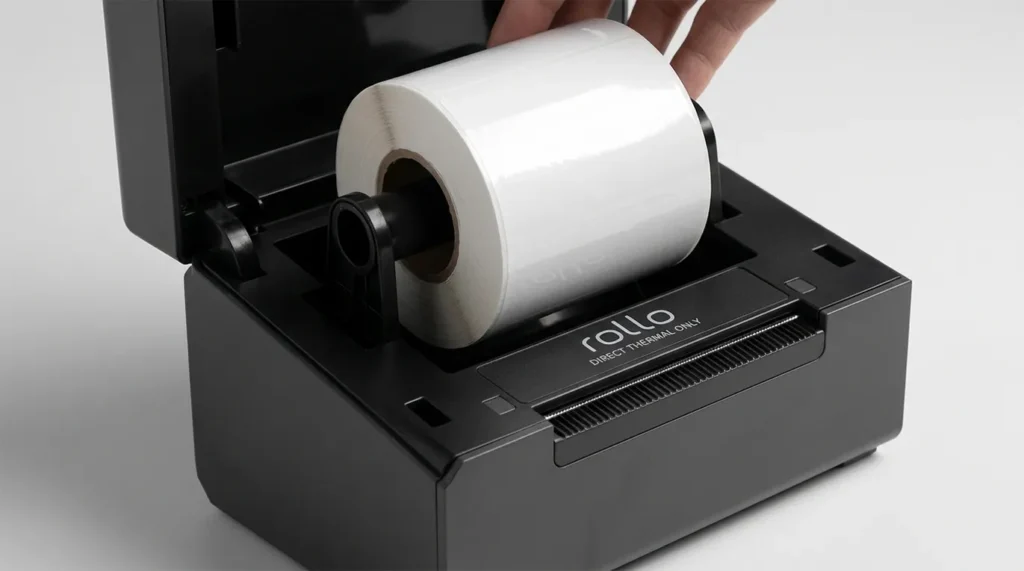
This is the single most common clear label mistake. Someone buys clear labels from Amazon, loads them into their Rollo or DYMO or MUNBYN, and gets blank labels every time. The printer looks broken, but it is actually not. It’s a direct thermal printer, and clear labels require thermal transfer.
The One Exception: Zebra 8000D Shelf Talker
Zebra produces a direct thermal clear polypropylene tag with adhesive that enables communication of temporary product promotions in aisle with a mobile printer, and it is compatible with freezers. This is the Zebra 8000D Shelf Talker, a specialty BOPP polypropylene label with a direct thermal-compatible coating applied to a transparent substrate.
This product is a confirmed exception to the rule that direct thermal cannot print on clear labels. It is not available through general Amazon label suppliers. It sells through Zebra certified supply channels. If you find “direct thermal clear labels” on Amazon from a generic supplier, assume they do not have the DT-compatible coating. They will print blank.
Which common printers cannot print on clear labels (direct thermal only):
- Rollo X1040
- MUNBYN ITPP941, RW411B, and all MUNBYN desktop models
- DYMO LabelWriter 4XL and 5XL
- Brother QL-800 and QL-1110NWB
- JADENS desktop Bluetooth printer
- Polono PL60
If you own one of these printers and need clear labels, you need a different printer. No setting change fixes a direct thermal printer’s inability to print on standard clear label stock.
Before confirming your printer type, our breakdown of direct thermal vs thermal transfer printing and which method your printer uses includes the 10-second fingernail test to identify your printer in under a minute.
Which Thermal Transfer Printers Print on Clear Labels
Any thermal transfer printer that accepts a resin ribbon handles clear labels. The printer brand does not determine clear label compatibility. The print mode does. A Zebra, HPRT, iDPRT, or SATO thermal transfer printer all produce output on clear PET and PP labels when loaded with a resin ribbon and set to the correct sensor mode.
Confirmed compatible thermal transfer printers for clear label printing:
| Printer | DPI Options | Form Factor | Best For |
|---|---|---|---|
| Zebra ZD421 (TT mode) | 203, 300 | Desktop | Small business clear labels, Etsy, jars |
| Zebra ZT411 | 203, 300, 600 | Industrial | High-volume clear cosmetic and pharma labels |
| HPRT XT300 | 203, 300 | Desktop | Food jars, bath products, clear PP labels |
| HPRT Glory-L / Gala | 203, 300, 600 | Industrial | Micro-text cosmetic labels, fine UPC barcodes on small containers |
| iDPRT iX4P | 203, 300 | Industrial | Clear vinyl, PP, PET; 300 DPI recommended for barcode on textured substrates |
| SATO CL4NX Plus | 203, 305, 609 | Industrial | Pharmaceutical clear labels, food manufacturing |
| Brady i5300 | 300 | Desktop/Industrial | Clear polyester asset tags, GHS chemical labels |
For high-volume, monochrome clear label printing, thermal transfer printers are favored for being cost-effective, efficient, and providing high-quality results, and the technique is ideal for food and cosmetics applications that frequently require storage or use in cold, damp conditions and may be exposed to chemicals like salicylic acid and alcohol.
The Sensor Setting Nobody Mentions (and Why Your Clear Label Printed Blank)
Here is the problem I see repeatedly. Someone owns a Zebra ZD421 in thermal transfer mode, loads a resin ribbon, loads clear PET labels, and still gets blank output or misaligned labels. The printer is the right type. The ribbon is right. The label is right. The sensor mode is wrong.
Thermal printers detect label position by shining a light through the backing paper. Standard paper labels have an opaque backing. The label blocks light. The gap between labels passes light. The printer reads that contrast and advances to the next label. This works perfectly on white or paper labels.
Clear labels break this completely. The label and the gap between labels both pass light through. The printer cannot tell the difference between a label and a gap. It either prints in the wrong position, skips labels entirely, or runs continuously without stopping.
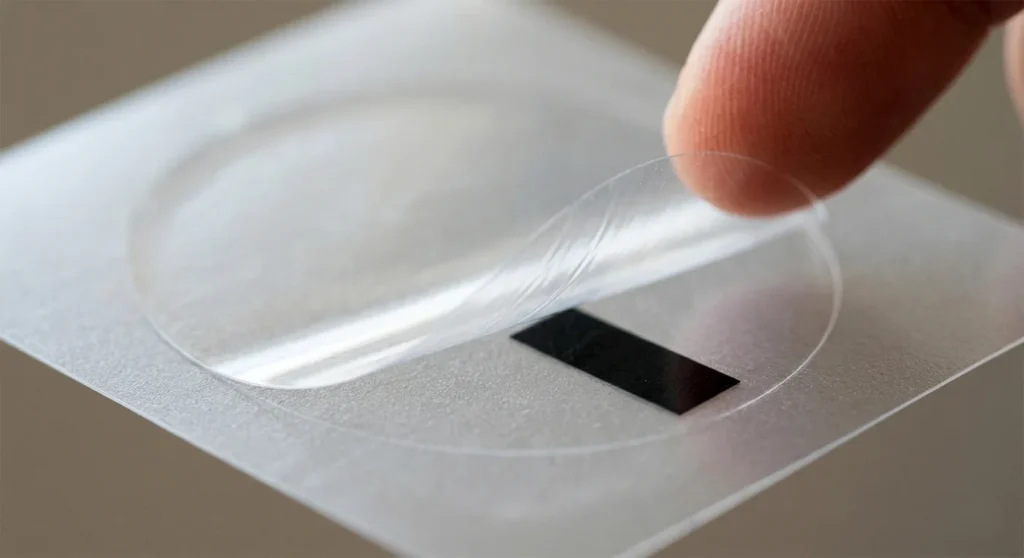
The fix requires two things, and both must be correct:
First: Your clear label roll needs a pre-printed black sensing mark on the liner backing. This is a small black stripe printed on the release paper behind each label, visible when you peel a label off. The reflective sensor reads this black mark instead of trying to detect a gap. If your clear label rolls do not have a black sensing mark on the liner, no sensor mode will detect them correctly. Buy clear labels with a black mark on the liner confirmed in the product spec sheet.
Second: Your printer must be switched from gap sensing to black mark (reflective) sensing mode.
How to Change Sensor Mode on a Zebra ZD421 or ZT411
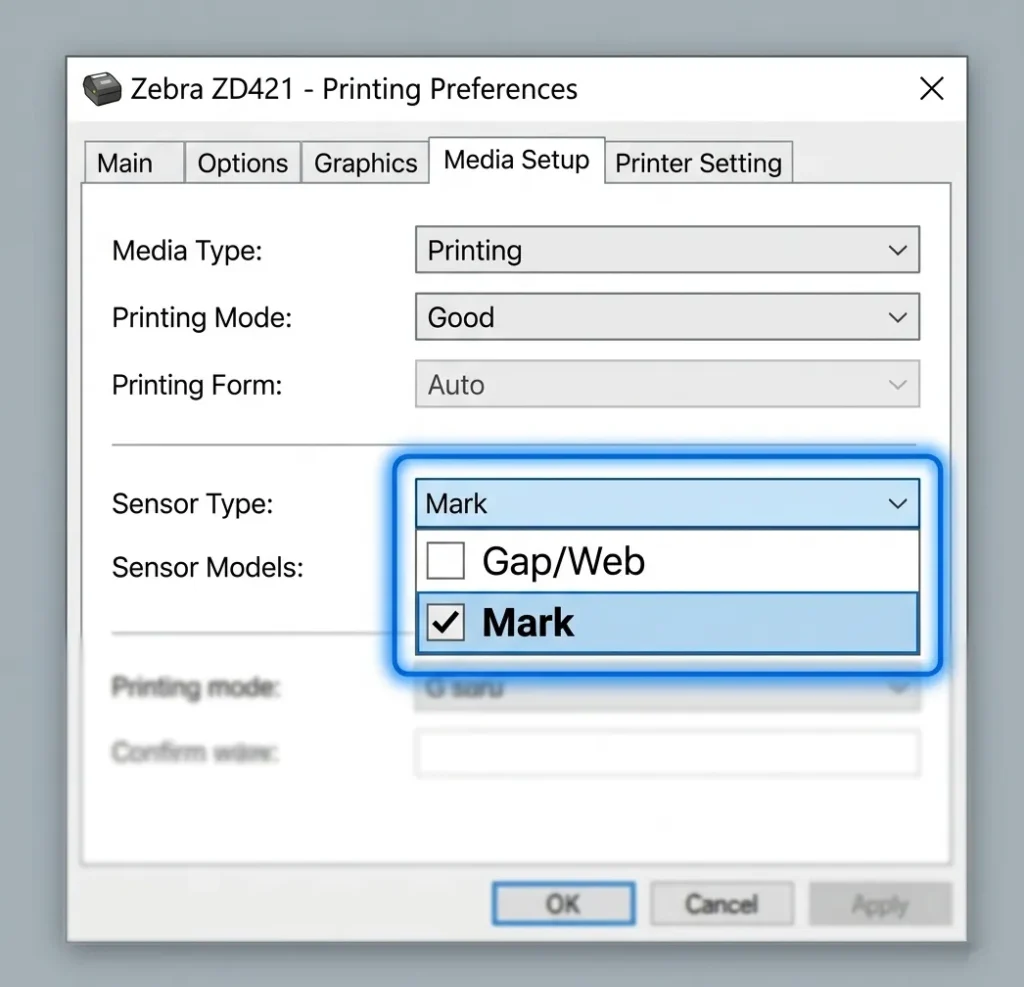
- Open the printer settings menu via the front panel or ZebraNet print server
- Navigate to: Settings > Media > Sensor Type
- Change from “Gap/Web” to “Mark”
- Press and hold the Feed button for 2 seconds to run sensor calibration
- Print a test label to confirm position alignment
This one change fixes the blank or misaligned output on clear labels in the majority of cases. The Zebra ZD421 menu path and the ZT411 menu path are identical. For HPRT and iDPRT printers, the same setting appears under Media Type in the printer configuration menu, also labeled Mark or Reflective.
What If Your Thermal Transfer Printer Does Not Have Black Mark Sensing?
Some entry-level thermal transfer printers support gap sensing only. If your printer’s spec sheet lists “gap sensing” and does not mention “black mark sensing” or “reflective sensing,” it cannot reliably print on clear label rolls, even with the correct ribbon and label substrate. Most Zebra, HPRT, iDPRT, and SATO models include both sensor modes. Confirm the sensor modes before ordering clear labels for a printer you have not used with them before.
Premier Markings confirms that clear thermal labels require a specific reflective type setting on the thermal printer when printing on a clear substrate, and that clear polyester with a resin ribbon is the right combination for outdoor labels while 2-mil clear BOPP with a wax-resin ribbon works for indoor applications.
Clear Label Substrate: PP, PET, or PVC
Three clear label materials exist for thermal transfer printing. Each has a specific use case, a specific ribbon requirement, and a specific durability profile.
Clear Polypropylene (PP): Food Jars, Bath Products, Candles
PP labels are flexible, lightweight, water resistant, and oil resistant. They suit food jars, condiment bottles, candle containers, bath products, and any packaging where the buyer handles the product with wet or oily hands. PP labels are food-safe and cost less per label than PET.
Use wax-resin ribbon on clear PP for indoor applications. The printed output resists moisture and light oil contact. Service temperature runs from approximately 14°F to 122°F, which covers most indoor food and cosmetics storage conditions.
For Etsy sellers labeling candle jars, spice jars, or handmade bath products who want the “no-label look” showing the product through the packaging: clear PP with wax-resin ribbon on a Zebra ZD421 or HPRT XT300 produces the right result at a desktop price point.
Clear Polyester (PET): Cosmetics, Pharma, Electronics
Clear polyester labels feature excellent tear strength, heat resistance, chemical resistance, and dimensional stability, with a service temperature range of -40°F to +300°F, and they require thermal transfer resin ribbons.
PET resists salicylic acid, alcohol, cleaning agents, and UV exposure. Cosmetics labels contact these chemicals regularly during use. A PP label on a skincare product fails after repeated alcohol contact. A PET label with resin ribbon does not.
Use resin ribbon exclusively on clear PET. Wax-resin does not adhere cleanly to PET’s smooth, non-porous surface. The ink smears or flakes off, producing labels that look poor and barcodes that fail to scan.
At 300 DPI, ingredient lists and UPC barcodes on small cosmetic container labels print with the edge definition needed for retail shelf compliance. The HPRT Gala reaches 600 DPI for micro-text on very small label formats, which suits pharmaceutical serialization labels on blister packs or vials.
Clear PVC: Retail Promotions and Industrial Parts
PVC labels conform to curved surfaces better than PP or PET. Cylindrical containers, rounded bottles, and equipment with non-flat tagging surfaces all benefit from PVC’s flexibility. PVC requires thermal transfer with resin ribbon. PVC labels are not food-safe in direct contact applications, so they do not suit food packaging where the label touches edible product directly.
Which Ribbon to Use on Clear Labels
The ribbon type determines print quality, chemical resistance, and substrate compatibility. Getting the ribbon wrong on clear labels produces smeared output, peeling ink, or scan failures.
Black resin ribbon: The standard for clear label printing. Black text, barcodes, and graphics on clear PET or PP background. The “no-label look” uses the product packaging color as the visible background while the label itself disappears. Black resin ribbon produces scan-ready barcodes at 203 DPI and above.
White resin ribbon: Required when the label needs white text or white graphic elements on a clear background. Cosmetic ingredient labels almost universally use white text because product packaging uses color, and black text on a colored background becomes difficult to read. White ribbons come in various types differing primarily in color purity, gloss, and durability, and white ribbons with insufficient color purity result in grey or yellowish prints that fall short of the desired visual effect and potentially harm the product’s premium image. For premium cosmetics applications, test the white ribbon on your specific clear label stock before committing to production volume.
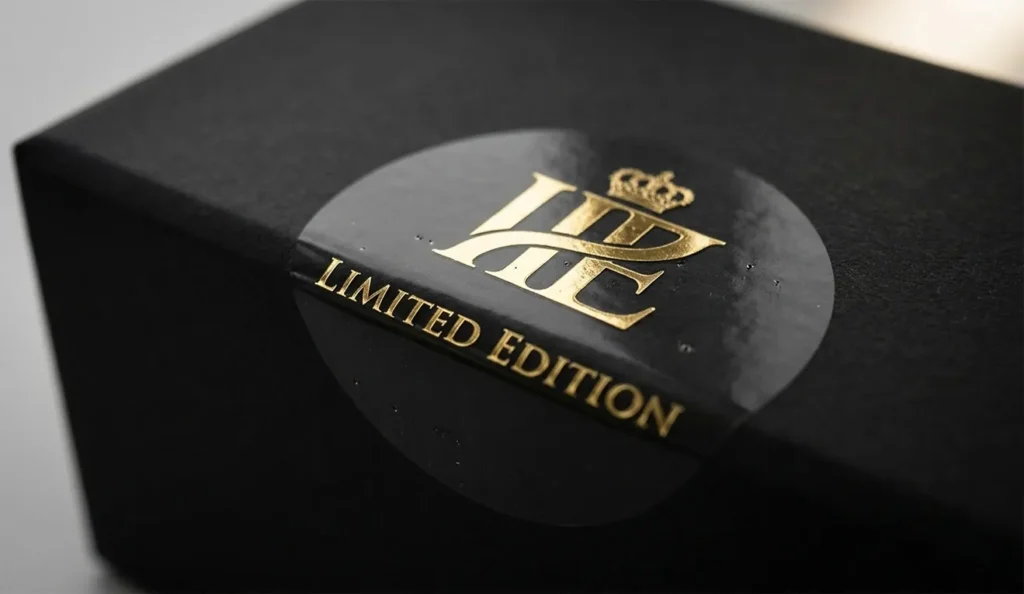
Gold and silver metallic resin ribbons: Used on premium packaging labels for gift boxes, supplement bottles, and luxury beverage products. Gold ribbon on clear PET produces a metallic gold label appearance. The substrate remains transparent. The printed output appears gold. HPRT, Zebra, and specialty ribbon suppliers including Able Label carry gold and silver resin ribbons for this application.
Wax-resin ribbon on clear BOPP: Lower cost than full resin. Works on clear PP labels in controlled indoor environments without chemical or UV exposure. Not suitable for outdoor, cold chain, or chemical-resistant applications. If the label stays indoors on a product that does not contact moisture, wax-resin on BOPP PP is an acceptable lower-cost option.
Clear Labels for Jars, Bottles, and Etsy Products
The “no-label look” is what most small business owners searching for clear labels actually want. The label becomes invisible. The product shows through. The printed text and barcode float directly on the packaging surface.
This effect works. But it requires three correct elements working together: the right substrate (clear PP or PET), the right ribbon (wax-resin for PP, resin for PET), and a thermal transfer printer with black mark sensing enabled.
For candle jars and glass containers: Clear PP with wax-resin ribbon. The flexibility of PP conforms slightly to glass curves. The adhesive holds on glass at room temperature. For candle jars that get warm during use, confirm the adhesive service temperature matches your candle’s maximum surface temperature.
For cosmetics and skincare bottles: Clear PET with resin ribbon. The alcohol and chemical resistance of PET protects the label from product contact during use. At 300 DPI, ingredient lists remain legible at the font sizes required by FDA cosmetic labeling regulations.
For food spice jars and condiment bottles: Clear PP with wax-resin ribbon, food-safe adhesive confirmed. Not all clear label adhesives carry food-safe certification for indirect food contact. Check the label spec sheet for FDA 21 CFR compliance before labeling food products.
Round Clear Labels for Thermal Printers
Round and oval die-cut clear PP and PET labels in 1-inch, 2-inch, and 3-inch diameters are available from LabelValue, Velocity Labels, and Premier Markings with pre-printed black sensing marks on the liner. These suit product seals, jar lid labels, and branding stickers for handmade products.
Round clear labels require the same sensor mode change as rectangular clear labels. Gap sensing fails on round clear labels for the same reason it fails on rectangular ones. The sensor cannot detect the gap between transparent circular labels on a clear liner.
Transparent 4×6 Labels
This autosuggest query deserves a direct answer. Transparent 4×6 shipping labels exist. They serve almost no practical shipping purpose. USPS, UPS, FedEx, and DHL require black-on-white labels because barcode scanners at sort facilities read contrast, not just barcode data. A clear 4×6 label applied to a brown corrugated box produces low-contrast output that fails at scanner distance in standard facility lighting. The 4×6 clear label use case is limited to inside-packaging inserts or specialty product identification, not external shipping labels.
Gold Transparent Thermal Labels
Clear PET label stock plus gold metallic resin ribbon produces the gold-on-clear effect used in premium cosmetics and gift packaging. The label substrate remains transparent. The printed text and graphics appear gold. This combination requires a thermal transfer printer, resin ribbon (gold metallic variant), and black mark sensing. LabelValue and Velocity Labels carry clear PET stock compatible with this application.
Where to Buy Clear Labels for Thermal Printers
Able Label carries 2-mil clear polyester labels with confirmed -40°F to +300°F service temperature, pre-printed black sensing marks, and thermal transfer resin ribbon specifications for Zebra and Honeywell Datamax desktop and industrial printers.
LabelValue stocks clear polypropylene Zebra-compatible labels in 2×1 and standard sizes with black mark sensing marks confirmed on the liner. Prime-equivalent shipping available.
Velocity Labels carries 3×2 and 4×3 clear thermal transfer labels in-stock with same-day shipping. Both sizes include pre-printed black sensing marks on the liner.
Premier Markings supplies custom clear thermal labels for Zebra, SATO, Datamax, and Toshiba printers with black mark sensing marks and indoor or outdoor material options. Contact them for custom sizes.
Office Depot and Staples carry limited clear label stock in-store. Neither carries the thermal-transfer-specific clear label rolls with black sensing marks that most thermal printers require. Retail stores suit general sticker purchases, not thermal transfer clear label purchases.
For a full reference on label materials, core sizes, adhesive types, and printer-by-printer compatibility, our guide on thermal label sizes, materials, core sizes, and adhesive types for every major printer brand covers every substrate in detail before you order.
Frequently Asked Questions
Can a Rollo printer print on clear labels?
No. The Rollo X1040 is a direct thermal printer. It has no ribbon compartment. Clear labels require thermal transfer printing with a resin ribbon. Loading clear labels into a Rollo produces blank output every time. No setting change fixes this.
Why did my thermal printer print blank clear labels?
Two reasons cover nearly all cases. First: you own a direct thermal printer, which cannot print on clear labels regardless of settings. Second: you own a thermal transfer printer but it is set to gap sensing instead of black mark (reflective) sensing. Clear labels and the gaps between them both pass light through, so gap sensing cannot distinguish the label from the gap. Switch the printer to black mark sensing mode, ensure your clear label rolls have a pre-printed black sensing mark on the liner, run calibration, and print a test label.
What printer do I need to print on clear labels?
Any thermal transfer printer with black mark (reflective) sensor capability handles clear labels. The Zebra ZD421 in thermal transfer mode suits small business and Etsy use cases at a desktop price. The Zebra ZT411, HPRT Gala, iDPRT iX4P, and SATO CL4NX Plus handle higher volume industrial applications at 300 to 600 DPI.
What ribbon do I need for clear labels?
Resin ribbon for clear PET labels. Wax-resin ribbon for indoor clear PP (polypropylene) labels. White resin ribbon when the label needs white text on clear. Gold metallic resin ribbon for premium gold-on-clear cosmetics and gift packaging labels. Wax ribbon does not adhere to any clear substrate and produces smeared, non-durable output.
Can thermal printers print round clear labels?
Yes, if the printer is a thermal transfer model with black mark sensing and the round label rolls have pre-printed black sensing marks on the liner. The label shape does not change the print method requirement. Round clear labels need the same ribbon and sensor setup as rectangular clear labels. LabelValue and Velocity Labels carry round and oval clear label rolls with black sensing marks confirmed.
What is the no-label look?
The “no-label look” describes a clear label applied to packaging where the label background disappears and the text and barcodes appear to float directly on the product surface. It uses clear PP or PET label stock printed with black, white, gold, or silver resin ribbon via thermal transfer printing. The product’s own packaging color shows through the transparent label substrate.
The Decision: Which Clear Label and Setup Suits Your Situation
Here are your 3 use cases and three setups with right label soulution. No hedging.
You label candle jars, spice jars, or bath products and want a no-label look: Clear PP + wax-resin ribbon + Zebra ZD421 in thermal transfer mode + black mark sensing enabled. Buy clear PP rolls with a pre-printed black sensing mark on the liner. That is the complete setup.
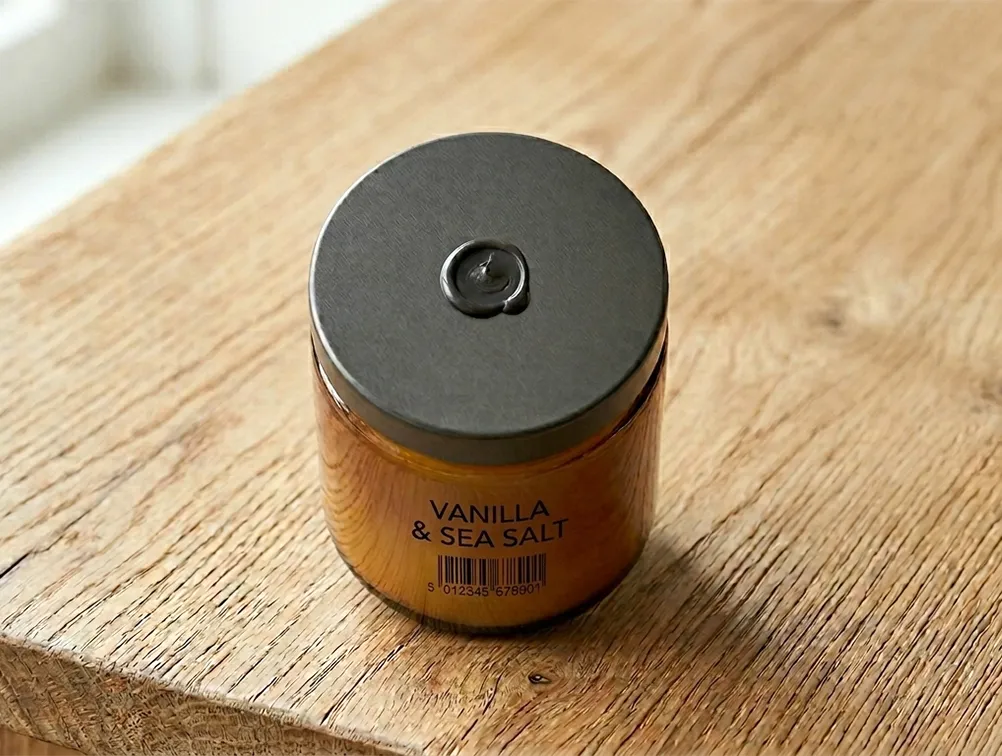
You label cosmetics, skincare, or pharmaceutical products that contact alcohol or chemicals: Clear PET + resin ribbon + any thermal transfer printer at 300 DPI minimum + black mark sensing enabled. Do not use PP for this application. PP fails under alcohol exposure within weeks of repeated contact.
You want gold or metallic text on a clear label for premium packaging: Clear PET + gold metallic resin ribbon + thermal transfer printer + black mark sensing. The substrate stays transparent. The output looks gold. This is a specialty ribbon purchase, not a specialty printer purchase.
If you are new to thermal printing and want to understand why print mode determines substrate compatibility at the fundamental level, our guide on how thermal label printers work and what direct thermal vs thermal transfer means in practice explains the mechanism clearly before you invest in hardware or label stock.
About the Author
Kamran Asghar Founder, GadgetsChamp.com
Kamran Asghar founded GadgetsChamp to cut through the noise in consumer tech buying guides. He covers thermal label printers, smartwatches, and wearable health technology with a focus on real-world specs, total cost of ownership, and honest verdicts. He does not list ten products and call all of them great. He picks one, explains exactly why, and tells you where it falls short.
His work on thermal label printing has covered label compatibility, ribbon chemistry, WMS integration, and the total cost gap between open-format and proprietary label systems. His smartwatch coverage focuses on battery life, health sensor accuracy, and the difference between a device that tracks data and one that measures it.