
By Kamran Asghar | Founder, GadgetsChamp.com | Updated April 2026
I have spent the last three years helping e-commerce sellers pick the right thermal printer. The question I get most often is not “which printer is fastest.” It is “why does my DYMO cost more to run than my original printer cost to buy.” The answer is the Proprietary Tax, and most buying guides never mention it. This article does.
Affiliate disclosure: GadgetsChamp earns a commission on qualifying purchases at no extra cost to you.
The Rollo X1040 is the best 4×6 thermal label printer for most e-commerce sellers. It prints at 150mm/s, accepts any open-format label roll at $0.02 to $0.05 per label, connects via dual-band Wi-Fi and AirPrint without drivers, and costs $200. That is the verdict. Here is where it earns it, and where it loses.
If you print under 100 labels per day and want to spend $80, buy the Polono PL60. If you run a warehouse WMS and print 500+ labels per shift, buy the Zebra ZD421. Everything else on this page fills the gap between those two scenarios.
Quick Comparison: Every Major 4×6 Thermal Printer Ranked
| Model | Print Speed | Resolution | Connectivity | Label Format | Price | 3-Year Cost (10k labels/yr) |
|---|---|---|---|---|---|---|
| Rollo X1040 | 150mm/s | 203 DPI | Wi-Fi, BT, USB-C | Open format | ~$200 | ~$1,100 |
| MUNBYN ITPP941 | 150mm/s | 203 DPI | USB only | Open format | ~$80-100 | ~$700 |
| MUNBYN RW411B | 150mm/s | 203 DPI | BT + USB | Open format | ~$120 | ~$800 |
| Polono PL60 | 127mm/s | 203 DPI | USB only | Open format | ~$80 | ~$1,640 |
| JADENS BT Printer | ~100mm/s | 203 DPI | BT + USB | Open format | ~$100 | ~$750 |
| DYMO LabelWriter 5XL | ~100mm/s | 300 DPI | USB only | Proprietary only | ~$209 | ~$6,614 |
| Brother QL-1110NWB | 4 IPS | 300 DPI | Wi-Fi, BT, USB | Proprietary DK | ~$200 | ~$4,000+ |
| Zebra ZD220 | 5 IPS | 203 DPI | USB | Open format | ~$150-200 | ~$900 |
| Zebra ZD421d | 6 IPS | 203/300 DPI | USB, BT, Wi-Fi opt. | Open format | ~$450-695 | ~$1,300 |
3-year cost = printer price + (label cost per unit x 30,000 labels). Open-format generic labels at $0.03/label. DYMO proprietary at $0.21/label. Polono at $0.052/label.
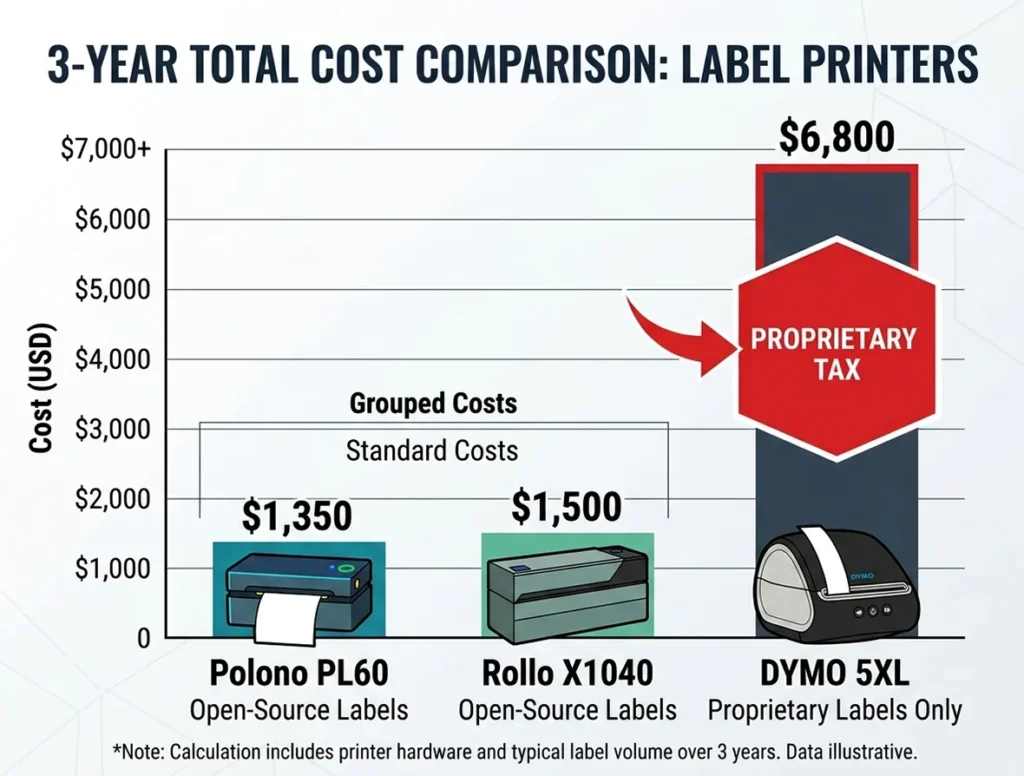
The DYMO 5XL costs more in labels in year one alone than the Rollo X1040 costs to buy outright. That gap widens every year you keep printing.
1. Rollo X1040: Best Overall 4×6 Thermal Label Printer
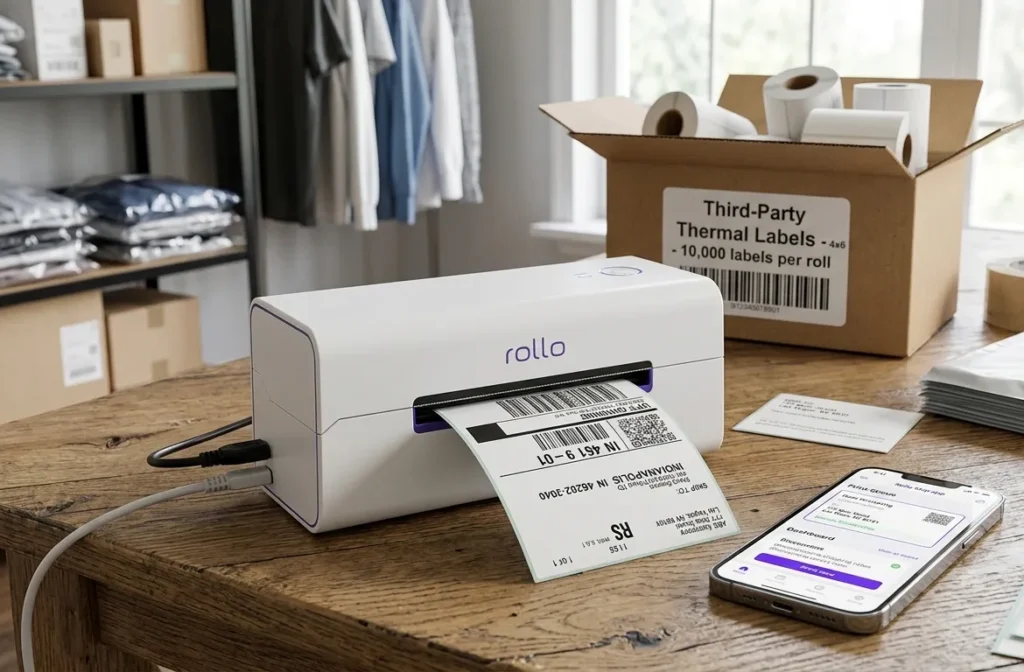
Print speed: 150mm/s (approximately 60 labels per minute at 4×6)
Resolution: 203 DPI
Connectivity: Dual-band Wi-Fi (802.11 a/b/g/n/ac), Bluetooth 5.0, USB-C
Label width range: 1.57 to 4.1 inches
Core size: 1-inch, maximum 5-inch OD
AirPrint: Yes, Apple AirPrint certified
Label format: Open format, any standard direct thermal roll
Price: ~$200
See current Rollo X1040 price on Amazon
The Rollo X1040 wins on three things that competitors argue about separately but never combine into one machine at this price: AirPrint certification, dual-band Wi-Fi, and open-format label compatibility.
AirPrint certification means your iPhone prints directly to the Rollo with no app required and no Bluetooth pairing required. Open the share sheet in Etsy, Shopify, or USPS.com. Select the Rollo X1040. Done. MUNBYN’s equivalent wireless models need the MUNBYN Print app. The Brother QL-1110NWB supports AirPrint but locks you into DK cassettes at multiples of the open-format label price.
Rollo advertises 150mm/s, holds that pace during long batch runs, and supports dual-band Wi-Fi, AirPrint, Bluetooth, and USB, while MUNBYN’s comparably-priced wireless model uses Bluetooth and USB only. Rollo Ship, the free companion software, auto-imports orders from Shopify, Amazon, eBay, and Etsy and compares USPS and UPS rates without requiring a separate account or browser extension.
Where the Rollo X1040 Loses
203 DPI is the ceiling. For sellers printing dense 2D barcodes, small logos, or product labels with fine text, 203 DPI produces slightly softer edges than the 300 DPI models from DYMO and Brother. Carrier barcodes scan perfectly at 203 DPI. GS1-128 compliance barcodes scan perfectly at 203 DPI. If you print detailed product artwork onto a 4×6 label, the Rollo is not the right tool.
The USB-only configuration of the non-wireless Rollo model saves $50 but costs you AirPrint. If printing from a phone matters to you, buy the X1040 with Wi-Fi, not the USB-only variant.
Who it is for: Etsy, Shopify, eBay, and Amazon FBM sellers printing 10 to 500 labels per day who want wireless phone printing and no proprietary label lock-in.
Who should skip it: Sellers printing under 50 labels per day who do not need wireless. The Polono PL60 at $80 does that job for $120 less.
2. Polono PL60: Best Budget 4×6 Thermal Printer Under $100
Print speed: 127mm/s (approximately 50 labels per minute at 4×6)
Resolution: 203 DPI
Connectivity: USB only
Label width range: 1.57 to 4.65 inches
Core size: 1-inch standard
AirPrint: No
Label format: Open format
Price: ~$80 See current Polono PL60 price on Amazon
The Polono PL60 costs $80. It prints 50 labels per minute. It accepts any open-format label roll. It works with Shopify, eBay, Amazon, Etsy, USPS, FedEx, and UPS out of the box. That is the entire case for it.
127mm/s is slower than the Rollo’s 150mm/s, but the difference in a 100-label batch is under 20 seconds. At this price point, the Polono PL60 outperforms anything else in the category on three-year total cost.
At 10,000 labels per year, the Polono PL60 costs $80 upfront plus $0.052 per label, reaching approximately $600 in year one. The DYMO 5XL reaches $2,344 in year one at the same volume, with labels costing $0.2136 each on proprietary rolls. The Polono PL60’s three-year total at that volume is approximately $1,640. The DYMO 5XL’s three-year total is approximately $6,614. The printer price gap between them is $129.
The Polono PL60 weighs almost 5 lbs, which is heavy for a desktop unit. It is not wireless. If you need Bluetooth printing from a phone, this is the wrong printer.
Who it is for: Sellers printing under 100 labels per day from a single fixed computer who want the lowest upfront and running cost.
Who should skip it: Anyone who prints from a phone, needs wireless, or runs a multi-person shipping station.
3. MUNBYN ITPP941 and RW411B: Best Mid-Range Alternative to Rollo
Print speed: 150mm/s
Resolution: 203 DPI (ITPP941); 203 DPI standard, 300 DPI Pro mode (RW411B / RW401)
Connectivity: USB only (ITPP941); Bluetooth + USB (RW411B)
Label width range: 1.57 to 4.3 inches (ITPP941); 40 to 110mm (RW411B)
AirPrint: No on base models; AirPrint on higher-priced MUNBYN models
Label format: Open format
Price: ITPP941 ~$80-100; RW411B ~$120
See current MUNBYN printer prices on Amazon
MUNBYN printers match Rollo’s 150mm/s print speed at a lower price. The ITPP941 at $80-100 with USB delivers Rollo-level throughput for sellers who print from a fixed desktop and do not need wireless. The RW411B adds Bluetooth for phone printing, but it requires the MUNBYN Print app where the Rollo X1040 uses native AirPrint.
The MUNBYN RW411B supports Bluetooth for iOS, Android, and Windows systems and prints up to 72 sheets of 4×6 labels per minute at 150mm/s using a Japanese ROHM printhead. The ROHM printhead is a specific quality signal. Cheaper budget printers use generic printheads with shorter rated lifespans.
MUNBYN’s auto label detection adjusts for different label sizes without manual calibration. The RW411B holds up to 350 labels internally and accepts fan-fold stock from the rear without an external holder, which saves desk space on a tight packing station.
The gap between MUNBYN and Rollo is driver installation on macOS. MUNBYN requires a driver install. Rollo runs driverless on Mac, Windows, Chromebook, Android, and iOS. For mixed-platform operations, that driver dependency is a real friction point.
Who it is for: Sellers who want Rollo-level speed at $80-120, print from a fixed computer, and do not need AirPrint.
Who should skip it: Sellers in mixed Mac/PC/phone environments where driverless setup matters.
4. Zebra ZD421d: Best 4×6 Thermal Printer for High-Volume Operations
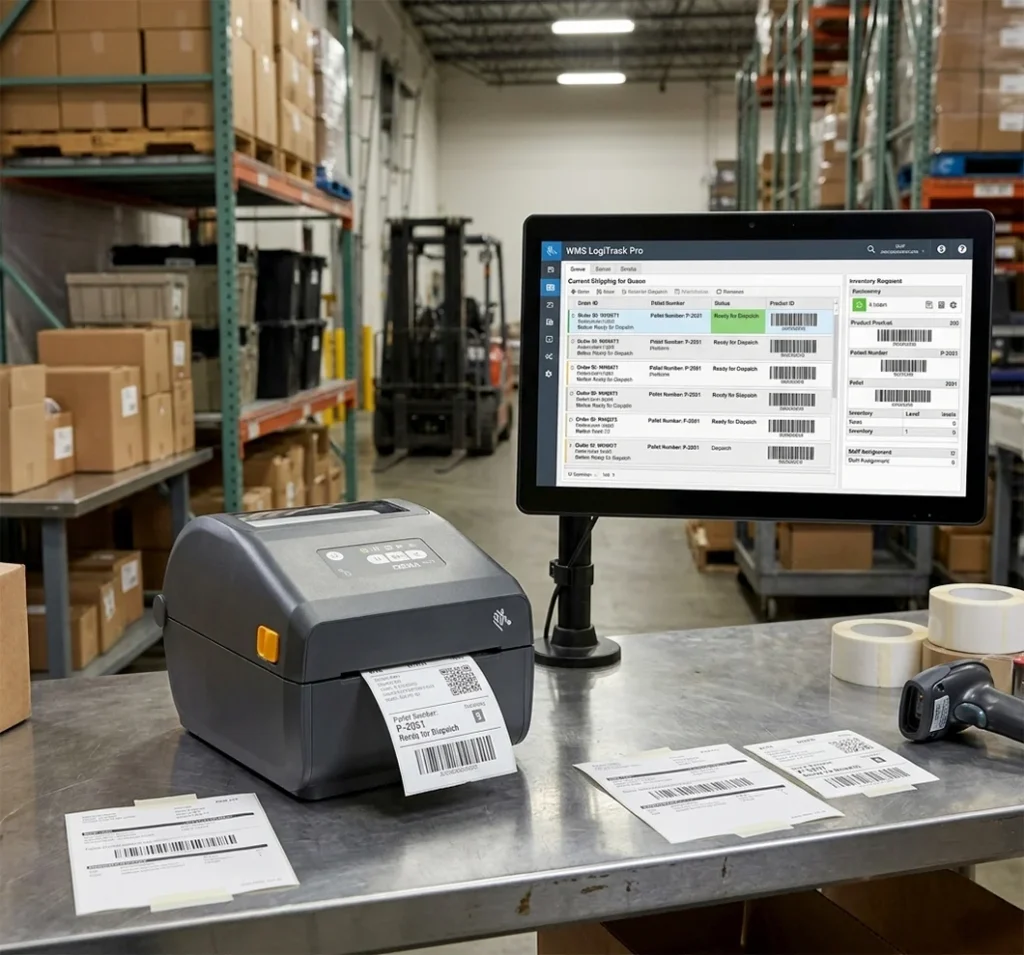
Print speed: 6 IPS (152mm/s) at 203 DPI; 4 IPS at 300 DPI
Resolution: 203 or 300 DPI (model-dependent)
Connectivity: USB, Bluetooth 5.0 standard; optional Wi-Fi (802.11ac); optional Ethernet
Label width range: 0.585 to 4.25 inches
Core size: 1-inch; maximum 5-inch OD
Design: OpenACCESS clamshell with color-coded media path
Label format: Open format (DT and TT modes)
Price: ~$450-695
See current Zebra ZD421 price on Amazon
The Zebra ZD421d is not for Etsy sellers. An Etsy seller buying a ZD421 spends $250 to $495 more than the Rollo X1040 for features they will never use. That money funds ZPL command language integration, WMS and ERP connectivity, enterprise fleet management via Link-OS, and a commercial duty cycle rated for continuous multi-shift use.
The Zebra ZD421d supports both 203 and 300 DPI options, prints at up to 6 IPS at 203 DPI, and features OpenACCESS clamshell media design with color-coded paths for faster media swaps, plus Zebra’s Link-OS SDK for IT-managed fleet deployment and monitoring.
The Zebra ZD421 dual-thermal capability is the other differentiator. It runs in direct thermal mode (no ribbon, paper labels only) or thermal transfer mode (ribbon required, accepts synthetic substrates including PP and PET). Sellers who label products that need to survive freezer temperatures or chemical contact need thermal transfer capability. No other printer on this list offers it in a desktop form factor.
Where the ZD421 Loses
Setup takes 30 to 45 minutes according to verified reviewer data, compared to under 10 minutes for Rollo. The ZD421 costs $250 to $495 more than the Rollo X1040 for shipping label use cases where both printers produce identical output. Enterprise features add cost and setup complexity that casual e-commerce sellers have no use for.
Who it is for: Fulfillment centers, 3PL operations, Amazon FBA prep centers, and IT-managed multi-printer fleets printing 500+ labels per day with WMS integration requirements.
Who should skip it: Any seller printing under 500 labels per day who does not need ZPL or thermal transfer capability.
For operations scaling beyond desktop printers into industrial territory, our comparison of high-volume industrial thermal label printers for warehouses printing 500 or more labels per day covers Zebra ZT411, Honeywell PM43, and TSC MX240P with full duty cycle and WMS compatibility specs.
5. The Proprietary Tax: What DYMO and Brother Buyers Actually Pay
Every guide mentions DYMO. Most of them note that DYMO uses proprietary labels and move on. We ran the actual numbers.
Three-year total cost at 10,000 labels per year:
DYMO LabelWriter 5XL:
- Printer: $209 Check Current Price On Amazon
- Label cost: $0.2136 per label on proprietary DK rolls
- Year 1: $209 + (10,000 x $0.2136) = $2,344
- Year 2 and Year 3: $2,136 each
- Three-year total: $6,616
Brother QL-1110NWB:
- Printer: ~$200
- DK cassette rolls average approximately $0.15 to $0.20 per label
- Year 1: $200 + (10,000 x $0.175 average) = $1,950
- Three-year total: approximately $5,150
Rollo X1040 with generic open-format labels:
- Printer: $200
- Generic 4×6 rolls: $0.03 per label (BETCKEY 500-pack at ~$15)
- Year 1: $200 + (10,000 x $0.03) = $500
- Three-year total: approximately $1,100
The DYMO 5XL costs $5,516 more than the Rollo X1040 over three years at 10,000 labels annually. The printer price difference between them is $9.
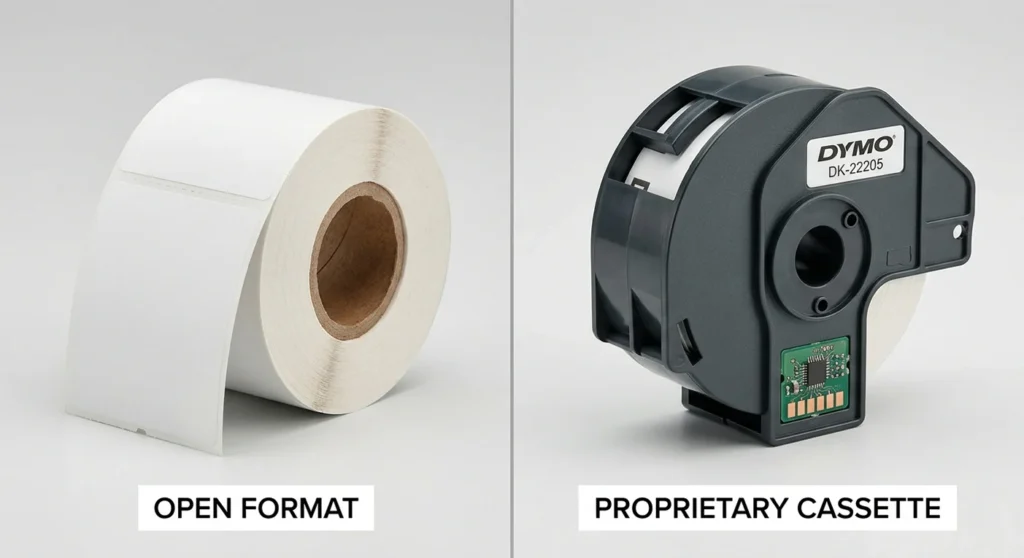
This is the Proprietary Tax. The printer is cheap or mid-range. The label rolls are where the margin lives. DYMO captures that margin on every roll you buy for the life of the printer. Rollo does not, because you buy labels from any supplier.
The DYMO 5XL does produce 300 DPI output, which is sharper than the Rollo’s 203 DPI for fine graphics and small fonts. If that sharpness is worth $5,516 over three years at 10,000 labels annually, buy the DYMO. For standard shipping label barcodes, 203 DPI scans correctly every time and the sharpness difference is invisible at scan distance.
Bluetooth vs Wi-Fi vs USB: Which Connectivity Do You Actually Need
Most buyers search for “4×6 thermal label printer Bluetooth” because wireless sounds like the right answer. It”s right in some situations but wrong in others. Here is the breakdown by consequence, not spec.
USB: Your printer connects to one computer. The label prints from that computer only. No pairing. No network. No app. Setup takes under 5 minutes. USB is the right choice if you run a single fixed packing station that never moves and never needs to print from a phone. The Polono PL60, MUNBYN ITPP941, and Zebra ZD220 all run USB only at the base configuration.
Bluetooth: Your printer pairs directly to a phone or tablet. No computer required. No network required. Right for mobile packing setups, pop-up shops, garage-based sellers who want to print from an iPhone, and anyone who sets up in different locations. The MUNBYN RW411B and JADENS Bluetooth printer both use Bluetooth as the primary wireless method. Limitation: Bluetooth range stops at approximately 30 feet, and connection sometimes requires the manufacturer’s app rather than native iOS/Android printing.
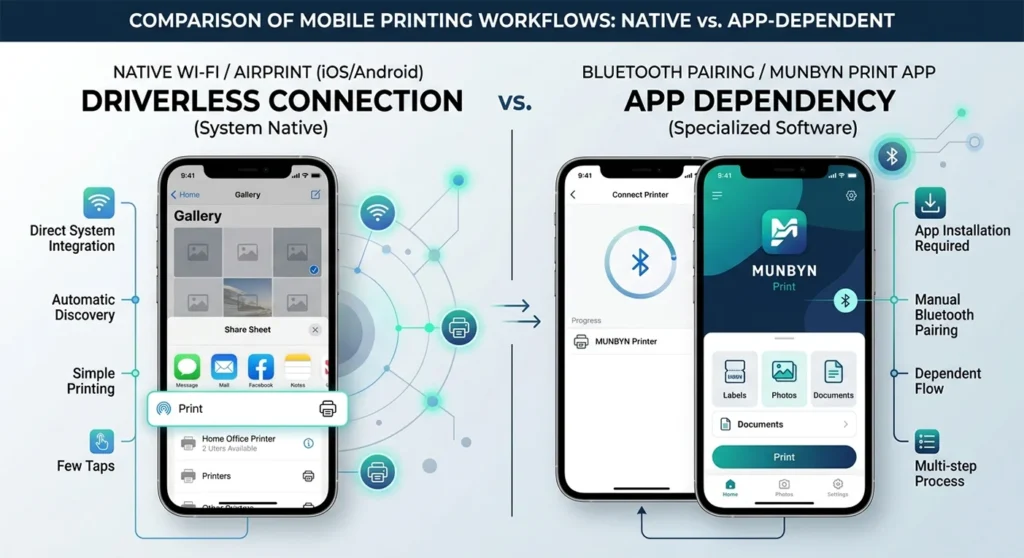
Wi-Fi (with AirPrint): Your printer joins the same Wi-Fi network as every device in your operation. Any phone, tablet, or computer on that network prints to the printer without installing drivers. The Rollo X1040 with AirPrint certification is the correct choice for this scenario. Sellers running multiple computers, a mix of Mac and Windows machines, or a phone alongside a desktop need Wi-Fi, not Bluetooth.
The choice is not “wireless vs wired.” The choice is “how many devices print to this printer, and does one of them need to be a phone without a computer nearby.”
Compatible 4×6 Label Rolls for Each Printer
The printer spec decides which rolls fit. Core size and outer diameter are the two numbers that prevent a bad purchase. Every desktop 4×6 printer on this list uses a 1-inch core with a maximum 5-inch outer diameter. That covers BETCKEY, Arkscan, MUNBYN-branded, Polono-branded, and most generic Amazon rolls.
Rollo X1040: Any 4-inch wide direct thermal roll, 1-inch core, maximum 5-inch OD. BETCKEY, Arkscan, and MUNBYN 4×6 rolls all confirm Rollo compatibility in their product listings. 500 labels per roll at approximately $15.
MUNBYN ITPP941 and RW411B: Standard 4-inch wide, 1-inch core direct thermal rolls. MUNBYN’s own branded rolls work. Generic Amazon rolls work. The printer auto-detects label length via gap sensing.
Polono PL60: 1-inch core, direct thermal, up to 4.65-inch width. Any generic 4×6 roll fits. The PL60 includes auto label position adjustment, which corrects minor misalignment without manual calibration.
Zebra ZD220: 1-inch core, maximum 4-inch and 5-inch OD rolls, maximum 4-inch print width. Third-party 4×6 direct thermal rolls work in DT mode. Zebra-branded rolls also work and are available in large industrial quantities.
Zebra ZD421: 1-inch core, 5-inch maximum OD, 4.25-inch maximum width. In direct thermal mode, any standard 4×6 roll works. In thermal transfer mode, a compatible ribbon must match the label substrate.
DYMO LabelWriter 4XL and 5XL: Proprietary DK roll format only. The newer 5XL firmware blocks non-DYMO rolls on some units. BETCKEY manufactures DYMO-compatible rolls confirmed to work across both firmware versions. Check the product listing for explicit 5XL compatibility before ordering.
Brother QL-1110NWB: Proprietary DK die-cut cassettes only. No standard 4-inch roll from any supplier works with the Brother QL-series printer. The DK cassette system is entirely incompatible with open-format label rolls.
For the complete label size, material, adhesive, and core size reference covering every major printer brand, our guide to thermal label sizes, materials, and core specifications for every major printer gives you the full breakdown before you order.
Where to Buy a 4×6 Thermal Label Printer Near You
Amazon: The right choice for most buyers. Rollo X1040, MUNBYN, Polono, and JADENS are Prime-eligible and arrive in 1 to 2 days. Widest selection. Lowest prices on open-format label rolls.
Rollo.com direct: Rollo sells the X1040 direct with a 30-day money-back guarantee and free U.S. return shipping, plus a 1-year hardware swap warranty extendable to 2 years. If the printer fails within a year, Rollo ships a replacement before you return the defective unit.
Office Depot and OfficeMax: Stock DYMO LabelWriter 4XL and 5XL in-store for same-day pickup. If you need a printer today and DYMO is acceptable, Office Depot is the fastest path. Label roll selection is limited to DYMO proprietary rolls in-store.
Staples: Carries DYMO models and select Brother QL models depending on location. Same-day pickup. Call ahead to confirm specific model stock.
Best Buy: Carries select MUNBYN and Brother models in larger locations. Stock varies significantly by store. Best Buy’s return policy on electronics adds some buyer protection that Amazon does not match on third-party sold units.
Frequently Asked Questions
What is the best 4×6 thermal label printer?
The Rollo X1040 is the best 4×6 thermal label printer for most e-commerce sellers. It prints at 150mm/s, accepts open-format labels at $0.03/label, connects via AirPrint and dual-band Wi-Fi without drivers, and costs $200. For sellers printing under 100 labels per day from a single computer, the Polono PL60 at $80 delivers similar output at a lower total cost.
Can I use a thermal label printer with USPS, FedEx, and UPS?
Yes. Every printer on this list works with USPS, UPS, and FedEx. All three carriers generate 4×6 label PDFs. Download the PDF from the carrier’s website or your shipping platform, send it to the printer, done. The carriers do not require a specific printer brand. They require a 4×6 label at 203 DPI minimum resolution, which every printer on this list meets.
Does the Rollo work with Shopify?
Yes. Rollo works with Shopify directly through the Shopify admin, through Rollo Ship, and through AirPrint from any iOS device on the same Wi-Fi network. Shopify also lists the Rollo X1040 as a recommended thermal label printer in their hardware documentation.
What is the cheapest 4×6 thermal label printer?
The Polono PL60 at $80 is the cheapest 4×6 thermal label printer with open-format label compatibility. The MUNBYN ITPP941 at $80 to $100 matches that price point with a faster print speed of 150mm/s versus the PL60’s 127mm/s. Both accept generic label rolls.
Does a 4×6 thermal printer need ink?
No. Direct thermal printers produce output by applying heat to heat-sensitive label paper. There is no ink, no toner, and no ribbon. The only consumable is the label roll itself. If you own a thermal transfer printer like the Zebra ZD421 in thermal transfer mode, it requires a ribbon in addition to the label roll, but still uses no liquid ink.
Can I print from my iPhone to a thermal label printer?
Yes, with the right printer. The Rollo X1040 supports AirPrint natively, so any iPhone or iPad on the same Wi-Fi network prints directly without an app. The Brother QL-1110NWB also supports AirPrint. MUNBYN’s Bluetooth models require the MUNBYN Print app. DYMO requires a workaround because the DYMO Connect software lacks a native iOS print driver.
Is the Zebra ZD421 worth it for an Etsy seller?
No. The Zebra ZD421 costs $450 to $695. An Etsy seller printing under 500 labels per day produces identical label output on a Rollo X1040 at $200. The ZD421’s advantages are ZPL WMS integration, commercial duty cycle, and 300 DPI precision. Etsy sellers need none of those features. The $250 to $495 price gap buys two or three years of label rolls on a Rollo.
What is the difference between the DYMO 4XL and 5XL?
The DYMO LabelWriter 5XL is newer, slightly faster, and has a more polished design than the 4XL. Both use proprietary DK rolls. The 5XL’s newer firmware blocks third-party rolls on some units where the 4XL was more permissive. If you want open-format label compatibility, neither model is the right choice.
The Decision: Which Label Printer Suits your Situation
Here are your 3 possible scenarios or use cases with right printer solution for each.
You print under 100 labels per day from a single computer and want to spend under $100: Polono PL60. Open labels. Compatible with every platform. USB only. Three-year cost is the second-lowest on this list. Buy it.
You print 10 to 500 labels per day and need wireless from a phone or multiple devices: Rollo X1040. AirPrint. Dual-band Wi-Fi. Open labels at $0.03/label. Three-year cost approximately $1,100. The Proprietary Tax on DYMO costs $5,516 more at this volume. Buy the Rollo.
You run a warehouse WMS, print 500+ labels per shift, and need ZPL integration or thermal transfer capability: Zebra ZD421d. Not cheap. Not easy to set up. The right tool for that specific context. Buy it.
Every other printer on this list fills a slot between these three. MUNBYN gives you Rollo speed at lower cost if AirPrint does not matter. JADENS covers Bluetooth mobile printing at $100 if your daily volume is under 50 labels. Brother and DYMO are the wrong answer unless you have a specific workflow reason to pay the Proprietary Tax.
If you are new to thermal printing and want to understand what “direct thermal” means before buying your first printer, our guide on how thermal label printers work and what the difference between direct thermal and thermal transfer means in practice walks through the mechanism without the jargon.