
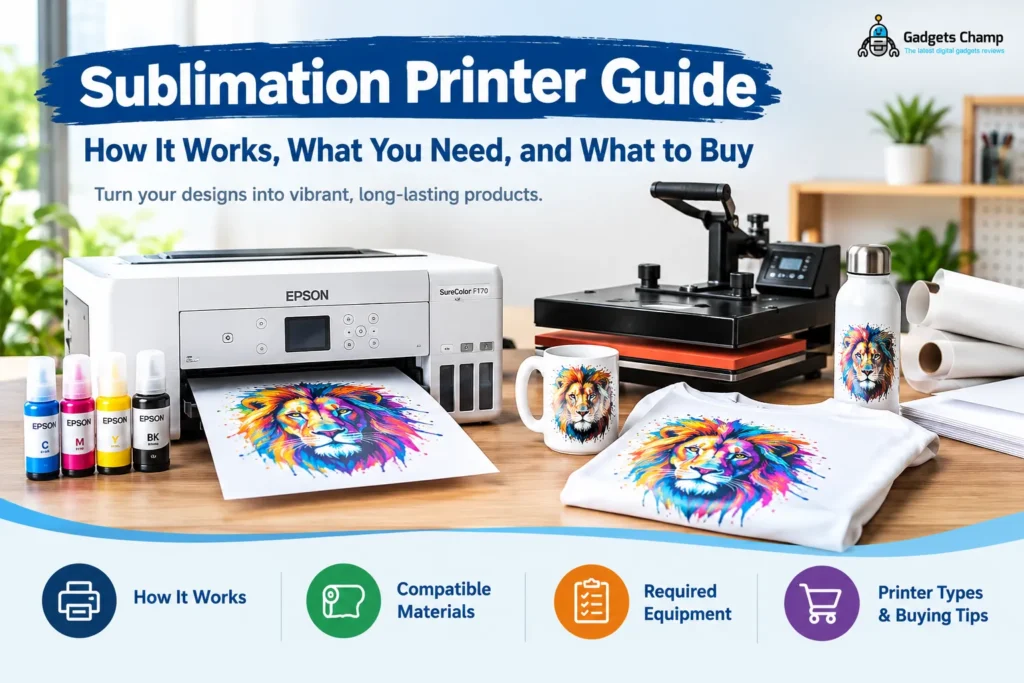
A sublimation printer prints designs onto transfer paper using compatible sublimation ink. A heat press then transfers the dye onto a suitable product, such as a polyester shirt or polymer-coated mug. The printer creates the transfer, but heat and pressure complete the decoration process.
Before buying equipment, understand one important limitation: conventional sublimation works best on white or light-colored polyester fabrics and compatible polymer-coated products. It does not directly print durable designs onto untreated cotton or create white ink for dark garments.
This guide explains how sublimation printers work, what supplies you need, and which printer setup suits your projects. You will also find a practical way to avoid buying equipment that cannot produce the products you want to sell.
Jump to: How it works · Compatible materials · Required equipment · Printer types · Setup cost · FAQs
What Is a Sublimation Printer?
A sublimation printer is a printing device that deposits compatible sublimation ink onto transfer paper. Heat and pressure then turn the printed design into a transfer that bonds with suitable polyester fibers or polymer-coated surfaces. The result is a decorated product rather than an ordinary sheet of printed paper.
What does a sublimation printer do?
A dye sublimation printer creates the image you want to transfer onto a product. Its output depends on compatible ink, transfer paper, print settings, and the design file.
The word sublimation describes a physical change in which a solid changes directly into a gas without passing through a liquid phase. In printing, heat causes the sublimation dye to vaporize and penetrate a compatible receiving material.
This is why the printer alone cannot finish the job. You also need suitable transfer equipment and a product designed for sublimation.
Sublimation printer vs. regular inkjet printer
Although some sublimation systems use inkjet printhead technology, a regular inkjet printer is not automatically suitable for sublimation.
| Feature | Sublimation printer | Regular inkjet printer |
|---|---|---|
| Ink | Compatible sublimation ink | Ink specified for that printer |
| Printed output | Transfer paper | Usually plain or photo paper |
| Finishing process | Heat transfer onto a compatible substrate | Normally no heat-transfer stage |
| Main applications | Polyester apparel and coated products | Documents, photographs and graphics |
| Compatibility | Requires an appropriate sublimation system | Depends on its intended ink and media |
A standard inkjet cannot simply use any ink and produce reliable sublimation transfers. Ink chemistry, printer compatibility, printhead design, and the manufacturer’s instructions all matter.
If you already own a printer, check which printers work for sublimation before buying ink or attempting a conversion.
Dye-sublimation transfer printers vs. photo printers
The phrase dye-sublimation printer can describe different technologies.
- Sublimation transfer printers print designs onto transfer paper for later application to shirts, mugs, and other compatible products.
- Dedicated dye-sublimation photo printers commonly use a thermal printhead and color ribbon or dye panels to produce photographs on specialized media.
These systems serve different purposes. A compact photo printer is not necessarily suitable for making sublimation transfers for apparel or drinkware.
If your goal is printing photographs rather than decorating blanks, explore our guide to dye-sublimation photo printers.
How Does Sublimation Printing Work?
Conventional sublimation printing follows four main steps. Each step affects the final image, so a good printer cannot compensate for unsuitable materials or incorrect pressing instructions.
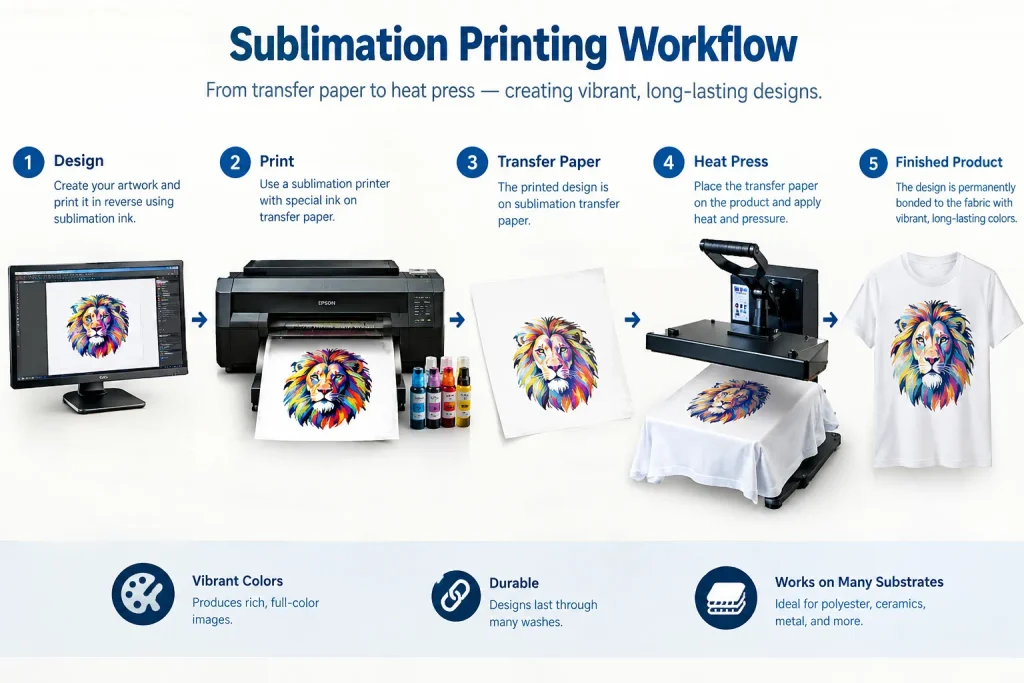
Visual workflow illustration. It is not evidence of hands-on testing by GadgetsChamp.
Step 1: Prepare and mirror your design
Create your artwork in compatible design software. Set the dimensions to match the product’s printable area and the transfer paper your printer supports.
Many garment transfers require mirrored artwork because the design faces down during pressing. However, mirroring depends on the transfer method and software workflow. Confirm the instructions before printing to avoid reversed text or logos.
Step 2: Print with sublimation ink
The printer deposits sublimation ink onto transfer paper. The paper temporarily holds the design until you apply heat.
Printhead technology also matters. Epson’s Micro Piezo technology uses piezoelectric elements to eject ink droplets through precise mechanical movement rather than the thermal-bubble mechanism used in some other inkjet designs.
That technology can support controlled droplet placement, but a Micro Piezo printhead does not automatically make every Epson inkjet compatible with sublimation ink. The printer model and approved ink system still determine suitability.
Step 3: Transfer with heat and pressure
Position the transfer against the compatible product and use the appropriate heat press. Under the required conditions, the dye vaporizes and enters the receiving polyester or polymer layer.
Do not treat one temperature or pressing time as universal. Fabric composition, coating, transfer paper, equipment, and blank manufacturer instructions can all affect the correct settings.
Step 4: Cool and inspect the finished product
Remove the transfer according to the blank’s instructions and inspect the result. Look for faded areas, unwanted color shifts, blurred edges, or marks caused by movement during pressing.
If something goes wrong, change one variable at a time. Check the artwork, paper, ink, substrate, and press settings before assuming the printer itself is defective.
What Materials Can a Sublimation Printer Print On?
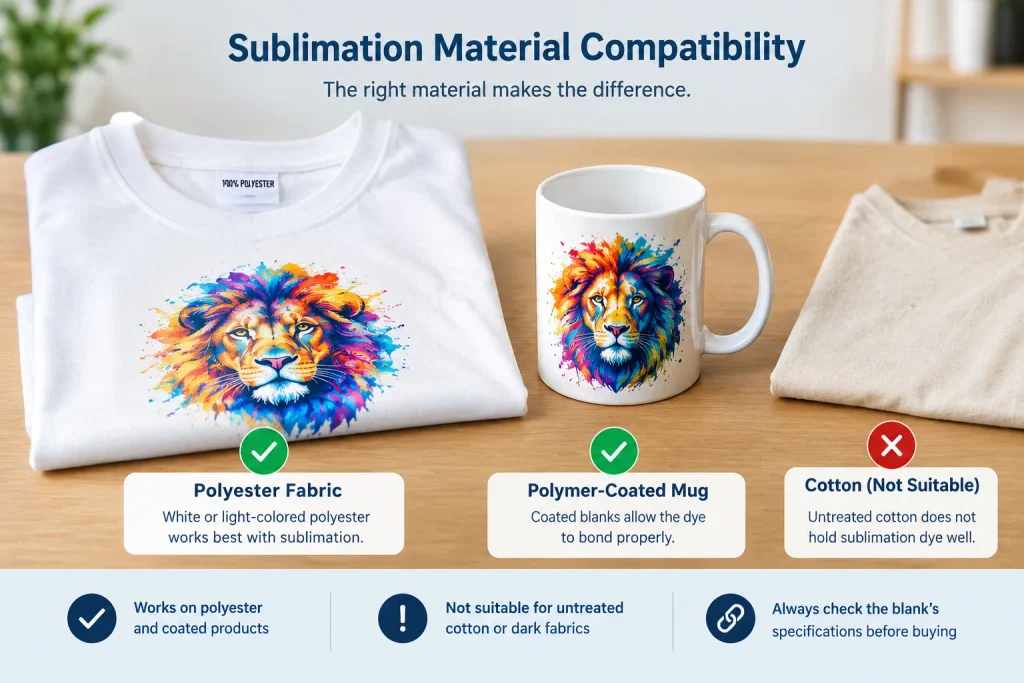
Material compatibility should determine your equipment purchase, not the other way around. Conventional sublimation relies on suitable polyester fibers or polymer-coated surfaces that can receive the dye.
Polyester shirts and light-colored fabrics
White or light-colored polyester is a practical starting point for apparel. The polyester content and fabric construction influence how the dye bonds and how the finished design looks.
Polyester blends may work, but results can vary with their composition. Do not assume every fabric containing polyester will produce the same color or durability.
For apparel projects, see our sublimation printer guide for T-shirts.
Polymer-coated mugs, tumblers and hard goods
Mugs, tumblers, and similar hard products need a suitable polymer coating or another specifically compatible receiving surface. An ordinary ceramic mug or uncoated metal tumbler will not become sublimation-ready just because you own a capable printer.
Check the blank’s specifications before purchasing it. For drinkware projects, follow our mug and tumbler sublimation guide.
Can you sublimate on cotton or dark shirts?
Conventional sublimation is not a direct solution for untreated cotton or dark garments. The dye bonds much more effectively with suitable polyester than with untreated natural fibers. It also cannot produce white ink to cover a dark base.
| Material | Conventional sublimation suitability | What you should know |
|---|---|---|
| White or light polyester | Suitable when compatible | A practical starting point |
| Untreated cotton | Not suitable for direct conventional sublimation | Consider another printing method |
| Dark garments | Poor fit for direct conventional sublimation | A method with an appropriate opaque layer may be better |
| Uncoated ceramic | Not suitable without a compatible receiving surface | Verify the blank’s coating |
| Polymer-coated hard goods | Suitable when specified for sublimation | Follow product and press instructions |
Important: A printer cannot make an incompatible material suitable. If you want to print on cotton or dark shirts, investigate methods such as direct-to-film (DTF) or direct-to-garment (DTG) instead.
For more ideas about compatible products and their limitations, read what you can sublimate on.
What Do You Need to Start Sublimation Printing?
A complete sublimation machine setup includes more than a printer. Budget for the equipment and consumables required to turn a printed transfer into a finished product.
First-project equipment checklist
- Compatible sublimation printer
A dedicated model or a verified compatible conversion. - Correct sublimation ink
Ink approved for the specific printing system. - Sublimation transfer paper
Paper suited to the printer and receiving material. - Design software
Tools for sizing, layout, color settings, and mirroring. - Suitable heat press
A flat, mug, or tumbler press for the intended product. - Compatible blank products
Polyester fabric or correctly coated hard goods. - Transfer accessories
Heat-resistant tape and protective paper where required.
Printer and compatible ink
A dedicated sublimation printer is designed for the intended ink system. A converted inkjet introduces additional responsibility for compatibility, setup, maintenance, and color management.
Do not treat every EcoTank model as interchangeable. Verify the exact model and conversion requirements before purchasing anything.
Sublimation paper and design software
Transfer paper holds the printed dye until pressing. Paper type, print quality settings, color profiles, and file preparation all influence the result.
If you plan to use a Cricut machine for cutting or aligning designs, understand how it fits into the workflow. A Cricut is not itself a sublimation printer. See our guide to a sublimation printer for Cricut projects.
Heat press and transfer accessories
Choose the press for your actual product. A flat press suits many flat textile transfers, while curved drinkware requires suitable equipment and compatible blanks.
Heat-resistant tape, protective paper, and other accessories help keep transfers aligned and protect surfaces when the process calls for them.
Compatible blanks and workspace supplies
Buy blanks that explicitly support the intended process. Keep the workspace organized, follow equipment safety instructions, and avoid touching hot surfaces.
For a complete breakdown of the items and their roles, use our sublimation equipment checklist.
Which Type of Sublimation Printer Should You Choose?
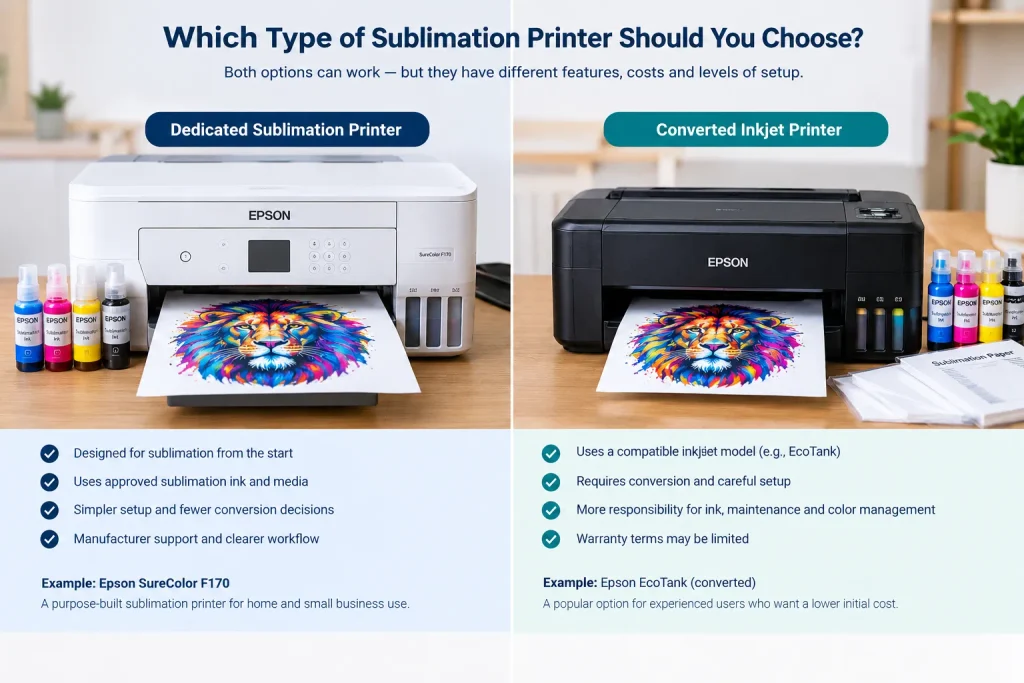
The main choice is between a purpose-built sublimation printer and a compatible inkjet conversion. Your budget matters, but so do technical confidence, ongoing maintenance, supported media, and the amount you plan to print.
Dedicated sublimation printers
A dedicated printer is designed for sublimation from the start. It usually provides a clearer ink and media workflow, reducing the uncertainty involved in converting a general-purpose inkjet.
For example, the Epson SureColor F170 is a purpose-built desktop model. Epson specifies genuine dye-sublimation ink, a 150-sheet auto-feed tray, and a maximum paper width of 8.5 inches. Its supported ink and media specifications illustrate why checking the exact model matters.
A dedicated printer still needs suitable transfer paper, a heat press, and compatible blanks. It also may not offer the print width or production capacity required for larger business orders.
Converted inkjet printers
Some inkjet printers can serve as sublimation systems when the exact model and conversion method support it. However, conversion introduces extra decisions.
You need to verify ink compatibility, initial setup, printhead maintenance, color management, and warranty implications. A printer designed for ordinary documents does not become a supported sublimation system simply because compatible-looking ink bottles fit into it.
If you are considering an Epson EcoTank conversion, read our Epson EcoTank sublimation printer guide before committing to a model.
Printers sold with sublimation ink included
A listing that includes ink does not automatically establish that the printer is factory-designed for sublimation. Sellers may offer converted machines or bundles assembled from different components.
Check the manufacturer’s documentation, the precise model number, the installed ink, and what the warranty actually covers.
Our guide to a sublimation printer with ink included explains what to verify before buying a bundle.
Epson, Sawgrass and other printer systems
Compare systems by their intended use rather than brand recognition alone.
- Epson: Verify whether the model is purpose-built for sublimation or whether a conversion is being proposed. Micro Piezo technology alone does not establish compatibility.
- Sawgrass: Check the specific sublimation printer’s supported ink, media, software, and warranty terms.
- Brother: Confirm the intended printing technology and exact model. A brand name does not make all printers suitable for sublimation.
- Other systems: Verify supported media sizes, ink, printhead requirements, and the manufacturer’s documentation before purchase.
For a detailed model comparison, use our best sublimation printers guide. It covers the commercial decision without turning this educational pillar into another product roundup.
The practical rule: Choose a dedicated system if you value a more straightforward, supported setup. Investigate a conversion only if the exact model is compatible and you accept the extra technical responsibility.
How to Choose a Sublimation Printer for Your Project
The right printer depends on what you want to make, how large your designs need to be, and how much production you expect.
For beginners and home use
Start by choosing the product you want to decorate. Then confirm material compatibility, the required press, printable dimensions, and total setup cost.
If you are new to the process, compare our best sublimation printer for beginners recommendations. Avoid paying for production capacity you do not need, but do not choose a printer that cannot handle your intended design sizes.
For T-shirts, mugs and Cricut projects
- T-shirts: Choose a printer that supports your design dimensions and use compatible polyester garments. Start with our T-shirt sublimation printer guide.
- Mugs and tumblers: Confirm that your blanks have suitable coatings and that your press supports their shape. See our mug and tumbler guide.
- Cricut projects: Check how your design software, printer, transfer paper, and cutting workflow work together. Read our Cricut sublimation guide.
- Sticker projects: Conventional sublimation is not the default choice for ordinary adhesive stickers. Review the relevant sticker printer options before purchasing equipment.
For larger prints or business production
If you plan to sell custom apparel or personalized products, maximum print width and order volume become important. A desktop printer may work for small items but limit larger designs or high-volume workflows.
Check the printer’s supported media dimensions, maintenance requirements, and expected production workflow before investing in more capacity.
Use the best sublimation printers comparison for model-level decisions and our Epson sublimation printer guide for the Epson-specific options.
Your 60-second printer decision map
Want the simplest supported setup?
Compare dedicated printers and beginner-friendly options.
Compare the best sublimation printers · Beginner printer guide
Want to convert an EcoTank?
Read the EcoTank conversion guide
Want to reuse a printer you already own?
Already know which products you want to make?
T-shirts · Mugs and tumblers · Cricut projects
Need to calculate the full budget first?
Review sublimation printer setup costs · Check the equipment list
How Much Does a Sublimation Printer Setup Cost?
The price of a printer is only one part of the initial investment. A complete setup also includes the equipment and supplies needed to transfer a design onto a compatible product.
Printer price vs. complete startup cost
Use this simple budget structure before purchasing anything:
| Cost category | What to include |
|---|---|
| Printer | Dedicated sublimation model or compatible converted inkjet |
| Ink and paper | Correct ink system and transfer paper |
| Heat press | Flat press or suitable drinkware equipment |
| Blank products | Compatible shirts, mugs, tumblers, or other products |
| Accessories | Protective paper, heat-resistant tape, and handling supplies |
| Software and maintenance | Any paid software, replacement supplies, and upkeep |
Some printer bundles include ink or paper, but the contents vary. Check exactly what is included rather than assuming a starter package contains everything you need.
For a detailed budget breakdown, visit our sublimation printer cost guide.
What affects your cost per print?
Your cost per finished product depends on several variables:
- The amount of ink used by each design.
- Transfer paper size and the number of designs printed per sheet.
- The price of each compatible blank.
- Pressing supplies, maintenance, and failed transfers.
- Your labor, packaging, and other business expenses.
Example: evaluating your first shirt. Suppose you want to sell a personalized polyester T-shirt. Before setting a retail price, record the blank cost, the actual paper and ink consumed, accessories used, and any failed transfers. Add packaging and labor, then account for your desired profit margin.
This is a planning example, not a measured GadgetsChamp cost-per-shirt result. Your actual cost depends on your materials, design, equipment, and workflow.
A cheaper printer may reduce your initial purchase cost but still produce a more expensive overall setup if it requires additional equipment or troubleshooting. Compare the complete workflow before choosing.
Common Sublimation Printer Mistakes to Avoid
Many expensive mistakes happen before the first transfer. Check these details before spending money on equipment or stock.
Buying before checking material compatibility
A suitable printer cannot overcome an unsuitable blank. Confirm that your garment contains compatible polyester or that your hard product has a coating designed for sublimation.
Start with one sample product before purchasing a large batch. This gives you an opportunity to check the material, press settings, color, and design placement before committing to inventory.
Assuming every inkjet can be converted
A refillable ink tank does not guarantee sublimation compatibility. Check the exact printer model, supported ink system, conversion requirements, and warranty terms.
Use our printer compatibility guide to investigate an existing printer. If you are considering an EcoTank conversion, use the dedicated conversion guide for the more specific process.
Ignoring paper size, color management and maintenance
A printer’s maximum paper width determines the size of transfer you can print. Color settings and profiles influence how the digital design translates into the final product, while maintenance helps keep the ink delivery system working correctly.
Before troubleshooting a poor transfer, check the artwork, paper, print settings, and material. Our sublimation settings and software guide covers the related workflow.
Practical first-project example: test before scaling
Imagine you want to launch a small online shop selling personalized shirts and mugs. Buying a printer first might seem like the quickest way to begin, but it leaves several expensive questions unanswered.
A better sequence is to:
- Select one compatible shirt and one coated mug.
- Verify the printer, ink, paper, and press requirements for both products.
- Print and press a sample using the product manufacturer’s instructions.
- Inspect the results and record the materials consumed.
- Calculate the complete cost before buying stock for sale.
This example illustrates a decision process, not a documented customer success story or a claim that GadgetsChamp has physically tested these products. It helps you identify compatibility and budgeting problems before they become larger expenses.
Choose Your Next Step
Ready to choose equipment? Compare the best sublimation printers if you want model recommendations, or review our printer compatibility guide if you already own a printer. Our sublimation equipment checklist can help you plan the rest of your setup.
Frequently Asked Questions About Sublimation Printers
What is a sublimation printer used for?
A sublimation printer creates transfers for decorating compatible polyester fabrics and polymer-coated products. Common applications include custom shirts, mugs, tumblers, mousepads, and personalized gifts. The printer produces the transfer, while a suitable heat press completes the process. Your material and equipment must support sublimation for the design to transfer correctly.
If you are choosing equipment for a specific product, start with the best sublimation printers guide.
Can you use a regular printer for sublimation?
Not every regular printer is compatible with sublimation. Some specific inkjet models can be converted, while purpose-built sublimation printers support their intended ink systems from the start. Check the exact model, ink compatibility, conversion requirements, and warranty terms before attempting a conversion.
Use our printer compatibility guide before purchasing ink.
Does a sublimation printer need a heat press?
Yes, conventional sublimation transfer workflows require suitable heat-transfer equipment. The printer deposits the design onto transfer paper, but heat and pressure transfer the dye onto the receiving material. You may need a flat press for garments or suitable equipment for mugs and tumblers.
Choose equipment based on your product’s shape and the manufacturer’s instructions.
What ink and paper does a sublimation printer use?
A sublimation printer requires compatible sublimation ink and transfer paper intended for its printing system. Ordinary ink and standard office paper are not interchangeable with these supplies. Ink, paper, print settings, and substrate compatibility all affect the final result.
Check the printer manufacturer’s documentation and the blank supplier’s transfer instructions before buying consumables.
Can you sublimate on cotton?
Conventional sublimation does not directly bond to untreated cotton in the same way it bonds to suitable polyester. The dye needs a compatible receiving material to produce the intended durable result. Specialized coatings and alternative transfer products exist, but they involve different requirements and should not be confused with ordinary direct sublimation on cotton.
For dark or cotton garments, compare other printing methods before investing in equipment.
Is a dedicated or converted sublimation printer better?
A dedicated sublimation printer generally offers a more straightforward, purpose-built ink and media workflow. A compatible converted inkjet may suit buyers who accept additional setup, maintenance, and compatibility responsibilities. Neither choice removes the need for a heat press, appropriate supplies, and suitable blanks.
Compare the full costs and limitations, then review the best sublimation printers before making your final decision.
Start With the Right Sublimation Setup
The best sublimation printer is the one that matches your products, materials, budget, and production needs. Before buying, confirm printer compatibility, calculate the complete setup cost, and make sure you can obtain suitable blanks and transfer supplies.
If you are ready to compare actual models, visit our best sublimation printers guide. If you already own an inkjet printer, begin with our printer compatibility guide.
Make the material decision first, the equipment decision second, and the purchase decision last. That sequence helps you avoid paying for a setup that cannot produce the products you want to make.
Author bio and editorial disclosure
Author: Kamran Asghar
Kamran Asghar writes SEO-focused technology and printer content for GadgetsChamp, helping readers understand product specifications, compatibility, and practical buying decisions. This guide uses manufacturer documentation and technical references to explain sublimation printing. It does not claim hands-on testing of the equipment described.
Affiliate disclosure: GadgetsChamp participates in the Amazon Associates Program and may earn commissions from qualifying purchases made through affiliate links, at no additional cost to the buyer. This educational guide prioritizes understanding the technology and choosing suitable equipment over promoting individual products.