
Affiliate Disclosure: As an Amazon Associate, GadgetsChamp earns from qualifying purchases. We may earn a commission if you buy through our links, at no extra cost to you. Our recommendations are based on specifications, documented product information, and practical trade-offs.
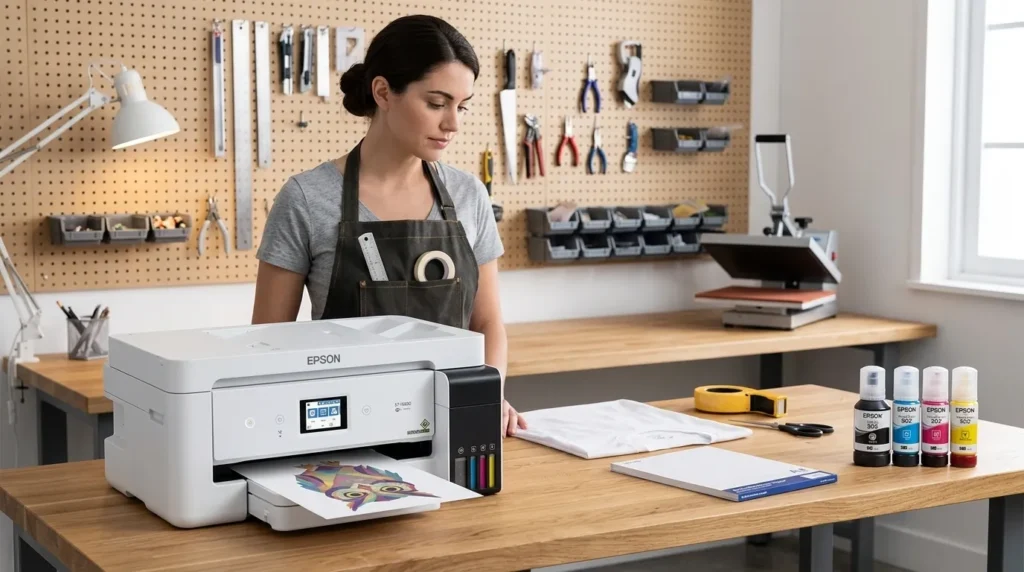
If you’re searching for an Epson EcoTank sublimation printer, there’s an important distinction to understand first: ordinary EcoTank printers are not sold by Epson as factory sublimation printers.
Some EcoTank models are commonly converted for sublimation printing by replacing the standard ink workflow with sublimation ink. That can create a lower-cost entry into sublimation, but it also introduces DIY setup, ink compatibility, maintenance, and warranty considerations.
The right choice depends mainly on print size, how often you will print, your tolerance for DIY maintenance, and whether saving money matters more than having a purpose-built system.
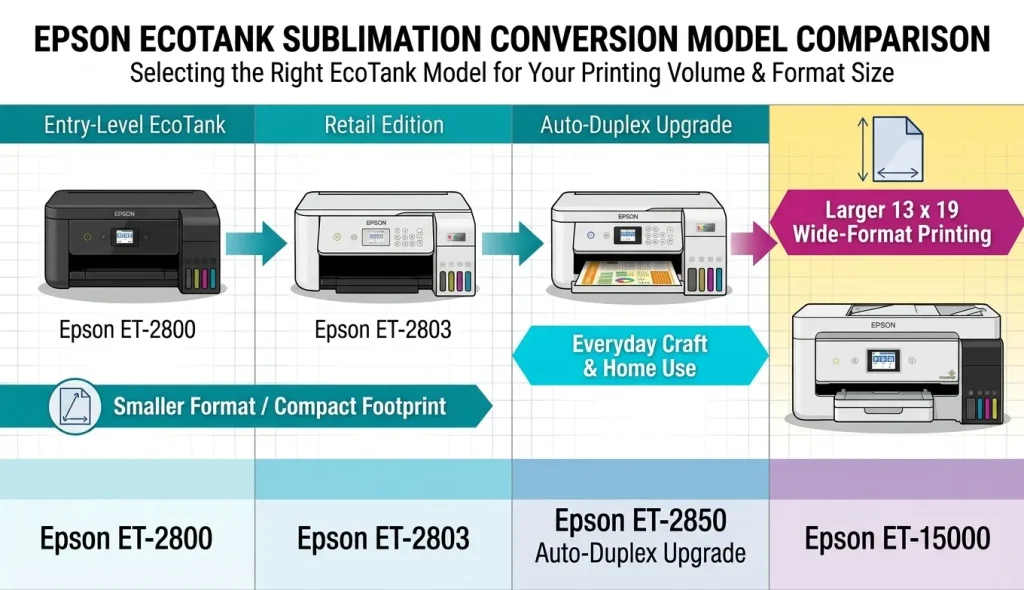
Quick answer: For smaller projects, the ET-2800 or ET-2803 are common budget-oriented conversion candidates. The ET-2850 offers a modest convenience upgrade. The ET-15000 becomes relevant when you need printing up to 13 × 19 inches. If you want to avoid conversion entirely, Epson’s SureColor F170 is a dedicated dye-sublimation option.
Which Epson EcoTank Is Best for Sublimation?
There isn’t one universal best EcoTank for sublimation. The right model depends on the products you want to make.
| Your priority | Model to consider | Why | Price |
|---|---|---|---|
| Lowest-cost DIY entry | ET-2800 / ET-2803 | Compact EcoTank platform suited to smaller projects | Check ET-2800 Price |
| Small convenience upgrade | ET-2850 | Similar basic format with additional everyday features | Check Current Price |
| Larger transfers | ET-15000 | Supports media up to 13 × 19 inches through its rear feed | Check Current Price |
| Newer-generation option | ET-2980 | Current EcoTank generation, but conversion ecosystem is less established | Check Current Price |
| No DIY conversion | SureColor F170 | Purpose-built dye-sublimation printer | Check Current Price |
The ET-2800 and ET-2803 make the most sense when your sublimation work fits within a smaller desktop format. Epson lists both as refillable EcoTank printers using Micro Piezo technology, but Epson also warns that non-genuine ink can cause damage that is not covered by the limited warranty.
The ET-15000 solves a different problem. Its major advantage is media handling, with Epson specifying printing up to 13 × 19 inches through the rear feed. That matters if you’re producing larger shirt transfers or other projects where an 8.5-inch-class printer becomes restrictive.
If you don’t want the conversion headache, the SureColor F170 is a completely different proposition. Epson sells it specifically as a dye-sublimation printer with genuine Epson dye-sublimation ink and a turnkey workflow.
If you’re still deciding between a converted EcoTank and other Epson models designed around sublimation, our guide to Epson sublimation options covers the broader range and explains where each approach fits.
Epson EcoTank Models Compared for Sublimation
Before buying an Epson EcoTank printer for sublimation printing, separate two questions:
- Can the printer physically be used as a conversion platform?
- Does that make it a sensible purchase for your particular projects?
Those are not the same question.
| Model | Conversion role | Print-size consideration | Best suited to | Main drawback |
|---|---|---|---|---|
| ET-2800 | Budget conversion candidate | Smaller desktop format | Mugs, small transfers, home makers | Limited larger-format flexibility |
| ET-2803 | Budget conversion candidate | Smaller desktop format | Similar projects to ET-2800 | Limited format |
| ET-2850 | Budget/convenience option | Smaller desktop format | Home makers wanting extra everyday features | Still limited for larger transfers |
| ET-15000 | Wide-format conversion candidate | Up to 13 × 19 inches | Shirts and larger transfers | Larger investment and footprint |
| ET-2980 | Emerging option | Verify exact media requirements | Buyers considering newer EcoTank hardware | Less established conversion history |
ET-2800 and ET-2803 for Budget Conversions
The Epson ET-2800 sublimation and ET-2803 sublimation searches exist because these compact EcoTank models are frequently discussed as inexpensive conversion candidates.
Their appeal is straightforward: refillable tanks make the physical ink-management side of a conversion more practical than a conventional cartridge printer.

- Innovative Cartridge-Free Printing ― No more tiny, expensive ink cartridges; each ink bottle set is equivalent to about …
But don’t confuse that with Epson officially approving them for sublimation. Epson’s product documentation describes them as EcoTank printers for ordinary printing and recommends genuine Epson ink. Epson specifically warns that non-genuine ink could cause damage not covered by the printer’s limited warranty.
For a beginner making smaller products at home, the compact format can be attractive. If your business eventually requires larger transfers, however, the savings from starting with a small printer can disappear when you have to upgrade.
ET-2850 for a Small Convenience Upgrade
The Epson ET-2850 sublimation follows the same basic EcoTank concept but adds features such as automatic two-sided printing for normal document work.
That can make it more useful if the printer will serve two roles: sublimation projects and everyday household or business printing.

- Sold as 1 Each.
- Innovative Cartridge-Free Printing – No more tiny, expensive ink cartridges; each ink bottle set is equivalent to about …
Don’t buy it simply because the model number is newer. For sublimation conversion, the key question remains whether its physical format and your intended workflow match the projects you actually produce.
Epson’s current product information again warns that non-genuine ink may cause damage not covered under the limited warranty.
ET-15000 for 13 × 19-Inch Sublimation
The Epson ET-15000 sublimation conversation is mainly about size.
Epson specifies support for media up to 13 × 19 inches through the rear paper feed, which puts this model in a different category from compact EcoTank options.
That larger media capability can matter for shirt transfers and other designs where a smaller printer forces you to resize or split artwork.
But bigger does not automatically mean better.
If most of your projects fit comfortably within a smaller format, paying more for the ET-15000 can add cost and desk space without solving a real problem.
What About the Newer ET-2980?
The ET-2980 deserves attention because it represents a newer generation of EcoTank hardware.
Epson introduced the ET-2980 as part of its seventh-generation EcoTank line and describes it as an everyday color printer using its newer PrecisionCore Heat-Free technology.
That makes it an interesting model to watch, but newer does not automatically mean best printer to convert to sublimation.
For a conversion project, you also care about the maturity of the third-party ink ecosystem, available profiles, documented workflows, troubleshooting information, and community experience.
Until those factors are established for a newer model, an older, widely documented conversion platform may be easier for a beginner to work with.
What Makes an EcoTank Suitable for Sublimation?
An EcoTank becomes interesting for conversion because of its refillable ink-tank design and Epson’s inkjet printing technology.
But the important point is what those features do not mean.
They do not mean Epson sells the printer as a sublimation machine.
Why Epson Micro Piezo Matters
Many EcoTank models use Epson’s Micro Piezo technology. Epson describes the ET-2803, for example, as using Micro Piezo Heat-Free Technology.
In simple terms, the printhead controls tiny droplets of ink and places them onto the media.
That technology is one reason EcoTank printers have become popular in discussions about conversion. But the printhead technology alone does not make a printer a sublimation printer.
Before choosing a conversion printer, it’s also worth understanding printhead compatibility, because the printer’s ink-delivery and printhead design can affect whether a particular model makes practical sense for sublimation.
The ink, paper, color-management workflow, and printer configuration all matter.
Why Refillable Ink Tanks Make Conversion Easier
The tank system is the practical attraction.
Instead of dealing with traditional disposable cartridges, EcoTank models use refillable reservoirs. That gives a conversion setup a place to hold sublimation ink.
The catch is that the original ink and the replacement ink are not interchangeable in a simple “pour one into the other” process.
A conversion needs a controlled ink transition and an appropriate workflow.
Sublimation Ink Changes the Printer’s Job
Standard EcoTank ink is designed for ordinary paper printing.
Sublimation ink is used for a different transfer process. The printed design is transferred with heat onto compatible polyester-coated or polyester-based substrates.
That means a converted printer is no longer being used in the way Epson originally designed the standard EcoTank ink system.
This distinction is why you should treat a converted EcoTank as a DIY sublimation setup, not as an Epson-supported factory sublimation printer.
What Do You Need to Convert an EcoTank?
A printer alone does not create a working sublimation setup.
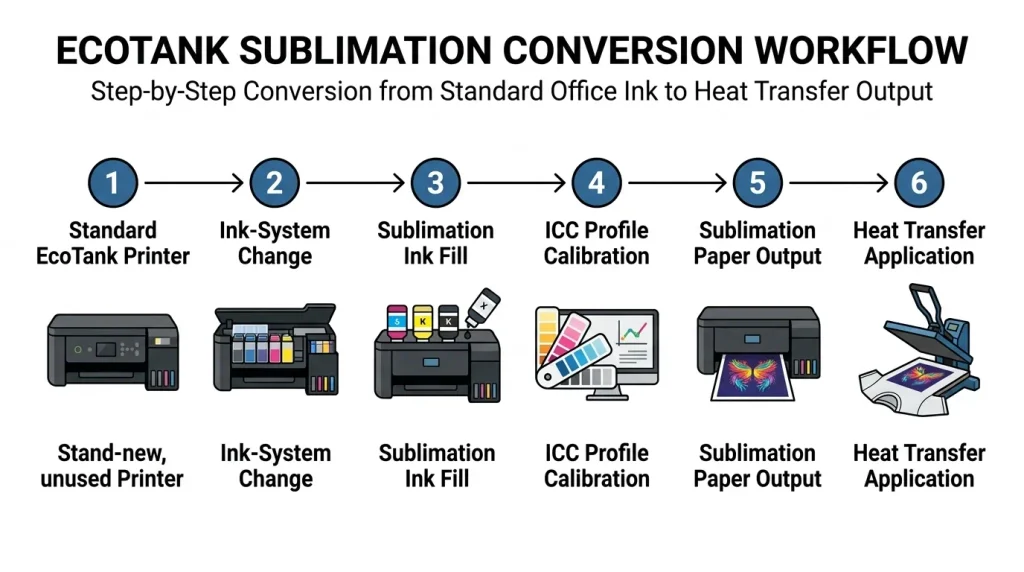
If you convert an EcoTank to sublimation, expect to account for the printer, ink, transfer media, color management, and maintenance.
New EcoTank Printer
A new printer gives you the cleanest starting point because you know what ink has been used in the system.
That matters when you are trying to establish a predictable sublimation workflow.
A used EcoTank can be cheaper, but unknown ink history introduces another variable.
Sublimation Ink
You need sublimation-specific ink rather than simply filling the printer with another ordinary ink brand.
Choosing the right ink is just as important as choosing the printer, so compare sublimation ink options for Epson before committing to a conversion.
The specific ink system affects color output, profiles, drying behavior, maintenance requirements, and compatibility.
Sublimation Paper
The printer also needs compatible sublimation transfer paper.
Paper affects how the printed image transfers, so buying the cheapest paper without checking compatibility can undermine the reason you converted the printer in the first place.
Your paper choice also affects transfer consistency, so it helps to compare the best sublimation paper for the type of projects you plan to make.
Cleaning or Flush Supplies
A conversion may require cleaning or flushing supplies depending on the starting condition and conversion method.
Do not treat cleaning fluid as an optional accessory if the conversion instructions for your specific setup call for it.
ICC Profile and Print Settings
Color management is another variable.
An ICC profile can help translate colors between the software, printer, ink and intended output. The exact profile depends on the ink and workflow, so don’t assume one profile works perfectly with every sublimation ink.
The actual conversion procedure belongs in a dedicated step-by-step guide rather than here. This page is about deciding whether the conversion makes sense in the first place.
Does Converting an EcoTank Affect the Warranty?
This is where you need to ignore the common blanket statement that “converting an EcoTank voids the entire warranty.”
That wording is too broad.
What Epson Actually Says About Non-Genuine Ink
Epson’s current U.S. product pages for models including the ET-2800, ET-2803, ET-2850 and ET-15000 state that Epson strongly recommends genuine ink and warn that non-genuine ink could cause damage not covered by the printer’s limited warranty.
That is materially different from saying that every part of the warranty automatically disappears the moment you use another ink.
Epson’s limited-warranty documentation also sets out specific coverage terms and exclusions, so the exact warranty document for your model and purchase date matters.
What the Warranty Risk Means in Practice
The practical risk is simple:
If a converted printer develops an ink-related problem, you should not assume Epson will cover the resulting damage under the original limited warranty.
That makes conversion a trade-off.
You may save money on the initial sublimation setup, but you accept more responsibility for the ink system and troubleshooting.
Why “It Voids the Entire Warranty” Is Too Broad
A more accurate way to frame it is:
Using non-genuine ink creates a documented warranty risk for damage associated with that ink, rather than giving you a universal reason to claim that every warranty provision disappears.
That’s the distinction buyers need.
⚠️ Warranty warning: A converted EcoTank is not the same as an Epson-supported sublimation printer. Check the current warranty terms for your exact model before converting it.
Will an EcoTank Sublimation Printer Clog?
Potentially, yes, but don’t turn that into a fake universal rule such as “you must print every two days.”
The required maintenance depends on the printer, ink, environment, usage pattern and condition of the ink system.
Why Sublimation Ink Can Create Maintenance Problems
Any inkjet workflow depends on ink moving reliably through the ink delivery system and printhead.
A converted printer adds another layer of variables because you are using an ink system different from the printer’s original intended ink.
That makes maintenance more important, especially if the machine sits unused for long periods.
How Regular Printing Helps
Regular use can help you identify developing print-quality problems before they become larger troubleshooting jobs.
A sensible maintenance routine includes:
- Checking ink levels.
- Watching for changes in print quality.
- Running a nozzle check when output looks wrong.
- Following the ink manufacturer’s maintenance guidance.
- Keeping the printer in an appropriate environment.
- Avoiding long periods of neglect when the machine is being used for active sublimation production.
There is no defensible universal rule that every converted EcoTank must print on an exact schedule.
What to Do When a Nozzle Check Fails
Start with the printer’s documented maintenance functions rather than immediately performing aggressive cleaning.
Check the nozzle pattern, follow the manufacturer’s cleaning procedure, and reassess the result.
Repeated cleaning can consume ink, so troubleshooting should be deliberate rather than treating cleaning cycles as a substitute for understanding the cause.
Used vs. New EcoTank Risk
A new EcoTank gives you a known starting point.
A used EcoTank may have been filled with ordinary ink, third-party ink, or a mixture of inks. You may not know whether the printhead has been maintained properly or whether previous ink has dried in the system.
That doesn’t make every used EcoTank unusable.
It simply means used conversion adds another layer of uncertainty.
If the price difference between a used unit and a new conversion candidate is small, calculate the risk before assuming the used machine is the bargain.
EcoTank Conversion vs Dedicated Sublimation Printer
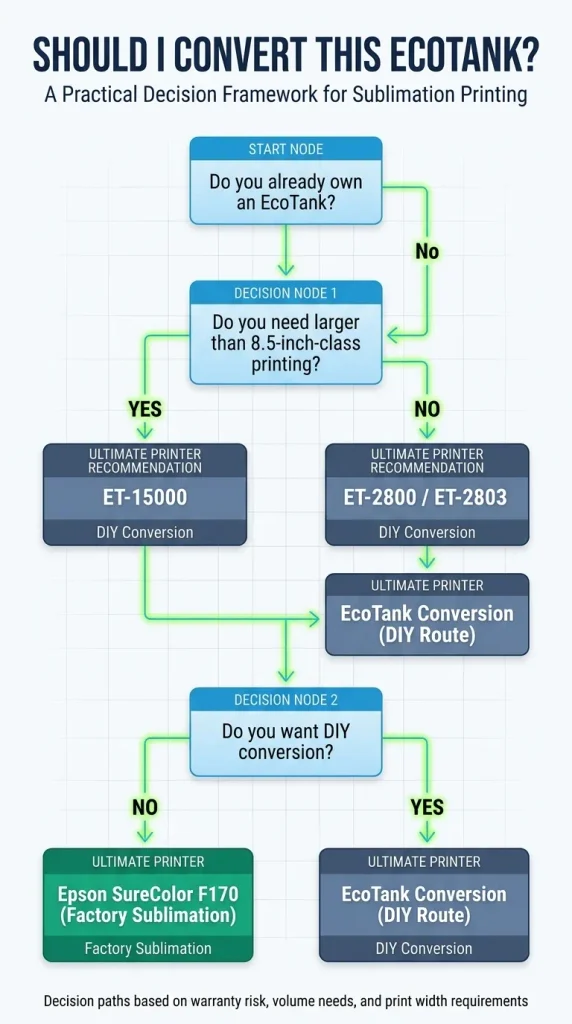
The real decision isn’t simply “EcoTank or no EcoTank.”
It is DIY conversion versus purpose-built sublimation printing. If you’re unsure which route makes more sense, our comparison of dedicated vs converted sublimation printers breaks down the differences in setup, ink, support, maintenance, and overall ownership.
| Factor | Converted EcoTank | Dedicated Sublimation Printer |
|---|---|---|
| Initial cost | Usually lower | Higher |
| Setup | DIY conversion | Designed for sublimation |
| Ink | Third-party conversion options | Manufacturer sublimation ink |
| Warranty/support | More complicated | Designed around the intended workflow |
| Maintenance | More DIY | Purpose-built workflow |
| Color workflow | More variables | Matched printer/ink system |
| Best for | Budget-focused makers | Buyers prioritizing a dedicated workflow |
Choose a Converted EcoTank If…
A converted EcoTank can make sense if:
- You’re comfortable following a DIY conversion process.
- Your budget is limited.
- Your projects fit the printer’s physical format.
- You’re willing to handle maintenance yourself.
- You understand that conversion is different from buying an Epson-supported dye-sublimation printer.
This is particularly relevant to home makers testing whether sublimation can become a useful side business.
Choose a Dedicated Printer If…
A dedicated sublimation printer makes more sense when you want a system designed specifically for the job.
Epson’s SureColor F170 is the obvious example within Epson’s lineup. Epson markets it as a dye-sublimation printer, supplies genuine Epson dye-sublimation ink, and describes it as a complete dye-sub solution designed to work out of the box.
The F170 also has a 1-year unit-exchange warranty according to Epson’s current product information.
That doesn’t make it automatically the right choice for every buyer. It means you’re paying for a fundamentally different workflow.
What You Pay for With the Cheaper Conversion
The lower upfront cost isn’t the entire story.
With a converted EcoTank, you’re taking on:
- Conversion work.
- Ink-system uncertainty.
- Color-management variables.
- More DIY troubleshooting.
- Greater warranty complexity.
- Responsibility for maintenance.
That’s the part many cheap conversion guides skip.
The real question isn’t:
“Can I make this cheaper?”
It’s:
“Will the money I save justify the extra responsibility?”
When Should You Buy the ET-2800 vs ET-15000?
This is where your project should drive the purchase.
Choose ET-2800 or ET-2803 If…
Consider the ET-2800 or ET-2803 if you mainly create smaller sublimation projects and want a compact starting point.
These models make more sense when:
- You’re new to sublimation.
- Your designs fit a smaller print area.
- You’re making mugs, small transfers or similar projects.
- You want to keep the initial printer investment lower.
- You accept the DIY nature of conversion.
Don’t choose one simply because it appears frequently in “best Epson EcoTank for sublimation” lists. Frequency in search results isn’t proof that it is the right printer for your workflow.
Choose ET-2850 If…
The ET-2850 makes sense when you want a similar compact EcoTank platform but also value features for normal household or office printing.
If sublimation is the only reason you’re buying the machine, compare the actual conversion requirements rather than paying extra for features you won’t use.
Choose ET-15000 If…
The ET-15000 becomes relevant when print size is the constraint.
Epson specifies printing up to 13 × 19 inches through the rear feed.
That makes it the more logical candidate when your work involves larger shirt transfers or designs that simply don’t fit comfortably within a smaller printer format.
The important point is that the ET-15000 isn’t “better” simply because it is larger.
It solves a different problem.
If you don’t need 13 × 19-inch capability, you may be paying for capacity that sits unused.
Price is only part of the calculation, so reviewing sublimation printer cost can help you account for the printer, ink, paper, maintenance supplies, and other ongoing expenses before choosing a conversion path.
Skip Conversion and Buy Dedicated If…
Skip the DIY route when your priority is a purpose-built workflow rather than the lowest possible entry cost.
A dedicated option such as the SureColor F170 is designed specifically around dye-sublimation printing, uses Epson dye-sublimation ink, and comes as a turnkey solution.
That makes the choice clearer for buyers who would rather spend more upfront than troubleshoot a converted printer later.
Ready to Pick Your EcoTank?
Don’t start with the printer model.
Start with the project.
Small projects: ET-2800 or ET-2803
Everyday printing plus smaller projects: ET-2850
Larger transfers: ET-15000
No DIY conversion: SureColor F170
Then compare the complete setup, not just the printer:
Printer + sublimation ink + paper + cleaning supplies + maintenance + your time
If you’re also buying supplies, compare your sublimation ink and sublimation paper choices before placing the order. A cheap printer does not make a cheap workflow if the consumables or maintenance create problems later.
Frequently Asked Questions
Can an Epson EcoTank Be Converted to Sublimation?
Yes, certain Epson EcoTank models are commonly used as conversion platforms, but ordinary EcoTank printers are not sold by Epson as factory sublimation printers. Conversion normally involves replacing the standard ink workflow with sublimation ink and establishing an appropriate color-management and transfer workflow. Epson warns that non-genuine ink can cause damage that is not covered by the printer’s limited warranty.
Which Epson EcoTank Is Best for Sublimation?
There is no single best EcoTank for every sublimation buyer. ET-2800 and ET-2803 are compact budget-oriented candidates, while the ET-15000 is more relevant when you need printing up to 13 × 19 inches. Your project size should drive the choice rather than the model’s popularity in online roundups.
Is the ET-2800 Good for Sublimation?
The ET-2800 is commonly discussed as a budget EcoTank conversion candidate for smaller sublimation projects. Its refillable tank design makes it practical for conversion discussions, but Epson does not market the standard ET-2800 as a sublimation printer. Epson also warns that non-genuine ink could cause damage not covered by its limited warranty.
Can the ET-2803 Be Used for Sublimation?
The ET-2803 is another compact EcoTank model commonly considered for conversion. Epson lists it with refillable EcoFit tanks and Micro Piezo Heat-Free technology, but its standard product documentation is for ordinary EcoTank printing rather than factory sublimation. Any conversion should therefore be treated as a third-party DIY workflow rather than an Epson-supported configuration.
Can the ET-2850 Be Converted to Sublimation?
The ET-2850 is commonly discussed as an EcoTank conversion candidate, but Epson sells it as a standard EcoTank printer rather than a sublimation machine. Its suitability depends on the conversion method, ink system, project requirements and your willingness to accept DIY maintenance and warranty considerations. Epson warns that non-genuine ink can cause damage not covered by the limited warranty.
Is the ET-15000 Good for Sublimation?
The ET-15000 is particularly relevant when you need larger-format printing. Epson specifies media support up to 13 × 19 inches through its rear feed, making it substantially more useful for larger transfers than compact EcoTank models. However, it is still a standard EcoTank printer rather than an Epson factory sublimation printer.
Does Converting an EcoTank Void the Warranty?
Don’t describe conversion as automatically voiding the entire warranty. Epson’s current product documentation warns that non-genuine ink could cause damage not covered by the printer’s limited warranty. The exact coverage depends on the applicable warranty terms and the nature of the problem, so check the warranty documentation for your specific model before converting it.
Will Sublimation Ink Clog an EcoTank?
Sublimation ink can create maintenance challenges, but there is no reliable universal interval that says every converted EcoTank must print after a specific number of days. Printer model, ink, environment and usage all matter. Regular use, nozzle checks and following the relevant maintenance instructions are sensible ways to catch print-quality problems early.
Should I Convert a Used EcoTank?
A used EcoTank can be converted, but it introduces uncertainty because you may not know which ink was previously used or how the printhead was maintained. A new printer gives you a cleaner starting point. If you choose a used unit, factor the unknown ink history and possible cleaning requirements into the real cost instead of comparing purchase prices alone.
Is a Dedicated Sublimation Printer Worth It?
A dedicated sublimation printer can make sense when you value a purpose-built workflow and want less DIY conversion work. Epson’s SureColor F170 is specifically sold as a dye-sublimation printer with genuine Epson dye-sublimation ink and a turnkey workflow. The trade-off is a different upfront cost compared with converting a consumer EcoTank.
Affiliate Disclosure
As an Amazon Associate, GadgetsChamp earns from qualifying purchases. We may earn a commission when you purchase through links on this page, at no additional cost to you.
Author
Kamran Asghar
Kamran is an SEO and affiliate-content specialist focused on practical product research, technical content structure, and buyer-focused comparisons. GadgetsChamp content is designed to help readers understand specifications, trade-offs, and ownership considerations before purchasing.