
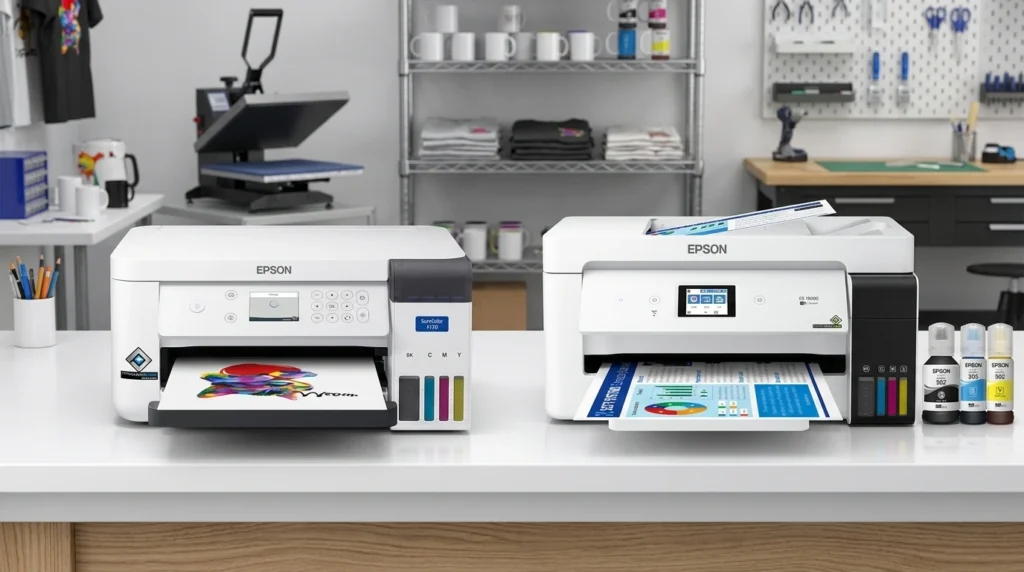
Choosing an Epson sublimation printer comes down to one important decision: buy a printer designed for sublimation or convert a standard inkjet printer. The first option offers a purpose-built setup. The second may reduce your initial hardware cost, but it adds ink, setup, color-management and support considerations.
The Epson SureColor F170 is the clearest choice if you want a dedicated sublimation printer for small-format projects. A converted EcoTank may suit a budget-conscious maker who accepts the additional work. The EcoTank ET-15000 deserves consideration if you need larger transfers, but its standard configuration does not use sublimation ink.
This guide compares the main Epson options, explains their limitations and helps you choose a printer that fits your products and workflow. If you are new to the process, start with our sublimation printer basics.
Affiliate disclosure: As an Amazon Associate, GadgetsChamp earns from qualifying purchases. We may earn a commission when you buy through links on this page, at no extra cost to you.
Which Epson Printer Is Best for Sublimation?
The Epson SureColor F170 is the best starting point for buyers who want a dedicated Epson dye sublimation printer. It comes configured for sublimation, while standard EcoTank and WorkForce printers require model-specific evaluation before you consider conversion.
Your best choice depends on four things:
- Setup: Do you want a purpose-built printer or are you comfortable converting one?
- Print size: Will you make small personalized items or larger apparel designs?
- Ink and color: Can you manage compatible sublimation ink, transfer paper and color profiles?
- Support: Are you willing to accept the additional risks associated with modifying a general-purpose printer?
If you want a wider range of brands and configurations, compare the best sublimation printers before committing to Epson.
Epson Sublimation Printer Comparison at a Glance
Use this table to narrow your choices before checking individual specifications and current prices.
| Printer | Original purpose | Sublimation setup | Print-size consideration | Best for |
|---|---|---|---|---|
| SureColor F170 | Dye-sublimation printing | Factory-configured | Up to 8.5-inch paper width | Small-format projects and supported setup |
| EcoTank ET-2800 | Home printing, scanning and copying | Requires conversion | Standard small-format output | Budget-conscious DIY users |
| EcoTank ET-2803 | General-purpose home printing | Requires conversion if suitable | Verify exact model specifications | DIY users after model verification |
| EcoTank ET-15000 | General-purpose wide-format printing | Requires conversion | Up to 13 × 19 inches through rear feed | Larger transfer designs |
| WorkForce series | Office printing | Model-dependent | Varies by model | Buyers who verify compatibility first |
Epson confirms that the F170 uses genuine Epson dye-sublimation ink and includes a 150-sheet auto-feed tray. Its US product page lists an 8.5-inch maximum paper width. The ET-15000 supports printing up to 13 × 19 inches through its rear feed. Those dimensions describe media handling, not a guarantee of finished transfer size. See the F170 specifications and ET-15000 specifications.
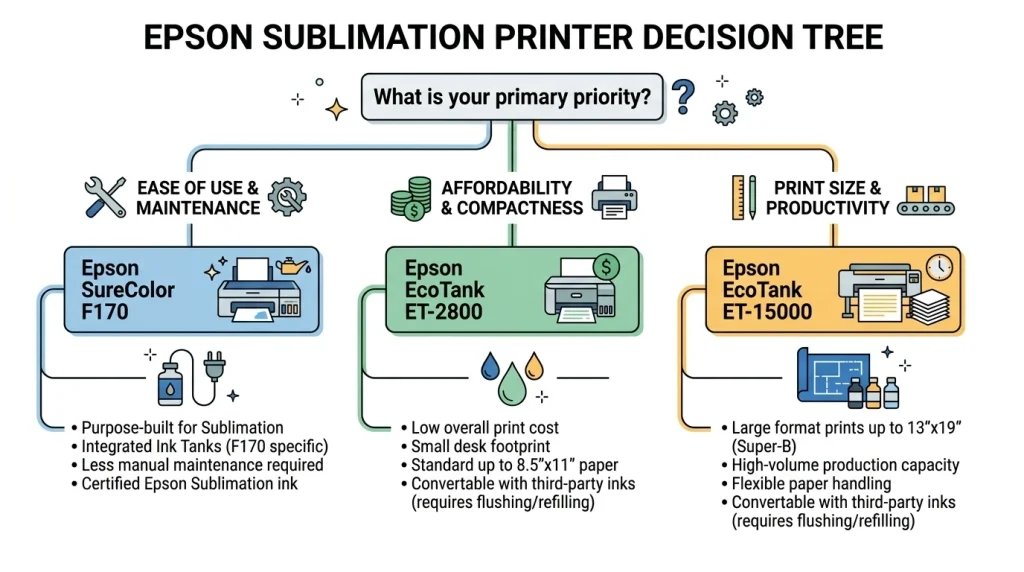
Quick verdict
- Choose the F170 if you want dedicated sublimation hardware and a simpler setup.
- Consider the ET-2800 or ET-2803 if you accept conversion work and model-specific risks.
- Consider the ET-15000 if wider media matters more than maintaining a factory-standard ink system.
- Treat WorkForce as a model-by-model decision, not a universally compatible printer family.
The Best Epson Sublimation Printer for Each Buyer
Epson SureColor F170: Best Dedicated Sublimation Printer
Verdict: Choose the F170 if you want an Epson printer designed specifically for dye-sublimation printing.
The SureColor F170 is a purpose-built sublimation printer rather than a general-purpose printer that you must modify. Epson supplies it with genuine dye-sublimation ink and a 150-sheet auto-feed tray. It also supports printing from Mac and Windows computers. Its PrecisionCore printhead uses Epson’s variable-sized droplet technology.
Advantages
- Designed for sublimation from the start.
- Includes a dedicated sublimation ink system.
- Offers a more straightforward starting point for supported small-format workflows.
Drawbacks
- Its 8.5-inch paper width limits design dimensions compared with wider-format options.
- It costs more upfront than some general-purpose printers.
- You still need compatible transfer paper, a heat press and suitable blanks.
Ink and support: Use the specified genuine Epson sublimation ink and follow the model’s documentation. Its warranty has specific terms, so confirm the current coverage before purchasing.
Best for: Crafters and small businesses producing suitable small-format sublimation products.
For the detailed model evaluation, read our Epson SureColor F170 review. Then compare the current F170 listing on Amazon with reputable retailers and Epson’s official store.
EcoTank ET-2800 and ET-2803: Budget Conversion Candidates
Verdict: Consider these models only if you understand the conversion process and have verified the exact printer’s compatibility.
The ET-2800 is a general-purpose all-in-one printer with refillable ink tanks. Epson identifies its printing technology as Micro Piezo Heat-Free. It was not designed as a factory-configured sublimation printer.
The ET-2803 belongs to the same general product family, but do not assume every specification, support condition or conversion instruction applies identically. Verify the precise model number and its documentation before buying.
Converting an EcoTank means changing the intended ink system and establishing a workable sublimation workflow. Compatible third-party sublimation ink, appropriate print settings and color management all matter. The hardware’s ability to eject ink does not, by itself, prove that a particular conversion will produce satisfactory transfers.
Advantages
- May offer a lower initial hardware cost than a dedicated sublimation printer.
- Refillable tanks provide a different ink-delivery approach from cartridge-based printers.
- Can appeal to DIY users who are comfortable researching and managing their setup.
Drawbacks
- Conversion adds setup and troubleshooting work.
- Results depend on ink compatibility, print settings and color management.
- Epson warns that damage caused by non-genuine ink may fall outside its limited warranty.
Ink and support: Epson’s standard ink bottles are intended for the printer’s original configuration. A conversion changes that arrangement, so you must account for the additional support risks.
Best for: Experienced or research-oriented DIY makers who accept those trade-offs.
Our Epson EcoTank sublimation conversion guide covers the conversion-specific questions separately. Check current ET-2800 listings on Amazon only after confirming that the exact model fits your intended workflow.
EcoTank ET-15000: Best for Larger Transfers
Verdict: Consider the ET-15000 if you need wider print media and accept the work involved in converting a standard EcoTank.
The ET-15000 is a general-purpose all-in-one printer with refillable ink tanks and PrecisionCore printing technology. Epson specifies printing up to 13 × 19 inches through the rear paper feed. That makes it a more relevant candidate than the F170 when your intended designs need wider media.
However, the larger paper size does not make the ET-15000 a dedicated sublimation printer. Its standard ink system is designed for ordinary printing. A sublimation setup requires compatible sublimation ink and a suitable conversion workflow.
Advantages
- Supports wider media than the F170.
- Includes an ink-tank system and office-oriented functions.
- May suit makers producing larger transfer designs.
Drawbacks
- Requires conversion rather than offering a factory-configured sublimation setup.
- The wider media capability does not remove ink, color-management or warranty concerns.
- Its additional office functions may be unnecessary if you only need sublimation printing.
Ink and support: Review the exact printer documentation and third-party ink requirements before making a purchase. Epson’s non-genuine ink warning applies to the standard printer’s warranty considerations.
Best for: Makers who need larger media and are comfortable managing a converted printer.
For a focused head-to-head decision, see our F170 vs. ET-15000 comparison. You can also check current ET-15000 listings on Amazon.
Epson WorkForce: When Conversion Makes Sense
Verdict: Do not buy a WorkForce printer for sublimation until you verify the exact model, ink system and conversion requirements.
Epson WorkForce covers multiple office-oriented printer models. Their specifications and ink systems vary, so a recommendation for one model does not automatically apply to the entire series.
A suitable candidate needs more than an inkjet printhead. You must verify whether the specific printer can support the intended ink system, whether compatible supplies and documented instructions exist, and whether the resulting workflow meets your print-size and color requirements.
Advantages
- Some models may appeal to buyers who already own compatible hardware.
- Office-oriented features can be useful for mixed printing needs.
- A model-specific evaluation may reveal a workable DIY option.
Drawbacks
- The series is not a universal sublimation compatibility category.
- Existing ink, cartridges or other components may complicate conversion.
- Support and warranty questions require model-specific answers.
Ink and support: Never infer compatibility from the WorkForce name alone. Check the exact model’s official documentation and understand the consequences of using non-genuine ink.
Best for: Experienced DIY users with verified model-specific evidence.
If you are still asking which printers work for sublimation, settle that question before purchasing a WorkForce model.
Dedicated F170 vs. Converted EcoTank
The F170 and a converted EcoTank can serve related purposes, but they do not offer the same starting point. Your decision should account for more than the price printed on the product listing.
Setup and Ink Differences
The F170 comes configured for dye-sublimation printing and uses the specified Epson sublimation ink. A standard EcoTank starts with an ordinary printing configuration.
Conversion introduces extra decisions:
- Which sublimation ink is compatible with the exact model?
- How will you establish the required ink system?
- Which printer settings and ICC color profile will you use?
- How will you handle nozzle checks, maintenance and troubleshooting?
An International Color Consortium (ICC) profile helps translate color values for a particular printing workflow. It does not automatically guarantee accurate color. Ink, paper, printer settings and the final transfer process also influence the result.
The F170 reduces conversion-related uncertainty, but it does not eliminate the need to learn transfer settings or maintain the printer.
Print Size, Workflow and Maintenance
The F170 supports media up to 8.5 inches wide. The ET-15000 supports up to 13 × 19 inches through its rear feed. That is a meaningful difference if you plan to print larger transfer designs.
Neither paper width nor printer selection determines the entire production workflow. You also need suitable transfer paper, a compatible heat press and blanks designed for sublimation. Finished results depend on the materials and process you use.
A converted EcoTank can also require more troubleshooting if you encounter ink-flow issues or color problems. The F170 offers a more direct starting point, although no printer removes routine maintenance.
If your priority is a ready-to-use setup, explore our guide to a sublimation printer with ink included. If you are still comparing brands, return to the broader best sublimation printers guide.
Epson Micro Piezo Printheads Explained
Printhead technology matters, but it is not a compatibility certificate. Micro Piezo describes how certain Epson printheads eject ink; it does not mean every Micro Piezo printer supports sublimation.
How Micro Piezo Technology Works
Micro Piezo printheads use piezoelectric elements that change shape when electrical signals reach them. This movement helps push ink through tiny nozzles without heating the ink to eject it.
Epson identifies Micro Piezo Heat-Free technology in the ET-2800 and PrecisionCore technology in the F170 and ET-15000. These are manufacturer descriptions of their printing technology, not proof that the models share identical ink requirements.
The practical lesson is simple: printhead design is only one part of the system. Ink delivery, compatible ink, media handling, software settings and color management also matter.
Micro Piezo vs. Thermal Inkjet
Thermal inkjet printheads use heat to create and eject ink droplets. Piezoelectric systems use mechanical movement instead.
That difference alone does not tell you which printer will work for sublimation. You need evidence for the exact printer model and the intended ink configuration.
Before treating any Epson printer for sublimation printing as a viable candidate, verify:
- The exact model number and printhead system.
- The ink-delivery arrangement and conversion requirements.
- The availability of suitable sublimation ink and profiles.
- The supported media dimensions and feed method.
- The relevant warranty and support conditions.
For a wider explanation of printer compatibility, use our guide to which printers work for sublimation.
Epson Sublimation Ink, Warranty and Support
Ink choice affects more than color. It also affects the printer’s intended use, maintenance requirements and the support you can expect if something goes wrong.
Which Ink Does Each Printer Use?
The F170 is designed for genuine Epson dye-sublimation ink. A converted EcoTank needs compatible third-party sublimation ink instead of the standard ink system. A WorkForce model requires its own compatibility assessment before you assume a conversion will work.
Sublimation ink is printed onto suitable transfer paper and then transferred to compatible materials using heat. The paper, ink and blank must suit the process. Ordinary inkjet ink does not become sublimation ink simply because you load transfer paper.
For more detail, read our guide to the best sublimation ink for Epson. Confirm compatibility with the exact model and ink supplier before purchasing supplies.
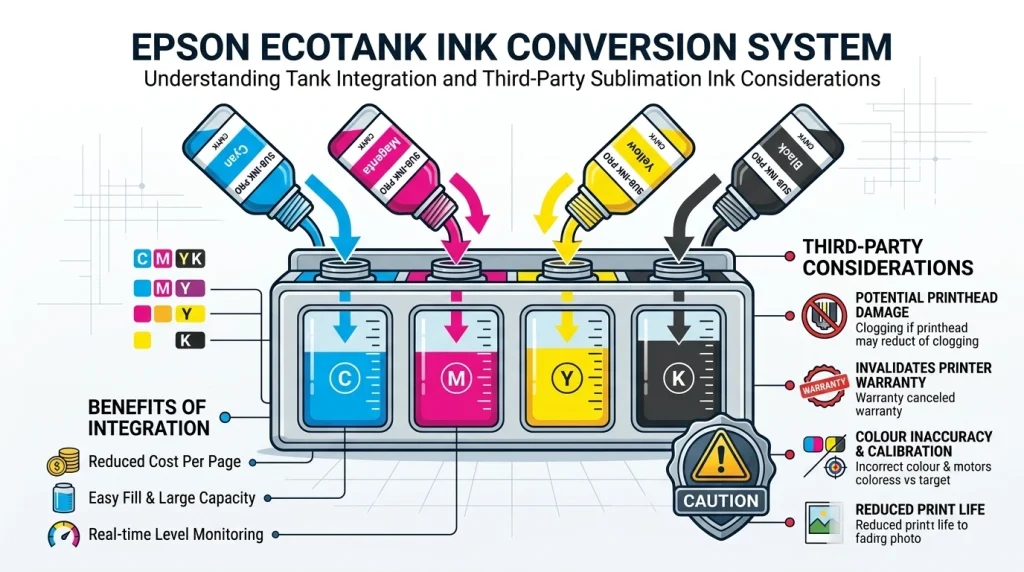
What Happens When You Convert an EcoTank?
Conversion changes the printer from its intended general-purpose ink configuration. That creates several practical risks:
- Ink compatibility: The ink must suit the intended printing system.
- Color management: You may need appropriate profiles and settings to get the desired colors.
- Maintenance: Nozzle checks and ink-flow troubleshooting remain important.
- Support: Epson may exclude damage caused by non-genuine ink from limited-warranty coverage.
Do not interpret this as proof that every conversion automatically cancels every part of every warranty. The applicable terms, jurisdiction and cause of failure matter. Epson’s product documentation specifically warns that damage caused by non-genuine ink may not be covered.
A dedicated printer reduces conversion-related uncertainty, but you should still read its warranty terms before purchase.
How to Check Warranty Coverage Before Buying
Use this checklist before committing to any printer:
- Identify the exact model. Do not rely on a product family name or a seller’s broad compatibility claim.
- Read the current warranty document. Check exclusions, coverage duration, service conditions and regional terms.
- Confirm the ink requirements. Determine which ink the manufacturer specifies for the printer.
- Ask the manufacturer about uncertainty. If a particular conversion or ink setup is not covered clearly, do not assume it is supported.
- Keep your records. Save the model number, receipt, warranty document and relevant ink information.
Epson’s ET-2800 documentation contains its warning about non-genuine ink. Read the current terms that apply to the printer you intend to buy.
How to Choose the Right Epson Printer for Your Projects
The best Epson sublimation printers for your needs are the ones that fit your actual products, not simply the ones with the lowest advertised price.
Mugs, Tumblers and Small Personalized Items
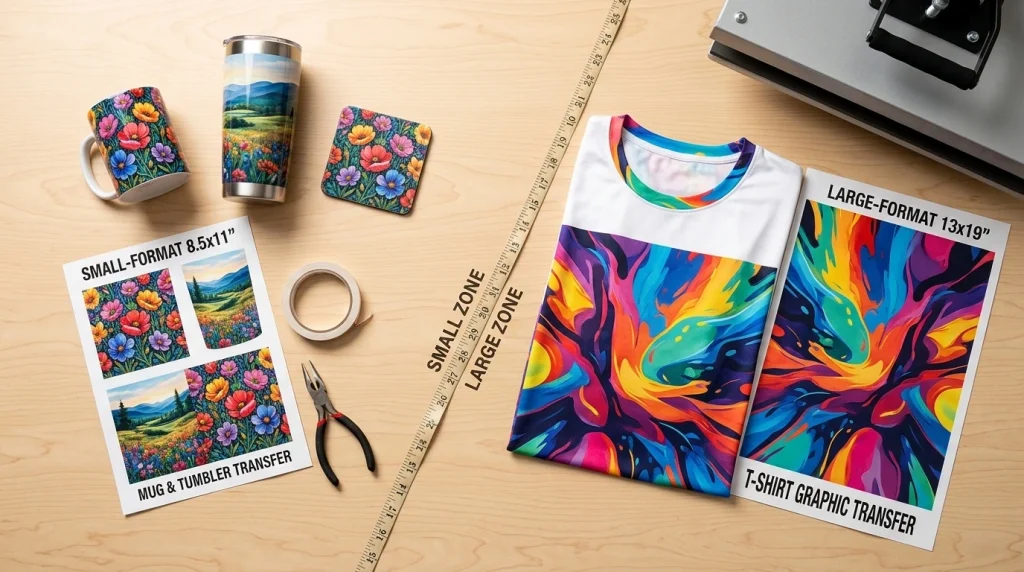
Start by checking the dimensions and shape of your intended transfers. The F170’s 8.5-inch paper width may be sufficient for many small-format designs, but you must still check the blank’s printable area and the transfer method.
A mug or tumbler also needs compatible sublimation-coated material and a suitable heat-transfer process. Printer choice is only one part of the equipment you need.
Shirts and Larger Transfer Designs
If you plan to print larger apparel transfers, compare your required design width with the printer’s supported media dimensions. The ET-15000’s 13 × 19-inch rear-feed capability may be useful, but its standard configuration still needs conversion for sublimation.
Fabric suitability also matters. Traditional sublimation works best with compatible polyester-rich materials or specially coated surfaces, rather than every ordinary cotton garment.
If apparel is your main business, explore our guide to sublimation printers for fabric. Match the printer, transfer process and blank to the product you intend to sell.
Home Crafting vs. Small-Business Production
A home crafter may value low upfront spending and the flexibility to learn a DIY process. A small business may care more about repeatable results, predictable maintenance and reducing downtime.
Consider the total cost of ownership, not just the printer price. Include ink, paper, compatible blanks, a heat press, maintenance supplies and any conversion equipment. Do not use a generic cost-per-transfer figure unless you have reliable prices and a defined calculation method.
Illustrative buying scenario, not a customer case study: Imagine an Etsy seller choosing between a converted EcoTank and the F170. The EcoTank’s lower purchase price may look attractive, but the seller must also account for conversion work, compatible ink and troubleshooting. The F170 may justify its higher initial cost if a dedicated setup and simpler support path matter more.
We do not have a verified customer case study with documented costs, print counts or outcomes for these models. We will not invent one. For your own decision, compare the complete setup cost with your expected production needs.
Where to Buy an Epson Sublimation Printer
Check the exact model, seller identity, return policy, included ink and current warranty before buying. Prices and stock can change, so compare the total purchase cost rather than relying on an old price snapshot.
- Epson SureColor F170 on Amazon
- Epson EcoTank ET-2800 on Amazon
- Epson EcoTank ET-2803 on Amazon
- Epson EcoTank ET-15000 on Amazon
These are product-search links, not verified offers for specific listings. Replace them with your tracked affiliate links to individual, verified products before publication. Do not imply that an ordinary EcoTank listing includes a sublimation conversion or compatible sublimation ink.
Frequently Asked Questions
Which Epson Printer Is Best for Sublimation?
The Epson SureColor F170 is the most straightforward choice if you want a dedicated sublimation printer. It comes configured for that purpose and uses genuine Epson sublimation ink. A converted EcoTank may suit a budget-conscious DIY user, while the ET-15000 offers wider media capability with additional conversion requirements.
Read our F170 review before buying.
Can You Convert an Epson EcoTank ET-2800 to Sublimation?
The ET-2800 is a general-purpose printer rather than a factory-configured sublimation model. Conversion requires a suitable ink setup, compatible supplies and a workable color-management process. Verify the exact model, conversion instructions and warranty implications before starting.
Our EcoTank conversion guide covers the conversion-specific decision.
Is the Epson SureColor F170 Better Than a Converted EcoTank?
The F170 is the clearer choice if you prioritize a dedicated sublimation setup. A converted EcoTank may appeal if the lower initial hardware cost matters more and you accept the additional work and support risks. The better choice depends on your print size, budget, maintenance preferences and production needs.
See our F170 vs. ET-15000 comparison for a related model comparison.
Can You Use an Epson WorkForce Printer for Sublimation?
It depends on the exact WorkForce model. The series includes different printers and ink systems, so you should not assume universal compatibility. Verify the model number, conversion requirements, ink availability and support conditions before buying a printer for sublimation.
For broader compatibility guidance, read which printers work for sublimation.
Does Epson Micro Piezo Technology Work With Sublimation Ink?
Micro Piezo describes a piezoelectric ink-ejection mechanism. It does not automatically make every printer using that technology suitable for sublimation. You must also verify the ink-delivery system, ink compatibility, media handling, settings and color-management workflow for the exact model.
Does Converting an EcoTank Affect Its Warranty?
It can affect coverage for damage associated with non-genuine ink or other excluded causes. Epson warns that non-genuine ink may cause damage that its limited warranty does not cover. That does not establish that every conversion automatically cancels every warranty provision. Read the current model-specific terms.
Can the Epson ET-15000 Print Larger Sublimation Transfers?
The ET-15000 supports media up to 13 × 19 inches through its rear feed, according to Epson. However, it is a general-purpose printer, not a factory-configured sublimation model. A suitable conversion and compatible ink system are still required, and your finished transfer size depends on the media and workflow.
Do You Need Special Sublimation Ink and Transfer Paper for Epson Printers?
Yes. Sublimation printing requires suitable sublimation ink and compatible transfer paper. You also need materials designed for the process and a suitable heat-transfer setup. The F170 uses specified Epson sublimation ink, while a converted EcoTank needs compatible sublimation ink and an appropriate configuration. Ordinary inkjet ink is not a substitute.
Choose Your Epson Sublimation Setup
Choose the SureColor F170 if you want dedicated sublimation hardware and a straightforward starting point for small-format projects.
Consider the ET-2800 or ET-2803 if you accept DIY conversion, additional setup and model-specific support risks.
Consider the ET-15000 if wider media matters enough to justify conversion and the additional workflow requirements.
Before you buy, verify the model, ink system, print dimensions, current warranty terms and total setup cost. Then continue to the Epson SureColor F170 review, the EcoTank sublimation conversion guide or the F170 vs. ET-15000 comparison based on your needs.