
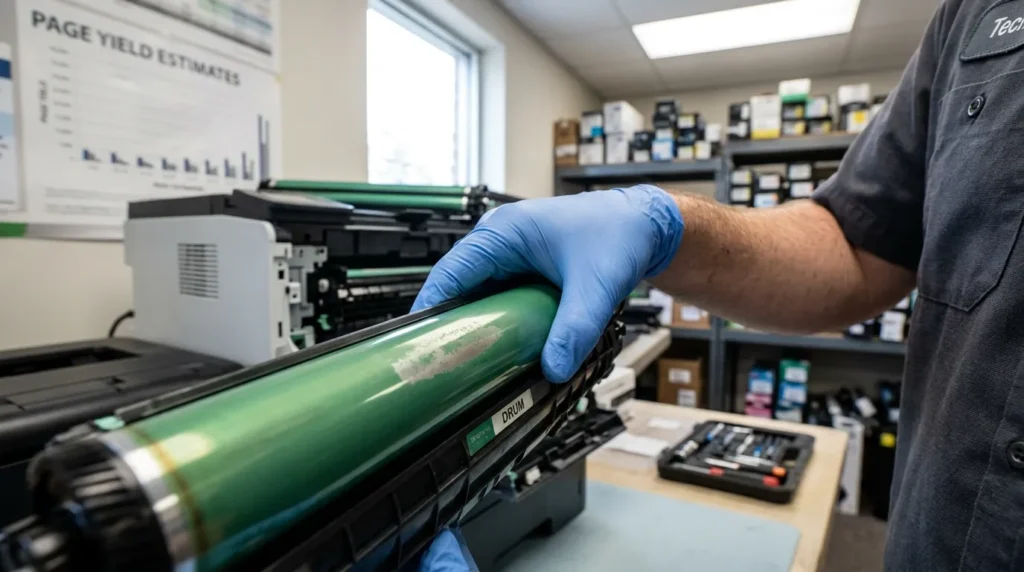
Quick Summary: A printer drum lasts between 12,000 and 50,000 pages depending on the brand and model. Brother DR-830 drums are rated for 12,000 to 15,000 pages. HP imaging drums built into toner cartridges last 1,000 to 2,400 pages and get replaced with every cartridge. Canon drum units vary by printer but usually last 15,000 to 50,000 pages.
Replace the drum when you see streaks, black spots, faded text, or a “Replace Drum” error. A Brother DR-830 costs roughly $90. A compatible third-party drum costs $15 to $30. If your printer is under $150, buying a new printer is often the better value.
This post contains affiliate links. We earn a commission when you buy through our links, at no extra cost to you.
What Is a Printer Drum?
A printer drum is a cylindrical photosensitive roller inside a laser printer. It carries an electrostatic charge that attracts toner powder from the cartridge. The drum then transfers that toner onto paper, where heat and pressure fuse it permanently.
The drum is not the same as the toner cartridge. The cartridge holds the powder. The drum applies it. Some printers combine both into one unit. Others keep them separate so you replace each one independently.
If you are new to laser printing, start by understanding what a monochrome printer is and how it differs from color models.
Drum vs. Toner: Two Different Architectures
Laser printers use one of two designs:
Single-Component (HP, Canon entry-level): The drum is built into the toner cartridge. Every time you replace the toner, you also replace the drum. HP calls this an “imaging drum.” You never buy a separate drum unit.
Dual-Component (Brother, Canon mid-range): The drum and toner are separate. You slide the toner cartridge into the drum unit. The drum lasts through three to five toner changes before it needs replacement. Brother uses this design because drums outlast cartridges.
| Architecture | Brands | Drum Lifespan | Replacement Cost |
|---|---|---|---|
| Built-in drum | HP, Canon entry-level | 1,000–2,400 pages (with each toner) | Included in cartridge price |
| Separate drum | Brother, Canon mid-range | 12,000–50,000 pages | $90 OEM / $15–$30 compatible |
If you need color output for worksheets and presentations, see our best printer for teachers guide.
How Long Does a Printer Drum Last by Brand?
Brother Drum Units
Brother rates most consumer drum units at 12,000 pages under ISO/IEC 19752. Some retailers advertise the DR-830 at 15,000 pages. Brother’s official support docs note that actual life depends on temperature, humidity, paper type, and toner used.
Most Brother drums last through three to five toner cartridges before replacement. Brother separates drums from toner to extend drum life. See which Brother laser printers for Mac use this design.
Popular Brother drum units:
- DR-830: HL-L2460DW, MFC-L2820DW, MFC-L2900DW — 12,000 to 15,000 pages
- DR-420: HL-2270DW, MFC-7860DW — up to 12,000 pages
- DR-270CL: Color laser models — approximately 15,000 pages per drum
HP Imaging Drums
HP builds the imaging drum into most toner cartridges. The drum lifespan matches the toner yield:
- HP 134A: 1,092 pages (drum included)
- HP 134X: 2,400 pages (drum included)
- HP CF232A / CF219A: Separate imaging drums for select MFP models — check your manual
Because HP drums are single-component, you replace the drum every time you replace toner. There is no separate drum counter to reset.
Canon Drum Units
Canon uses both architectures. Entry-level imageCLASS models integrate the drum into the toner. Mid-range and professional models use separate drum units rated for 15,000 to 50,000 pages. Check your printer manual to determine which design yours uses.
How to Check Remaining Drum Life
Brother Printers
Method 1 (LCD display models): On the control panel, press the OK key twice. Select Parts Life > Drum Life > Black. The percentage of remaining life appears.
Method 2 (No LCD): Press the GO button three times. The printer outputs a settings page that lists drum life percentage on page two.
Important: The reading is only accurate if you reset the Brother machine’s drum counter when installing a new drum. Resetting a used drum skews the count.
HP Printers
HP printers with separate imaging drums display “Imaging Drum Low” or “Imaging Drum Very Low” on the control panel. Built-in drums show no separate life meter — replace the toner cartridge when print quality drops.
Canon Printers
Canon imageCLASS models with separate drums display drum life in the printer status monitor on your computer. Open the Canon printer utility and check the Maintenance tab.
Signs Your Printer Drum Needs Replacing
Streaks or lines: Vertical or horizontal lines that repeat at regular intervals — usually 26 mm or 94 mm apart on HP, or random on Brother — indicate drum wear.
Black spots: Toner dots or smears that appear in the same position on every page mean the drum surface has damage or debris.
Faded or uneven printouts: Text looks light or faded on the printed pages even after replacing the toner. The drum can no longer transfer toner evenly.
Blank patches: Sections of the page print completely white. The drum’s photosensitive coating has worn away in those areas.
“Replace Drum” or “Drum Error” message: Brother printers display this after approximately 12,000 to 15,000 pages. The printer continues to function but print quality degrades.
“Drum End Soon” message: This means the drum has reached 80 to 85 percent of its rated printed life. You do not need to replace it immediately, but you should order a replacement.
How to Replace a Printer Drum (Brother)
Step 1: Turn on the printer and open the front cover.
Step 2: Remove the toner cartridge and drum unit assembly.
Step 3: Push down the green lock lever and pull the toner cartridge out of the old drum.
Step 4: Unpack the new drum unit. Do not touch the green roller, because fingerprints cause print defects.
Step 5: Slide the toner cartridge into the new drum until it clicks.
Step 6: Reinsert the assembly into the printer and close the cover.
Step 7: Reset the drum counter (see below). Failure to reset causes the “Replace Drum” message to persist.
How to Reset the Drum Counter (Brother)
The reset method varies by model. Here are the three most common procedures:
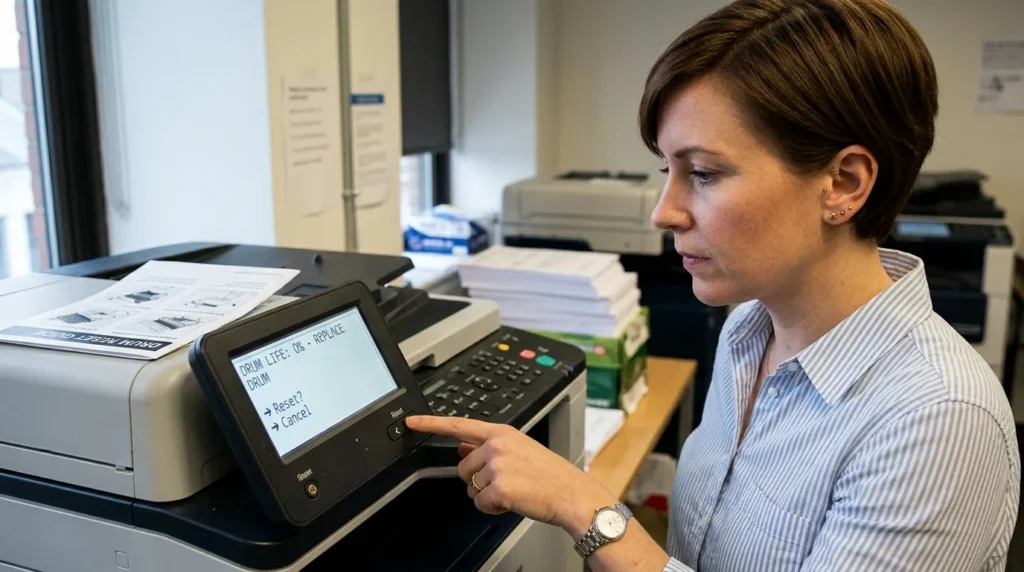
- HL-L2400D: With the front cover open, press and hold GO for four seconds until all LEDs light up. Release GO. Close the cover.
- HL-L2460DW / HL-L2420DW / HL-L2865DW: Make sure the cover is closed. Press OK and the Up Arrow at the same time. Press OK to select Drum. Select Reset.
- MFC-L2820DW / MFC-L2900DW: Press the Home button to clear any error. Press Toner until the touchscreen changes. Tap Drum, then tap Yes to confirm reset.
Critical warning: Only reset the counter when installing a brand-new drum. Resetting a used drum causes inaccurate life readings and can mask genuine wear.
Is It Worth Replacing a Printer Drum?
The answer depends on your printer’s age and value.
Replace the drum if:
- Your printer cost $200 or more
- The printer is less than three years old
- You are satisfied with print quality and speed
- The drum costs less than 50 percent of a new printer
Buy a new printer if:
- Your printer cost under $150
- The printer is out of warranty and showing other issues
- A new drum ($90 OEM) plus toner costs more than a new printer ($175)
- You want newer features like AirPrint, duplex scanning, or faster speed
Real example: A Brother HL-2270DW owner faced a $63 drum replacement on a $100 printer. A new HL-L2460DW costs $175 and includes a starter drum and toner plus a one-year warranty.
For printers in the $150 to $300 range, replacing the drum is usually the smarter financial choice. The printer body has years of life left, and one drum lasts through thousands of pages.
After replacing a drum, you may need to re-add the printer. See our Mac printer setup guide for the fastest method.
How to Extend Printer Drum Life
Use genuine toner. Third-party toner can contain abrasive particles that wear the drum faster. Brother explicitly warns that non-genuine supplies may reduce drum life and void warranty coverage.
Print in a clean environment. Dust and debris scratch the drum surface. Keep the printer in a dust-free room with adequate ventilation.
Avoid extreme temperatures. High heat and humidity degrade the photosensitive coating. Ideal conditions are around 68°F (20°C) with low humidity.
Use standard paper. Glossy and textured paper increases drum wear. Plain copy paper is easiest on the drum. For shipping labels that never touch your laser printer drum, see our thermal label printers guide.
Run print jobs regularly. Long idle periods allow toner to settle unevenly on the drum. Print at least one page per week to keep the drum surface conditioned.
FAQs
How long does a printer drum last?
Between 12,000 and 50,000 pages depending on brand and model. Brother DR-830 drums last 12,000 to 15,000 pages. HP imaging drums built into cartridges last 1,000 to 2,400 pages. Canon separate drums last 15,000 to 50,000 pages.
How do I know if my printer drum is bad?
Look for streaks, black spots, faded text, blank patches, or repeating defects in the same position on every page. A “Replace Drum” or “Drum Error” message on the display also signals end of life.
How often should a printer drum be replaced?
Replace the drum when the printer alerts you or when print quality degrades. For Brother models with separate drums, this is typically after three to five toner cartridge changes. For HP models with built-in drums, replacement happens with every toner change.
How much do printer drums cost?
OEM Brother DR-830 drums cost approximately $90. Compatible third-party drums cost $15 to $30. HP imaging drums built into toner cartridges are priced as part of the cartridge ($45 to $90). Canon drum units range from $60 to $200 depending on the model.
Is it worth replacing a drum on a printer?
Yes, if the printer cost $200 or more and is under three years old. No, if the printer cost under $150 and a new drum approaches the price of a new printer.
What happens when a printer drum goes bad?
Print quality degrades progressively. You see streaks, spots, and fading. Eventually the printer stops printing or displays a permanent error until the drum is replaced.
How do I check drum life on a Brother printer?
Press OK twice, then navigate to Parts Life > Drum Life. On models without an LCD, press the GO button three times to print a settings page that shows drum life percentage.
Why does a printer drum need to be replaced?
The photosensitive coating on the drum wears down with each rotation. After thousands of pages, the drum can no longer hold an electrostatic charge evenly, which causes print defects.
Can I use a compatible drum instead of OEM?
Compatible drums cost $15 to $30 versus $90 for OEM. Quality varies. Some users report good results. Others experience shorter life and print defects. Brother warns that non-genuine drums may void warranty coverage.
For creative projects that need color, see our picks for the best printers for stickers and vinyl work.
Do Mac users need to replace drums differently?
No. Drum replacement is a hardware procedure. It is identical on macOS, Windows, and Linux. The drum counter reset happens on the printer itself, not through your computer.
Mac users with creative projects should also see our CD DVD inkjet printers guide for disc-compatible models.
Final Verdict
A printer drum lasts 12,000 to 15,000 pages in most Brother laser printers, 1,000 to 2,400 pages in HP cartridge-integrated systems, and 15,000 to 50,000 pages in Canon mid-range models. Replace the drum when you see streaks, spots, fading, or error messages.
For Brother printers, remember to reset the drum counter after installing a new unit. For HP printers, the drum replaces automatically with each toner cartridge. For Canon printers, check whether your model uses a separate drum or a built-in one before ordering.
If your printer cost under $150, consider buying a new model rather than replacing the drum. If your printer cost $200 or more, a $90 drum replacement extends its life for years.
Ready to buy a replacement drum? Click the Amazon links above to check current pricing and availability for your specific model.
About the Author
Kamran Asghar is the founder of GadgetsChamp and a hardware reviewer with over a decade of experience testing printers, consumables, and office equipment. He has replaced drum units across Brother, HP, and Canon laser printers in real-world home office environments. His work focuses on total cost of ownership and practical maintenance, not marketing claims.
GadgetsChamp participates in the Amazon Services LLC Associates Program. We earn commissions on qualifying purchases made through our affiliate links. This does not affect our editorial independence or the price you pay.