
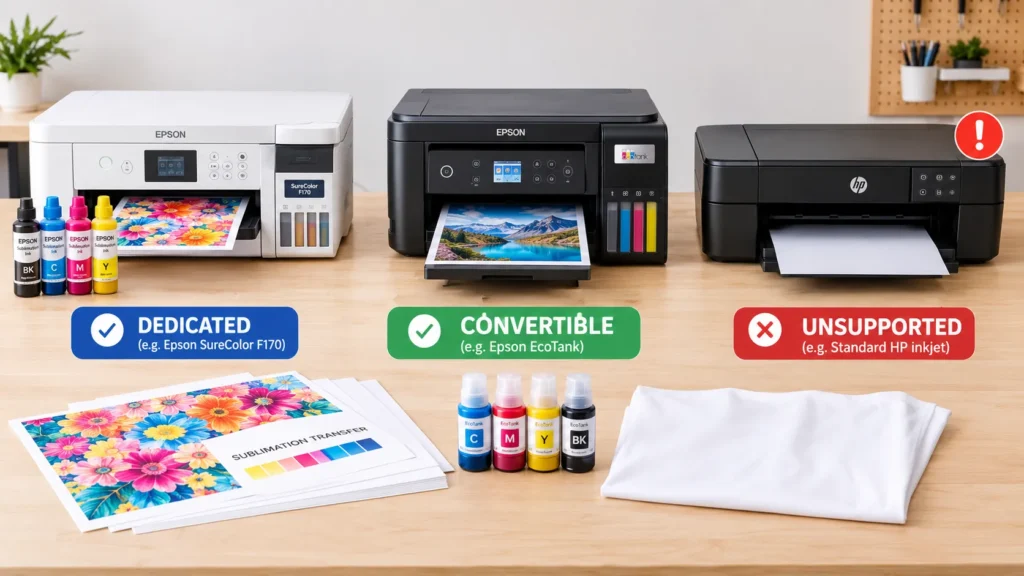
Yes, you need a printer designed for sublimation or a compatible inkjet model that supports a documented conversion. Many Epson EcoTank printers are conversion candidates, while ordinary HP and Canon inkjets should not be converted by default. Laser printers cannot perform standard sublimation-ink transfers.
The important detail is that not every inkjet printer can safely use sublimation ink. Your exact model, printhead technology, ink delivery system and available conversion instructions determine whether your existing printer is a suitable candidate.
If you’re new to the process, start with our sublimation printer guide to understand how sublimation printing works. Then use the compatibility table below to decide whether to keep your current printer, convert an eligible model or buy a dedicated machine.
Affiliate disclosure: As an Amazon Associate, GadgetsChamp earns from qualifying purchases. If you buy through our affiliate links, we may earn a commission at no additional cost to you.
Which Printers Can Be Used for Sublimation?
Three main options exist: a purpose-built sublimation printer, a compatible inkjet printer with a documented conversion path, or a different printing method if your equipment cannot support sublimation.
| Printer type | Compatibility verdict | Best next step |
|---|---|---|
| Dedicated sublimation printer | Designed for sublimation | Use the specified ink and supplies |
| Epson EcoTank | Often a conversion candidate, model-dependent | Verify the exact model and conversion instructions |
| Ordinary HP inkjet | Do not convert by default | Check for an explicitly supported system |
| Ordinary Canon inkjet | Do not convert by default | Verify model-specific evidence |
| Ordinary Brother inkjet | Model-specific; not a blanket yes | Check printhead and ink compatibility |
| Ricoh printer | Depends on the exact model and ink system | Confirm specialist conversion documentation |
| Conventional laser printer | Not suitable for standard sublimation-ink transfers | Choose compatible inkjet equipment |
Dedicated Sublimation Printers
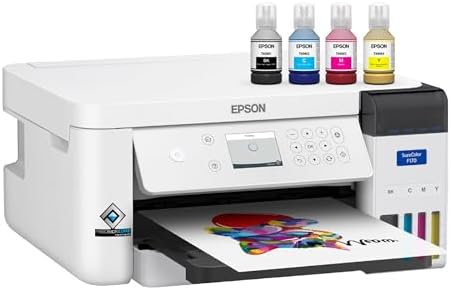
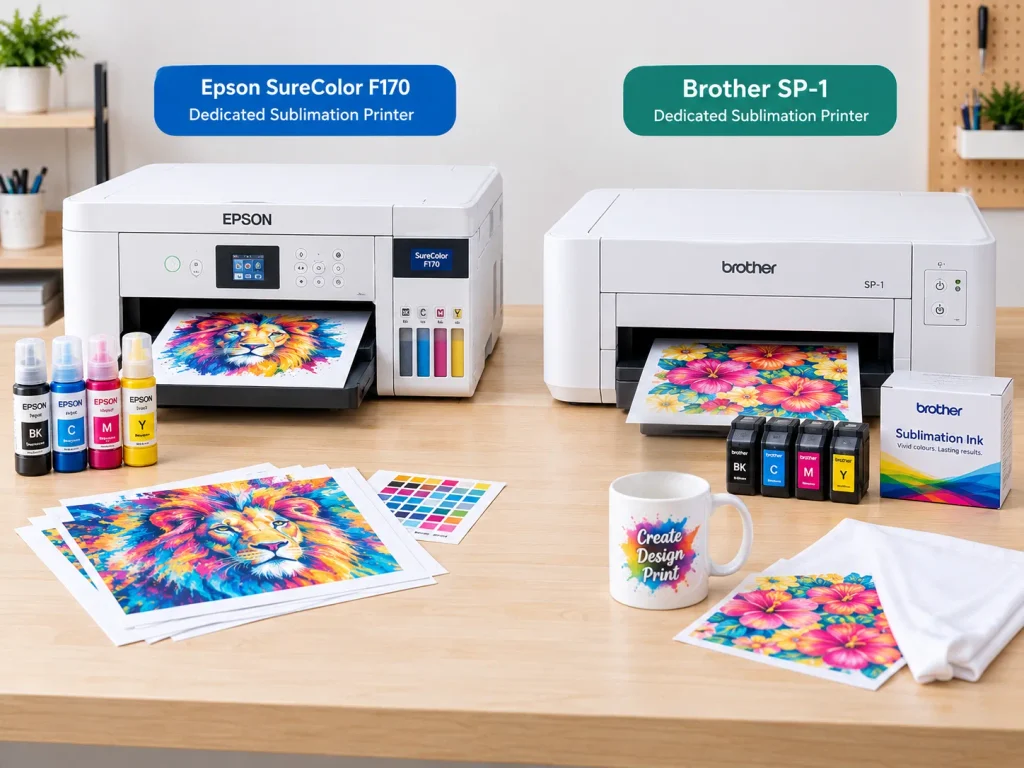
A dedicated sublimation printer is designed to print with the appropriate sublimation ink and transfer-paper workflow. Examples include the Epson SureColor F170 and Brother SP-1.
Epson specifies genuine dye-sublimation ink for the F170, while Brother supplies sublimation ink and paper with the SP-1. These are purpose-built systems rather than ordinary printers that you must convert.


Compatible Inkjet Printers You Can Convert
Some standard inkjet printers can be converted by replacing their ordinary ink with sublimation ink. However, conversion requires more than buying a bottle of ink.
You need a compatible model, an appropriate ink delivery system and reliable instructions for that exact printer. Depending on the model, conversion may also require dedicated cartridges, refillable tanks or a fresh ink supply path.
Epson EcoTank models are popular conversion candidates, but do not assume every EcoTank model is suitable. Check our Epson EcoTank sublimation printer guide before purchasing conversion supplies.
Ordinary Inkjet and Laser Printers to Avoid
Ordinary inkjet printers use ink formulated for conventional documents and photos. That ink is not interchangeable with sublimation ink.
A laser printer presents a different problem: it deposits toner rather than liquid sublimation ink. Standard sublimation transfer paper is not designed to turn an ordinary laser print into a conventional sublimation transfer.
The safest approach is to confirm compatibility before filling a printer, replacing cartridges or buying transfer paper.
Why Printhead Technology Matters
Printhead technology helps explain why certain inkjet printers are better conversion candidates than others. It is a useful starting point, but it cannot replace model-specific compatibility checks.
Piezoelectric Printheads and Micro Piezo Technology
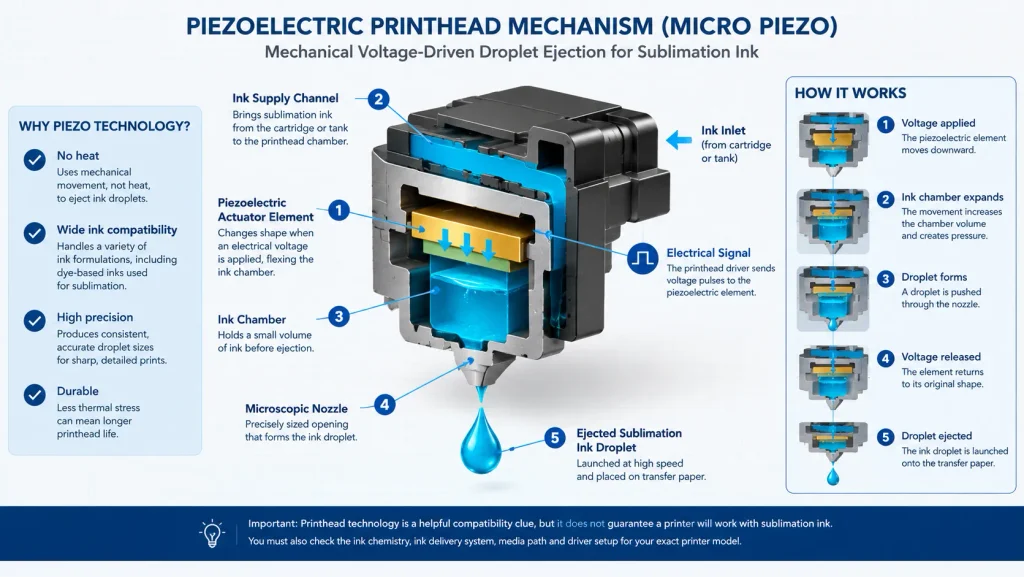
A piezoelectric printhead uses tiny elements that change shape when an electrical voltage is applied. This mechanical movement pushes ink droplets through microscopic nozzles.
Epson calls its technology Micro Piezo. Its documentation explains that the printhead ejects droplets mechanically rather than heating the ink to create them. This allows the technology to accommodate a wider range of ink formulations than systems that rely on heating, although the printer’s design still determines which inks it supports.
This is why many Epson inkjet printers attract attention from sublimation users. Some Brother models also use piezoelectric technology, so compatibility should not be judged by brand name alone.
Thermal Inkjet Printheads and Sublimation Ink
A thermal inkjet printhead uses a small heater to create a bubble inside an ink chamber. The bubble pushes an ink droplet through a nozzle.
This method works well with the ink formulations designed for the printer. However, you should not assume that an ordinary thermal inkjet can handle sublimation ink.
The issue is not simply whether the printer can print a colorful image. The ink must also flow through the printhead correctly and produce a usable transfer when heat and pressure are applied.
Why Printhead Type Alone Doesn’t Guarantee Compatibility
A piezoelectric printhead is a helpful technical clue, not proof that a printer supports sublimation ink.
You must also check:
- Ink chemistry: Is the ink formulated for the specific printer and transfer process?
- Ink delivery: Can the cartridge or tank system handle the intended ink?
- Printer model: Does reliable documentation cover the exact model?
- Software and setup: Are the correct driver settings and conversion instructions available?
A printer that passes only the printhead check is not automatically ready for conversion.
Which Printer Brands Work for Sublimation?
The following verdicts distinguish purpose-built equipment from ordinary printers that may require conversion. They are compatibility guidelines, not a guarantee that every model in a brand’s range will work.
| Brand or model | Verdict | Important qualification |
|---|---|---|
| Epson EcoTank | Potentially convertible | Verify exact model and documented conversion support |
| Epson SureColor F170 | Designed for sublimation | Uses specified genuine Epson dye-sublimation ink |
| HP consumer inkjets | Avoid conversion by default | No general compatibility assumption is justified |
| Canon consumer inkjets | Avoid conversion by default | Verify any claimed exception by exact model |
| Brother ordinary inkjets | Model-dependent | Piezo technology alone is insufficient |
| Brother SP-1 | Designed for sublimation | Uses Brother sublimation supplies |
| Ricoh systems | Model-dependent | Specialist compatibility does not cover the entire range |
Epson EcoTank and SureColor
Epson offers two different paths.
An EcoTank may be a candidate for conversion if the exact model has a documented, suitable setup. The SureColor F170, by contrast, is purpose-built for dye-sublimation printing and uses genuine Epson sublimation ink. Epson also specifies that the F170 is designed for Epson ink bottles rather than third-party ink.
- Confidence – Epson authorized partner. Original Epson Manufactured product delivered in Epson’s factory-sealed packaging…
- Genuine Epson Ink Included – Comes with a full set of OEM Epson sublimation inks, certified ECO PASSPORT by OEKO-TEX for…
If you prefer a converted system, review our Epson EcoTank sublimation printer options. For broader brand-specific recommendations, see our best Epson printer for sublimation guide.
HP Printers and Sublimation Ink
Do not put sublimation ink into an ordinary HP printer unless reliable documentation confirms that the exact model supports the intended setup.
An HP Support Community response specifically advises against using sublimation ink in HP printers that are not designed for sublimation. This is model-specific support guidance, not proof that every printer under the HP brand shares the same technical design.
Canon Printers and Sublimation Ink
Treat ordinary Canon consumer inkjets as unsuitable for conversion unless you find credible documentation for the exact model and ink system.
Do not rely on statements that every Canon printer uses the same printhead technology. Printer technology varies across product families, and a technical exception does not establish that a consumer model supports sublimation ink.
If you cannot verify the model, choose a purpose-built sublimation printer instead.
Brother Printers: Ordinary Inkjet vs. SP-1
Brother requires a clear distinction between its ordinary inkjets and the SP-1 sublimation printer.
The SP-1 is designed for sublimation and comes with Brother sublimation ink and transfer paper. Brother’s own guidance also says its sublimation transfer paper should not be used with laser printers, copiers or non-sublimation-transfer inkjets.
- Brother SP-1 Dye-Sublimation Printer with full set of CMYK inks, 10 sheets sublimation paper, and Artspira Software
- INCLUDES: Full Set of Sublimation Inks – Black, Cyan, Magenta, Yellow 47ml Each, 10 Sheets of Brother Sublimation Paper …
An ordinary Brother inkjet is a different case. Some models use piezoelectric printheads, but that fact alone does not confirm ink compatibility or a reliable conversion path.
Ricoh Printers and Specialist Sublimation Systems
Ricoh has been associated with specialist sublimation workflows, but that does not mean any Ricoh office printer can use sublimation ink.
Before buying a used printer or conversion kit, verify the exact model, intended ink, cartridge or tank system, and documented setup. If the evidence does not establish compatibility, treat the printer as unverified rather than assuming it will work.
Can You Use a Laser Printer for Sublimation?
No, not for standard sublimation-ink transfers. A conventional laser printer uses toner, while the usual sublimation transfer process requires special liquid ink printed onto transfer paper.
Why Laser Toner Isn’t Sublimation Ink
A laser printer forms an image using toner and a fusing process. Standard sublimation printing instead deposits sublimation ink onto transfer paper before heat and pressure transfer the dye to a suitable surface.
These are different printing systems. Buying sublimation transfer paper will not make an ordinary laser printer compatible with sublimation ink.
Brother’s transfer-paper instructions explicitly exclude laser printers from the supported workflow.
If you are comparing a dye sublimation laser printer with a conventional sublimation inkjet, start by checking what the product actually prints with. The wording can blur important technical differences.
Dye-Sublimation Photo Printers vs. Transfer Printers
Dye-sublimation photo printers are not the same as printers used to create heat-transfer designs for shirts and coated blanks.
A photo printer may use a dedicated dye-transfer process and specialized media. A sublimation transfer printer prints onto transfer paper, which you then use with a heat press.
For a deeper explanation of these two categories, see our guide to dye-sublimation photo printers vs. transfer printers. This distinction matters because a printer advertised for dye-sublimation photos is not automatically suitable for making shirt transfers.
How to Check Whether Your Existing Printer Will Work
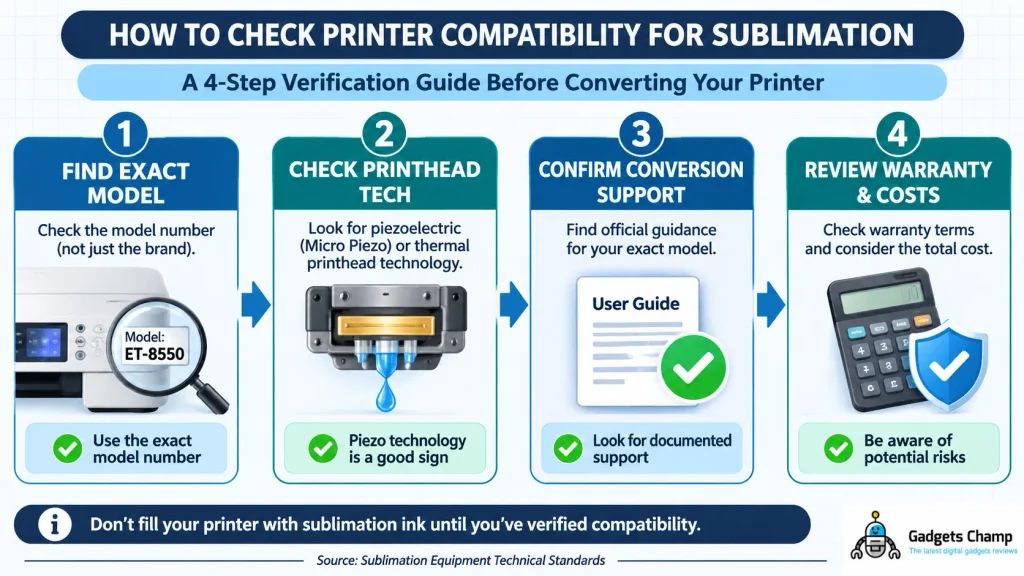
Before you spend money on sublimation ink, follow this four-step checklist. It helps you separate a promising conversion candidate from a printer that is unsuitable or simply unverified.
1. Find the Exact Printer Model
Look at the model number on the printer, its settings menu or the manufacturer’s support page. Do not stop at the brand name.
For example, an Epson EcoTank and an Epson SureColor F170 may both print with inkjet technology, but their intended ink systems differ. A model number lets you find the correct specifications and conversion instructions.
2. Check Printhead Technology and Ink Compatibility
Find documentation for the printhead and intended ink system. Look for the manufacturer’s specifications or instructions from an established sublimation ink supplier.
A piezoelectric printhead may make a printer worth investigating. However, you still need evidence that the specific printer can handle the proposed ink and deliver usable transfer prints.
3. Confirm Conversion Support
Look for instructions that explicitly cover your exact model. Confirm the required cartridges or tanks, ink type, driver settings and setup process.
Be cautious of sellers who advertise a conversion kit as compatible with an entire brand. If their documentation does not list your model, ask for confirmation before buying.
4. Check Warranty and Practical Costs
Review the manufacturer’s warranty terms and any relevant exclusions. Third-party ink or modifications may affect warranty coverage, depending on the product and circumstances.
Also consider the cost of ink, replacement cartridges, setup supplies and a failed conversion. A low-cost printer is not necessarily the cheaper option if you need to replace it afterward.
Warning: Do not fill your printer with sublimation ink until you have verified the exact model and conversion process. Switching ink systems without proper instructions can lead to poor print quality, clogs or other operating problems.
Should You Convert Your Printer or Buy a Dedicated Model?
The right choice depends on the printer you already own, your budget and how much setup uncertainty you are willing to accept.
When a Compatible Conversion Makes Sense
Conversion may suit you if you already own a compatible, unused inkjet printer and can find reliable instructions for its exact model.
It can reduce the need to purchase another printer. However, you must account for the ink system, setup requirements, maintenance and potential warranty implications.
Do not buy a printer solely because a video or forum post shows someone converting a similar model. Confirm that the same model and ink system are supported.
Our Epson EcoTank conversion guide is the next step if an EcoTank is your preferred route.
When a Dedicated Sublimation Printer Is the Safer Choice
A dedicated printer makes sense when you want equipment designed around the sublimation workflow rather than an uncertain conversion.
The Epson SureColor F170 and Brother SP-1 are two examples. Both are purpose-built systems, with their respective manufacturers specifying the intended sublimation supplies.
You still need transfer paper, suitable blanks and a heat press. A dedicated printer simplifies the printing side of the process, but it does not remove the other requirements.
If you want a setup with compatible ink supplied, explore our sublimation printer with ink included guide.
Which Route Should You Choose?
| Your situation | Recommended route |
|---|---|
| You own a model with documented conversion support | Compare conversion costs and requirements |
| You want a straightforward, supported setup | Choose a dedicated sublimation printer |
| Your model’s compatibility is unclear | Do not convert until verified |
| You have a conventional laser printer | Choose compatible sublimation equipment |
An Illustrative Decision Example
Imagine you own an Epson EcoTank and want to print custom polyester shirts for a small Etsy shop. You find a conversion kit, but the supplier’s instructions do not list your exact model.
The sensible decision is to pause, not to experiment with the ink. Verify compatibility with the supplier or compare a dedicated printer’s total setup cost. If you cannot confirm the conversion, a purpose-built system offers a clearer route.
This is an illustrative scenario, not a report of a tested printer conversion or a real customer case study. The lesson is simple: verify first, then spend.
Find a Compatible Sublimation Printer
You do not need to buy a new printer automatically. First, establish whether your existing model has a documented conversion path. If it does not, compare purpose-built options based on the materials you want to print, your budget and your expected workload.
Choose your next step:
- Comparing available models? Start with our best sublimation printers guide.
- Prefer the Epson route? Review our best Epson printers for sublimation.
- Want a ready-to-use setup? Compare options in our sublimation printers with ink included guide.
These links lead to the appropriate buying guides rather than pushing an unverified printer or conversion kit. Before purchasing, confirm the current model specifications, included supplies and compatibility information.
Frequently Asked Questions
Can You Use Any Printer for Sublimation?
No. Standard sublimation transfers require compatible sublimation ink, a suitable inkjet printer and transfer paper. Some inkjet models can be converted, but you must verify the exact model and its ink system before starting.
Can I Put Sublimation Ink in My HP Printer?
Not by default. Ordinary HP inkjets should not be assumed compatible with sublimation ink. Check the exact model and any documented support before making changes. If you cannot verify compatibility, choose a dedicated sublimation printer.
Can I Convert a Canon Printer to Sublimation?
Do not assume an ordinary Canon consumer printer can be converted. You need credible, model-specific evidence that the printer and ink system support the conversion. A general claim about Canon printers is not enough to justify buying ink or a conversion kit.
Can Every Epson EcoTank Be Used for Sublimation?
No. Many EcoTank models are considered conversion candidates, but compatibility depends on the exact model, ink system and conversion instructions. Check our Epson EcoTank sublimation guide before committing to a conversion.
Can You Use a Brother Printer for Sublimation?
Some Brother printers are designed specifically for sublimation, including the SP-1. Ordinary Brother inkjets are a separate category. Even if a model uses piezoelectric technology, you must verify its compatibility with sublimation ink.
Do You Need a Special Printer for Sublimation Shirts?
You need a compatible sublimation printer, special ink and transfer paper. You also need a heat press and suitable fabric. Standard sublimation works best on white or light-colored polyester because the dye bonds with polyester fibers. It is not a direct substitute for printing on ordinary cotton shirts.
Can a Laser Printer Print Sublimation Transfers?
No, not through the standard sublimation-ink transfer process. Laser printers use toner rather than liquid sublimation ink. Use a compatible sublimation inkjet printer and the appropriate transfer paper instead.
Is a Dedicated Sublimation Printer Worth It?
A dedicated printer is worth considering if you want a more straightforward setup with specified ink and supplies. Conversion may cost less if you already own a compatible printer, but only when the model has a reliable conversion path. Compare the total setup cost, not just the printer’s initial price.
Final Recommendation: Verify Compatibility Before You Buy
The best printer for sublimation is not necessarily the cheapest printer or the one with the most attractive online tutorial. It is the printer whose ink system and setup support your intended transfer process.
Remember three rules:
- Verify the exact model. Brand names alone do not establish compatibility.
- Check the ink system. A suitable printhead is only one part of the decision.
- Choose the supported route. Convert a verified candidate or buy a dedicated sublimation printer.
Ready to compare your options? Explore our best sublimation printers for your needs before committing to a printer or conversion kit.
Author: Kamran Asghar
Kamran Asghar creates SEO-focused technology content designed to help readers understand product specifications, compare options and make informed buying decisions. This guide uses manufacturer documentation and model-specific compatibility guidance rather than claiming firsthand printer-conversion tests.