
Affiliate Disclosure: As an Amazon Associate, GadgetsChamp earns from qualifying purchases. We may earn a commission if you buy through our links, at no extra cost to you.
A sublimation ink printer can mean a purpose-built printer that ships with genuine sublimation ink, or a regular inkjet printer that someone has already converted with sublimation ink. Those setups can look similar in a product listing, but they are not the same purchase.
If you want the least setup risk, look for a dedicated sublimation printer with genuine ink included. You pay for a more controlled setup, but you avoid much of the uncertainty that comes with converting an EcoTank yourself.
🎯 KEY TAKEAWAY: “Ink included” does not automatically mean “ready to print.” Check the ink type, exact quantity, paper, warranty, and whether the printer is dedicated or converted.
What Does “Sublimation Printer With Ink Included” Mean?
A printer with sublimation ink is simply a printer sold with ink designed for dye-sublimation printing. The important question is what kind of printer you are getting and exactly what the package contains.
A dedicated machine such as the Epson SureColor F170 or Brother SP-1 is designed for sublimation from the start. A converted EcoTank begins life as a conventional inkjet printer and gets repurposed for sublimation.
That distinction affects setup, support, ink choices, and warranty considerations.
What Should Be in the Box?
A genuine ready-to-use bundle should clearly identify its included components.
Look for:
- Sublimation printer
- Sublimation ink
- CMYK ink cartridges or bottles
- Sublimation paper, if advertised as part of the bundle
- Power cable
- Printer software and drivers
- Maintenance components where applicable
- Warranty documentation
Do not assume every “sublimation printer and ink” listing includes paper. Some packages include only the printer and starter ink.
For example, Brother currently lists the SP-1 with four 47 mL CMYK sublimation ink cartridges and 10 sheets of sublimation paper. It also lists a 2-year limited warranty with replacement service.
That is very different from a marketplace listing that simply says “ink included.”
Does “Ink Included” Mean a Full Set?
Not necessarily.
The phrase can describe anything from a small starter quantity to a full CMYK set. You need to find the actual volume.
For example, the Brother SP-1 includes:
- Black: 47 mL
- Cyan: 47 mL
- Magenta: 47 mL
- Yellow: 47 mL
- Sublimation paper: 10 sheets
That gives you 188 mL of included ink in total across the four cartridges.
The Epson SureColor F170 uses Epson T49M dye-sublimation ink bottles. Epson lists the in-box fill volume at 140 mL for each CMYK color, giving the standard package 560 mL of ink by fill volume.
But do not compare ink volume alone. Different printer systems can consume ink differently, and Epson itself warns that volume is not a reliable standalone way to compare different ink systems.
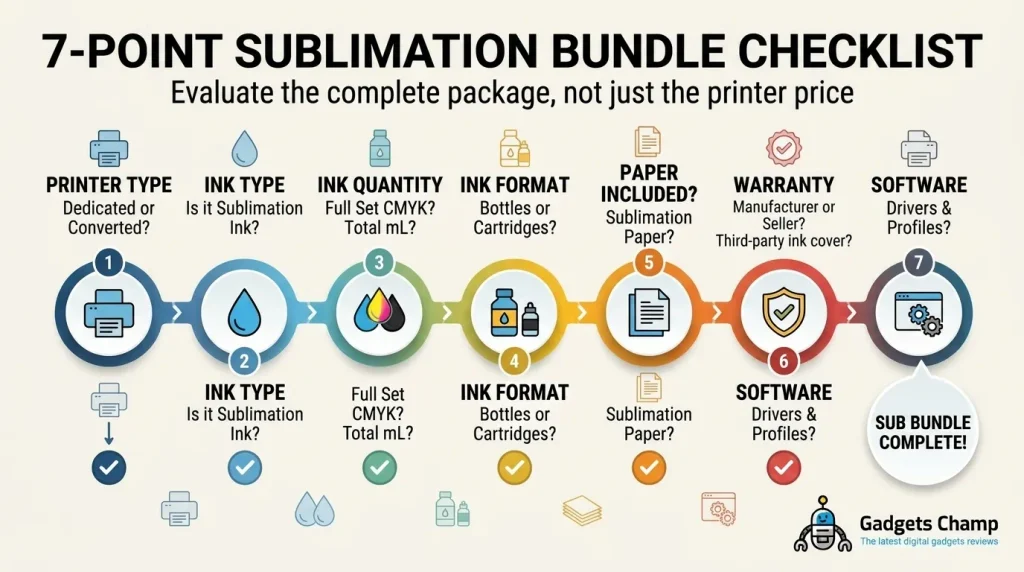
Read the bundle listing before you buy:
- Is the ink actually sublimation ink?
- How many milliliters are included?
- Is it CMYK?
- Are the bottles or cartridges full-size?
- Is sublimation paper included?
- Is the printer dedicated or converted?
- Does the manufacturer’s warranty still apply to that configuration?
That seven-point check can save you from buying a “complete” bundle that still needs another $50–$100 of supplies.
Dedicated vs Converted Sublimation Printers
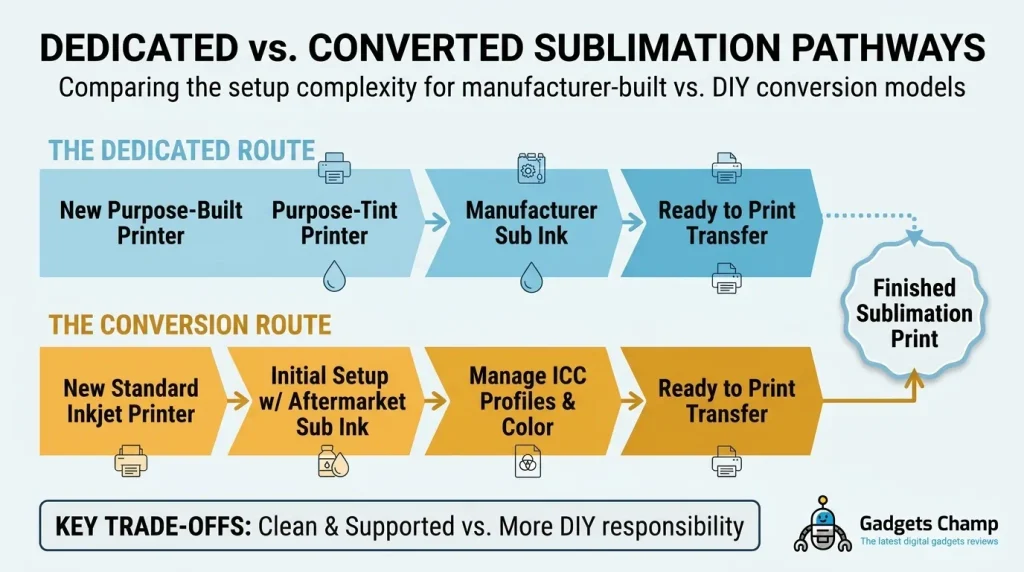
The biggest decision is not the color gamut or maximum resolution. It is whether you want a printer designed for sublimation or a printer converted to use sublimation ink.
Dedicated Sublimation Printers
A dedicated sublimation printer is built around a sublimation ink system from the manufacturer.
That gives you a much cleaner starting point.
The main advantages are:
- Purpose-built sublimation hardware
- Manufacturer-specific sublimation ink
- Defined consumables
- Manufacturer support
- Clearer warranty terms
- Less conversion work
- Lower risk of installing the wrong ink
The Epson SureColor F170 is a good example. Epson identifies it as a dye-sublimation printer and specifies a 4-color CMYK system using T49M ink bottles. Epson lists a standard 1-year unit-exchange warranty.
The Brother SP-1 takes the same basic approach. Brother explicitly markets it as a printer you can get started with out of the box. Its package includes four full-size 47 mL Brother Genuine sublimation cartridges and sublimation paper.
That simplicity has real value.
You do not have to wonder whether the previous owner used ordinary ink. You do not need to flush an ink system. You do not have to choose an aftermarket conversion ink before your first print.
Converted EcoTank Printers
A converted EcoTank starts with an ordinary inkjet printer.
You then replace or repurpose its ink system for sublimation printing.
The attraction is obvious. A compatible EcoTank can sometimes provide a lower-cost route into sublimation, especially when aftermarket ink is considerably cheaper than proprietary cartridges.
But the trade-off is additional responsibility.
A converted setup can involve:
- Choosing compatible sublimation ink
- Managing the conversion
- Avoiding contamination from regular ink
- Checking ink compatibility
- Accepting more uncertainty around support
- Monitoring print quality and maintenance
- Understanding the manufacturer’s warranty exclusions
This is why you should not treat a converted EcoTank as simply a cheaper dedicated sublimation printer.
If you want to understand the conversion route in detail, see our guide on which EcoTank models convert for sublimation.
Ready-to-Use Printers Worth Considering
These are examples of dedicated sublimation ink printers, not a replacement for our broader top sublimation printer picks.
| Printer | Type | Included Ink | Setup | Best For |
|---|---|---|---|---|
| Epson SureColor F170 | Dedicated | 4 × 140 mL Epson T49M* | Low | Straightforward desktop sublimation |
| Brother SP-1 | Dedicated | 4 × 47 mL Brother Genuine | Low | Makers wanting an out-of-box setup |
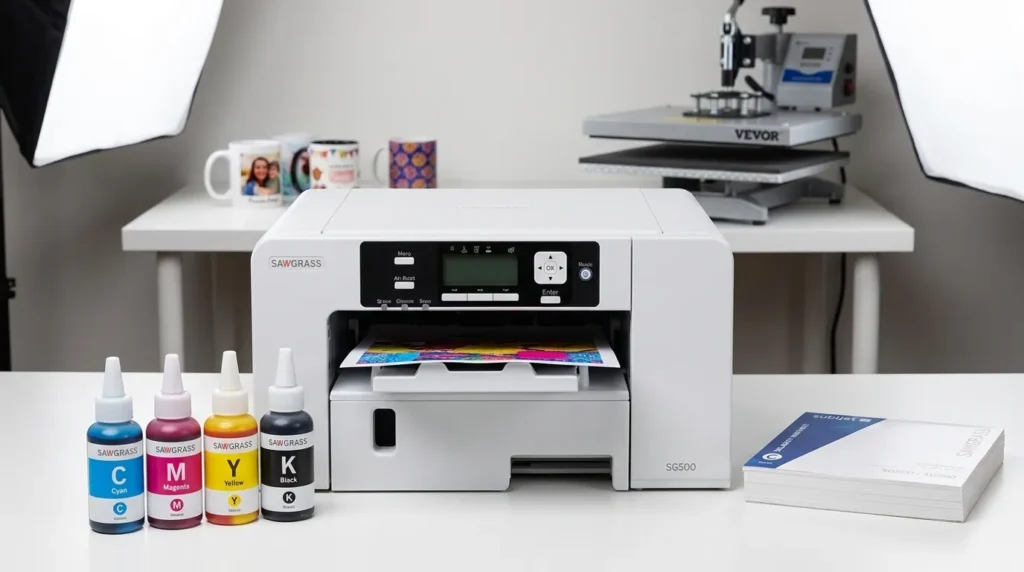
| Sawgrass SG500 | Dedicated | Depends on bundle | Low | Buyers wanting an integrated ecosystem |
*Epson lists 140 mL in-box fill volume for each CMYK color.
Epson SureColor F170
The Epson SureColor F170 makes sense if you want a dedicated Epson printer without dealing with an EcoTank conversion.
Epson lists a 4-color CMYK system and 140 mL bottles for black, cyan, magenta and yellow. It also lists a standard 1-year unit-exchange warranty.
Epson’s current U.S. ink listing shows T49M 140 mL replacement bottles at $24.95 each. That puts one complete four-color replacement set at $99.80 before tax or shipping.
That recurring ink cost matters.
The F170’s advantage is not that its ink is magically cheap. The advantage is the controlled ecosystem. You know which ink belongs in the printer, and you avoid the conversion step.
For a first-time buyer, that simplicity can be worth paying for.
If you want a deeper look at the printer itself, see our Epson SureColor F170 review.
Brother SP-1
The Brother SP-1 is particularly interesting for buyers who want a clear “open the box and start” setup.
Brother lists:
- 4 × 47 mL CMYK sublimation cartridges
- 10 sheets of sublimation paper
- Sublimation printer
- 2-year limited warranty and replacement service
Brother also describes the included cartridges as a full-size set of Brother Genuine ink.
The compact footprint is another practical advantage. Brother lists the printer at 17.1 inches wide, 13.5 inches deep and 6.2 inches high.
The downside is the same basic trade-off found with other dedicated systems: you are buying into the manufacturer’s ink ecosystem.
That can make long-term running costs more important than the initial printer price.

- Compatible with Artspira: Import and save up to 20 printing images easily with the Artspira app. With access to printing…
- Create in Artspira: To start using the Brother dye sublimation printer for DIY crafts, you must first download the Artsp…
Sawgrass Bundle
The Sawgrass SG500 belongs in this comparison because Sawgrass built its ecosystem specifically around sublimation printing.
The important detail is the bundle.
Some SG500 packages include sublimation ink, while others can differ by seller or bundle configuration. Do not assume every SG500 listing contains the same consumables.
Look for the exact SubliJet ink quantity and cartridge count before comparing its price against an Epson or Brother.
That is the broader lesson with any sublimation printer with sublimation ink: compare the complete package, not just the printer’s headline price.
What Does a Converted EcoTank Actually Cost?
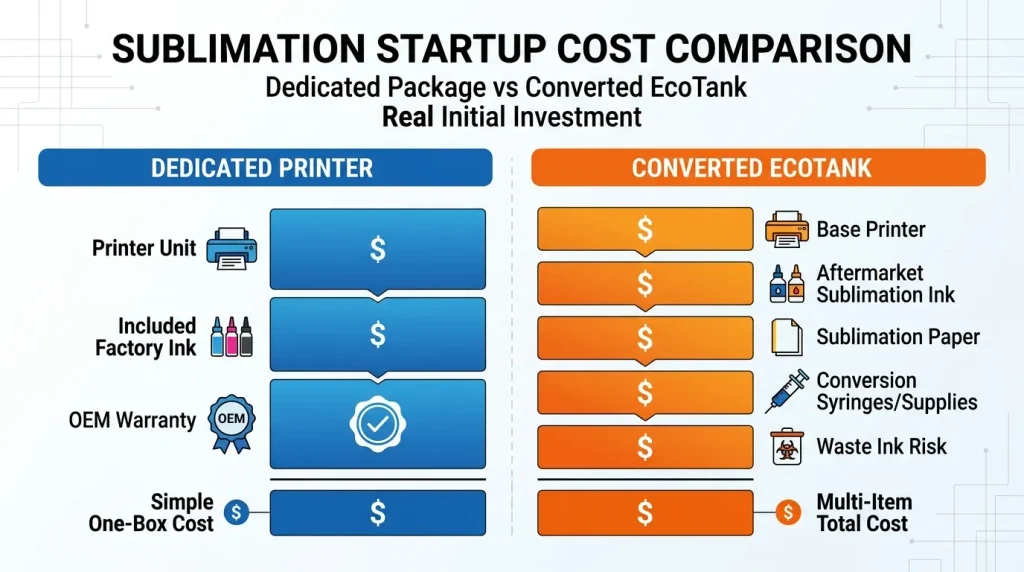
A converted setup can look cheaper because the printer itself may cost less than a dedicated sublimation machine.
But the printer is only one part of the purchase.
Printer + Sublimation Ink + Setup
Use this formula when comparing the two approaches:
Converted setup cost = printer + sublimation ink + paper + conversion supplies
You may also need to account for test prints, wasted ink, and time spent getting the system working correctly.
A dedicated printer has a simpler calculation:
Dedicated setup cost = printer + included sublimation ink + any missing supplies
That difference matters for beginners.
Suppose a converted printer costs less upfront. That does not automatically make it cheaper after you add sublimation ink, paper and conversion supplies. For startup budget and cost per print, explore our guide on sublimation printer running cost.
The conversion route also transfers more of the setup risk to you.
Refill Costs Can Change the Equation
Ink cost becomes more important as your print volume increases.
Compare:
- Ink volume per cartridge or bottle
- Price per bottle or cartridge
- Cost per milliliter
- Expected print volume
- Replacement frequency
- Ink shelf life
- Waste during maintenance or conversion
- Whether you can reliably source replacement ink
For example, Epson currently lists its F170 T49M bottles at $24.95 each for 140 mL. That works out to roughly $0.18 per mL at the listed price.
But cost per mL is not the same as cost per printed transfer.
Print coverage, color mix, cleaning cycles and printer design all affect actual consumption.
You can consider aftermarket brands such as Hiipoo or Cosmos Ink when researching converted EcoTank setups. Treat them as third-party options, not as Epson-supported ink.
The distinction matters because “compatible with an EcoTank” does not mean “approved by Epson.”
What About the Warranty?
⚠️ WARNING: Do not use the blanket claim that converting an EcoTank automatically voids its entire warranty.
The more accurate issue is warranty coverage for damage caused by unsuitable or third-party ink.
Epson documentation states that its warranty does not cover damage caused by third-party ink or ink not designed for the printer. Epson also warns that non-genuine ink could cause damage that is not covered by the limited warranty.
That means you should check the warranty terms for the exact printer model before converting it.
A marketplace seller’s “warranty included” statement does not automatically equal the manufacturer’s original warranty.
This is one reason dedicated sublimation printers appeal to first-time buyers. You start with the manufacturer’s intended ink system rather than modifying a conventional printer.
Which Setup Should You Buy?
There is no universal winner. The right choice depends on what you value more: simplicity or control over entry cost and ink options.
| If You Care Most About… | Choose |
|---|---|
| Least setup work | Dedicated |
| Manufacturer support | Dedicated |
| Simpler warranty position | Dedicated |
| Lowest possible entry cost | Converted EcoTank |
| More control over aftermarket ink | Converted |
| First sublimation printer | Dedicated |
| Occasional hobby printing | Dedicated |
| Regular small-business production | Either, based on volume and budget |
| Avoiding conversion mistakes | Dedicated |
Choose a Dedicated Printer If…
Choose a dedicated dye sublimation ink printer if you want to minimize variables.
This is especially sensible when:
- You are buying your first sublimation printer.
- You want to start printing quickly.
- You do not want to modify hardware.
- You value manufacturer support.
- You prefer predictable consumables.
- You do not want to troubleshoot a conversion.
You are paying for simplicity.
That is not wasted money if your alternative is spending hours troubleshooting a converted machine.
Choose a Converted EcoTank If…
A converted EcoTank can make sense when you understand the trade-offs and want more control over ink choices.
Consider it if:
- You already understand printer maintenance.
- You are comfortable researching compatible sublimation ink.
- Lower entry cost matters heavily.
- You print enough to care about ongoing ink economics.
- You accept more responsibility for setup and troubleshooting.
If those conditions do not describe you, the cheaper-looking route may create more headaches than savings.
How to Check a “Sublimation Printer With Ink” Listing
Product listings often use “ink included” as if it tells you everything.
It doesn’t.
Use this checklist before buying.
Check the Exact Ink Quantity
Do not stop at “includes sublimation ink.”
Look for specific numbers.
A good listing might say:
4 × 47 mL CMYK cartridges
or:
140 mL CMYK bottles
Specific quantities let you compare bundles properly.
If the seller refuses to state the volume, treat that as a warning sign.
Check Whether the Ink Is Sublimation Ink
Regular inkjet ink is not interchangeable with sublimation ink.
Cricut’s current guidance states that sublimation printer paper must be used with sublimation inks. Regular inkjet ink or toner will not work for the sublimation process.
This sounds obvious, but marketplace listings can make the distinction surprisingly unclear.
Look specifically for terms such as:
- Sublimation ink
- Dye-sublimation ink
- CMYK sublimation ink
- Genuine manufacturer sublimation ink
Do not buy a normal inkjet printer with ink included and assume you can use its standard cartridges for sublimation.
Check Whether the Printer Is Converted
Look for words such as:
- “Converted”
- “Refilled”
- “Aftermarket ink”
- “Compatible ink”
- “Conversion kit”
- “Previously converted”
A listing that says “ready to use” may still describe a converted machine.
That is why you need to identify the printer’s original model and its ink system.
Check the Warranty
Finally, verify who actually provides the warranty.
Ask:
- Is it the manufacturer warranty?
- Is the printer new or converted?
- Does the seller provide the warranty?
- Does the warranty cover the modified configuration?
- What happens if third-party ink causes a problem?
For Epson printers, the manufacturer’s documentation specifically excludes certain damage associated with third-party or unsuitable ink.
Do not make a purchase based on a vague “warranty included” badge.
Ready to Print Without a Conversion?
If you don’t want to convert an ordinary EcoTank, start with our current sublimation printer picks. We compare dedicated and converted options by setup, ink cost and use case.
That is the better next step if you are still deciding which actual printer to buy.
Frequently Asked Questions
Do Sublimation Printers Come With Ink?
Yes, many dedicated sublimation printers include sublimation ink, but the quantity varies. The Brother SP-1, for example, includes four 47 mL CMYK cartridges. Epson lists 140 mL in-box fill volume for each CMYK color in the SureColor F170.
Always check the exact bundle before buying. “Ink included” does not tell you whether you are getting a starter quantity, a full-size set, or aftermarket ink.
What Is the Best Sublimation Printer With Ink Included?
For a simple ready-to-use setup, a dedicated model is usually the safer choice. The Epson SureColor F170 and Brother SP-1 are two current examples with manufacturer-specific sublimation ink included.
The better choice depends on your priorities. The F170 offers a larger stated in-box ink volume, while the SP-1 includes full-size 47 mL cartridges plus sublimation paper.
For a broader product comparison, see our best sublimation printers guide.
Is the Epson F170 Ready to Print Out of the Box?
Yes, the Epson SureColor F170 is designed as a dedicated dye-sublimation printer and includes Epson T49M CMYK ink. Epson lists 140 mL in-box fill volume for each color and a standard 1-year unit-exchange warranty.
You still need the appropriate sublimation media and transfer equipment for your project. “Printer ready” does not mean the entire sublimation workspace is included.
Is a Dedicated Sublimation Printer Better Than a Converted EcoTank?
For most first-time buyers who prioritize simplicity, yes. A dedicated printer removes the conversion step and gives you a more controlled ink and support ecosystem.
A converted EcoTank can still make sense if you prioritize lower entry cost or aftermarket ink flexibility. The trade-off is that you take on more setup and compatibility responsibility.
Can I Put Sublimation Ink in Any EcoTank Printer?
No. You should not assume every EcoTank model is suitable for sublimation conversion. Compatibility depends on the specific printer, ink system and conversion approach.
Do not pour sublimation ink into an EcoTank simply because the printer uses refillable bottles. Research the exact model first and follow the conversion method recommended for that configuration.
Our EcoTank sublimation conversion guide covers that topic in greater depth.
How Much Does Sublimation Printer Ink Cost?
There is no single price because dedicated and aftermarket ink systems differ. Epson currently lists its F170-compatible T49M 140 mL bottles at $24.95 each on its U.S. site. A complete four-color set would therefore be $99.80 at those listed prices.
Converted EcoTank systems can use aftermarket sublimation inks with different bottle sizes and prices. Compare cost per mL and actual consumption rather than bottle price alone.
Can I Use Regular Ink in a Sublimation Printer?
No. Regular inkjet ink does not perform the sublimation process. Cricut specifically states that sublimation printer paper must be used with sublimation inks and that regular inkjet inks or toner will not work for sublimation.
If a printer is sold as a dedicated sublimation machine, use the ink system specified for that printer.
Does Converting an EcoTank Affect Its Warranty?
It can affect warranty coverage for damage caused by unsuitable or third-party ink, but do not claim that every conversion automatically voids the entire warranty. Epson’s warranty documentation excludes certain damage caused by third-party or unsuitable ink.
Check the exact warranty for your printer before converting it. Also distinguish the manufacturer’s warranty from a seller’s separate warranty.
Does a Sublimation Printer With Ink Included Also Include Paper?
Not always. Some dedicated printers include paper, while others only include ink.
The Brother SP-1 currently lists 10 sheets of sublimation paper in the box alongside its four 47 mL CMYK cartridges.
Epson’s F170 specifications identify the included ink, but you should verify the current package contents before assuming paper is included.
How Long Does Sublimation Ink Last?
It depends on how much you print, the coverage of your designs, cleaning cycles and the specific ink system. Brother says SP-1 ink longevity varies with print frequency and the size and complexity of designs.
Do not treat a bottle’s milliliter count as a guaranteed number of shirts, mugs or transfers.
Final recommendation: If you want your first sublimation setup to be predictable, start with a dedicated sublimation printer with genuine ink included. If saving on the initial purchase matters more and you are comfortable handling compatibility and conversion issues, a converted EcoTank can be worth considering.
The important part is knowing what you are actually buying. A printer, a sublimation printer, and a sublimation printer with ink included are not necessarily the same thing.