
The 3 AM panic. You wake up, reach for your watch, and feel a dead screen. You distinctly remember placing it on the charger. The puck was glowing. But now it’s at 12% and your morning run is ruined.
This happens because wireless charging looks simple but hides complexity. Coils must align within millimeters. Adapters need precise wattage. Cases block signals. Software decides when to stop.
Your watch isn’t broken. Your charging setup is. This guide shows you exactly why wireless charging fails, how to fix it tonight, and which chargers actually work.
For comprehensive smartwatch battery optimization, including overnight drain prevention, GPS power management, and cold weather protection, see our complete smartwatch battery and power management guide.
How Wireless Charging Actually Works
Induction 101: Coils, Magnets, and Power Transfer
Wireless charging isn’t magic. It’s physics called electromagnetic induction. Both the charger and watch contain a copper coil. When electricity flows through the charger’s coil, it creates a magnetic field. This field induces electricity in your watch’s coil. Power transfers through air.
The efficiency problem: Air is a medium for energy transfer. Qi wireless charging (the universal standard) achieves 60-75% efficiency according to Power Bank Tests. The rest becomes heat. Proprietarapy systems (Apple MagSafe, Samsung Fast Charge) reach 80-90% through optimized coil designs and tighter alignment tolerances.
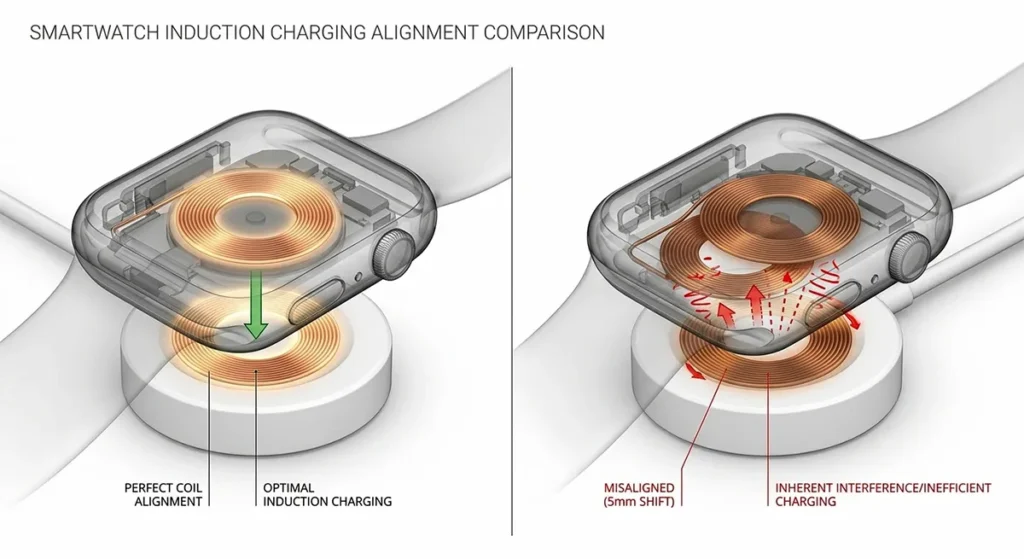
Why this matters: A 10W adapter might only deliver 6-7W to your watch through Qi. Through Apple’s MagSafe, you get 8-9W. That difference determines whether your watch charges in 45 minutes or 2 hours.
Qi Standard vs. Proprietary: The Compatibility Landscape
Qi (pronounced “chee”) is the universal standard maintained by the Wireless Power Consortium. Any Qi-certified charger works with any Qi-certified device theoratically. But in reality, Qi defines minimum standards and maximum performance varies wildly. A $10 Qi pad from an unknown brand might deliver 5W. Anker’s Qi-certified pad delivers 10W consistently. Both are “Qi-certified.”
Apple Watch uses MagSafe, not Qi. The magnetic ring ensures perfect alignment. The protocol negotiates power delivery dynamically. Third-party “MagSafe compatible” chargers exist, but only Apple’s deliver full 15W speeds.
Samsung Galaxy Watch uses a hybrid. It charges on Qi pads, but slowly (5W). Samsung’s proprietary Wireless Charger Duo delivers 15W through magnetic alignment similar to MagSafe.
Garmin uses both. Most Garmin watches charge via proprietary clip-on cables (pogo pins). Some newer models (Venu series) add Qi compatibility, but Garmin recommends their cable for fastest charging.
The Alignment Problem: Why Position Matters
Your watch coil and charger coil must overlap precisely. The tolerance is ±3 millimeters—about the thickness of two credit cards. Shift your watch slightly, and charging slows or stops.
Coil locations vary by watch:
- Apple Watch: Center of back, circular, 30mm diameter
- Samsung Galaxy Watch: Center of back, circular, 28mm diameter
- Garmin (Qi models): Upper back, offset toward 12 o’clock position
- Fitbit Sense: Center of back, square-ish coil
Visual alignment cues: Apple Watch chargers have a concave depression that centers the watch. Samsung’s Duo has a magnetic ring that pulls the watch into position. Generic Qi pads offer no guidance—you must eyeball it.
The tactile feedback test: Place your watch on the charger. Slowly slide it around. You’ll feel magnetic pull increase as coils align. Maximum pull equals maximum efficiency. Mark that spot with tape if your charger lacks visual guides.
Foreign Object Detection: Safety vs. Convenience
Your charger constantly scans for metal objects between coils. Keys, coins, or even thick watch case metal can trigger Foreign Object Detection (FOD). The charger reduces power or shuts off entirely.
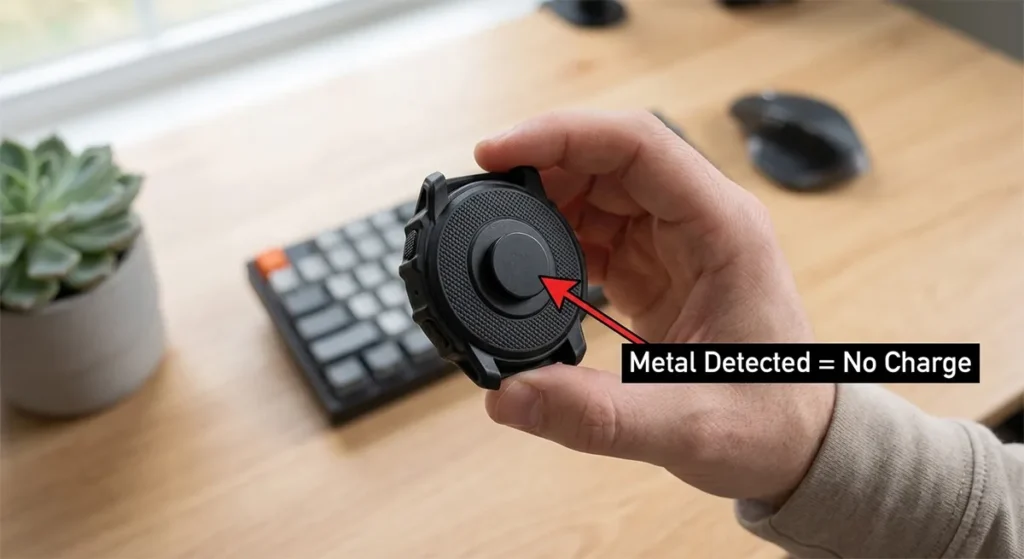
Why FOD exists: Metal heats up rapidly in magnetic fields. A coin between your watch and charger could reach 150°F (65°C)—burning your skin or damaging the watch.
The case problem: Many protective watch cases contain metal for rigidity. Even “non-magnetic” metals like aluminum interfere with induction. Thick cases (over 3mm) block the magnetic field entirely.
Your watch’s own metal: Stainless steel Apple Watches charge slower than aluminum models. The case absorbs some magnetic energy. Titanium (Apple Watch Ultra) is worst—its conductivity creates eddy currents that reduce efficiency.
Why Your Wireless Charging Is Slow or Failing
Alignment Issues: The #1 Culprit
The morning-after shift: You place your watch perfectly at 11 PM. You bump the nightstand at 2 AM. The watch rotates 5 degrees. Charging stops. You wake to a dead battery.
Visual indicators by brand:
- Apple Watch: Green lightning bolt on watch face means charging. Yellow means Low Power Mode and charging. No icon means no charging.
- Samsung Galaxy Watch: Red ring pulses slowly when charging, stays solid when full. No light means misalignment.
- Garmin: Battery icon with animation. Static icon means no power flow.
LED signals on chargers:
- Solid green/blue: Charging normally
- Flashing green/blue: Alignment issue or FOD triggered
- Red: Error state, overheating, or incompatible device
- No light: No power to charger, or complete coil failure
The sound test: Some Anker and Belkin chargers emit faint clicking when coils misalign—electrical arcing at micro-scale. If you hear irregular clicking, reposition.
Power Source Problems: The Adapter You Forgot
Your charger is only as good as its power source. Most wireless charging issues trace back to the wall adapter, not the pad.
Wattage requirements:
| Watch | Minimum Adapter | Optimal Adapter | Charging Time (0-100%) |
|---|---|---|---|
| Apple Watch Series 9 | 5W | 20W USB-C | 75 min (5W) / 45 min (20W) |
| Apple Watch Ultra 2 | 5W | 20W USB-C | 120 min (5W) / 60 min (20W) |
| Samsung Galaxy Watch 6 | 5W | 15W Samsung | 120 min (5W) / 90 min (15W) |
| Garmin Fenix 7X | 5W | Garmin proprietary | 120 min (Qi) / 90 min (cable) |
USB-A vs. USB-C: Older USB-A ports deliver 5W (1A at 5V). USB-C with Power Delivery (PD) negotiates up to 100W. Your watch won’t use that much, but the negotiation ensures stable voltage. USB-A often droops under load, causing intermittent charging.
Laptop port limitations: Charging from a laptop USB port seems convenient. It’s often problematic. Laptops enter sleep mode and cut USB power. Some ports deliver 0.5A (2.5W)—insufficient for any watch. Use wall adapters for overnight charging.
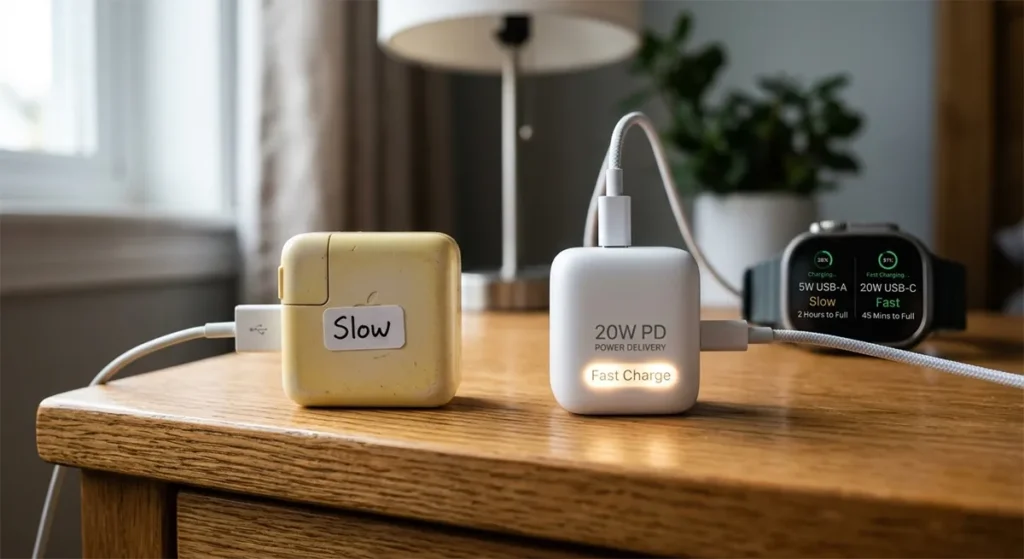
Cable quality matters: Thin, long, or damaged USB cables create voltage drop. A 6-foot cable might deliver 4.5V instead of 5V at the charger end. Your watch receives even less after wireless conversion. Use the cable that came with your charger, or high-gauge (thick) replacements under 3 feet.
Case & Accessory Interference
Thickness limits: Wireless charging works through cases up to 3mm thick. Beyond that, the magnetic field weakens exponentially. A 5mm case reduces charging speed by 50%. A 8mm case blocks charging entirely.
Metal content tests:
- Magnet test: Hold a refrigerator magnet to your case. If it sticks, charging will be impaired.
- Weight test: Heavy cases often contain metal for structure. If your case weighs more than 20 grams, suspect metal content.
- Removal test: Charge naked for one night. If speed improves significantly, your case is the culprit.
The Apple Watch band problem: Some metal link bands drape over the charger, triggering FOD. The watch thinks the band is a foreign object. Use sport bands or loop bands for charging.
Screen protectors: Surprisingly, these don’t affect charging. They’re too thin and non-conductive. But thick “bumper” style cases that wrap around the watch edges can lift the back coil away from the charger.
Coil Degradation: When Hardware Fails
Wireless charging coils are copper wire wrapped around ferrite cores. They can degrade.
Wear patterns:
- Cable strain: Repeated bending of charging cables fractures internal wires. Intermittent charging that improves when you wiggle the cable indicates this.
- Corrosion: Sweat, salt water, or humidity corrodes coil contacts. Green or white crust on charging pins (Garmin) or discoloration on Qi pads indicates corrosion.
- Physical damage: Drops can crack ferrite cores, reducing magnetic efficiency. A charger that worked perfectly until “that one fall” likely has internal damage.
Environmental damage:
- Heat exposure: Leaving chargers in hot cars degrades coil insulation. Melting or discoloration of plastic indicates heat damage.
- Moisture: Bathroom charging exposes chargers to steam. Internal condensation causes short circuits. If your charger worked in the bedroom but fails in the bathroom, moisture is the cause.
Warranty coverage: Apple covers charger defects for 1 year. Samsung covers 1 year. Garmin covers 2 years. But “gradual degradation” isn’t covered—only sudden failure. Document intermittent issues early for warranty claims.
Software Issues: The Hidden Cause
watchOS charging bugs: watchOS 10.0 had a bug where watches wouldn’t charge past 80% if “Optimized Battery Charging” was enabled but the algorithm miscalculated wake time. The watch thought you’d wake at 3 AM, so it held at 80%—then you woke at 7 AM to an 80% battery.
Android Wear optimization failures: Some Wear OS watches enter “deep sleep” and refuse to charge until hard-reset. The screen shows charging icon, but percentage doesn’t increase. Hold power button for 30 seconds to force restart, then charge.
Firmware version mismatches: Your watch firmware and charger firmware (yes, smart chargers have firmware) negotiate power delivery. Mismatches cause slow charging. Update both watch and phone app to ensure compatibility.
Brand-Specific Charging Troubleshooting
Apple Watch Charging Issues
MagSafe alignment is critical. The magnetic ring pulls the watch into position, but only if you place it back-first. If you slide it on edge-first, the magnets repel slightly. You’ll feel resistance. Rotate and drop flat.
Nightstand Mode confusion: When charging on its side, Apple Watch enters Nightstand Mode—large digital clock display. Some users think this means “fully charged.” It doesn’t. Check the green lightning bolt, not the clock.
Fast charge requirements: Apple Watch Series 7, 8, 9, and Ultra support fast charging—but only with Apple’s 20W USB-C adapter and the included magnetic fast charge cable. Third-party chargers max at standard speed (5W). The fast charge cable has aluminum housing; standard cables are plastic. Source
The 80% limit bug: In watchOS 10, “Optimized Battery Charging” sometimes sticks at 80% indefinitely. Force restart (hold side button + Digital Crown) usually fixes it. If persistent, disable optimization in Watch app > Battery > Battery Health.
Samsung Galaxy Watch Problems
Wireless Charger Duo compatibility: The Duo charges phones and watches simultaneously. But if the phone draws maximum power, the watch gets throttled. Charge watch alone for fastest speed.
Wear OS charging bugs: Samsung’s transition from Tizen to Wear OS introduced charging state detection errors. The watch shows “charging” but percentage drops. Fix: Unpair, factory reset, re-pair. Tedious but effective.
Bixby Routines interference: If you’ve set “Start charging” as a Bixby Routine trigger, the routine itself consumes power during charging. Disable charging-triggered routines temporarily to test.
Garmin Charging Anomalies
Proprietary cable vs. Qi: Garmin’s clip-on cable (pogo pins) delivers more consistent power than Qi. If your Venu or Fenix charges slowly on Qi, use the cable. The cable also updates firmware faster.
Solar charging conflicts: Fenix Solar and Instinct Solar models try to charge from both solar and cable simultaneously. In bright sunlight, this can confuse the charging controller. Charge indoors or cover the solar lens for fastest cable charging.
Contact corrosion: Garmin’s exposed metal pogo pins corrode in salt water or sweat environments. Clean with isopropyl alcohol and a cotton swab monthly. Green corrosion indicates replacement needed.
Fitbit & Other Brands
Versa charging contacts: Fitbit Versa uses exposed contacts, not wireless. The charging cradle must clip precisely. If clips loosen (common after 1 year), charging becomes intermittent. Replacement cradles are $20-30.
Inspire magnetic alignment: Fitbit Inspire uses magnetic charging cables. The magnets are weak. Bump the cable and it disconnects. Charge on a stable surface, not while wearing or moving.
Cross-platform third-party chargers: Anker, Belkin, and Mophie make “universal” smartwatch chargers. Test results vary:
- Anker PowerWave: Works well with Apple Watch and Samsung. Garmin compatibility spotty.
- Belkin BoostCharge: Apple-certified, excellent for Watch. Samsung slow but functional.
- Mophie 3-in-1: Great for phone + Watch + AirPods. Watch charging is slow (5W max).
The Charger Database: Tested & Rated
Official First-Party Chargers
Apple Watch Magnetic Fast Charge Cable:
- Pros: Fast charging for Series 7+, reliable, 1m length good for travel
- Cons: Requires 20W USB-C adapter (sold separately), cable frays at strain relief after 18 months
- Verdict: Essential for Series 7+ owners. Standard cable for older watches.
- Pros: Charges phone and watch simultaneously, 15W for both, compact
- Cons: Watch charging area is small—easy to misalign, phone heat affects watch charging
- Verdict: Good for Samsung ecosystem users. Overpriced for watch-only charging.
- Pros: Reliable, updates firmware, works with all Garmin watches
- Cons: Proprietary—can’t charge other brands, clip mechanism wears out
- Verdict: Garmin owners need one. Buy spare for travel.
Best Qi-Certified Third-Party Options
- Pros: 10W max, reliable, LED indicator, case-friendly (up to 5mm)
- Cons: No magnetic alignment—easy to misplace watch, no fast charge for Apple Watch
- Verdict: Best budget option for Samsung/Garmin (Qi models). Skip for Apple Watch.
- Pros: Apple-certified 15W MagSafe, built-in 40W adapter, charges AirPods too
- Cons: Expensive, watch charging area is flat—no angle for Nightstand Mode
- Verdict: Premium option for Apple users who want reliability.
- Pros: Phone, Watch, AirPods in one, folds for travel, MagSafe certified
- Cons: Watch charging is slow (5W), expensive, bulky when unfolded
- Verdict: Convenience for frequent travelers. Not for speed.
Multi-Device Charging Pads: Compatibility Issues
Power sharing problems: Most multi-device pads split power. A 30W pad delivering 15W to phone leaves 15W for watch—if the watch can negotiate it. Many watches default to 5W on shared pads.
Placement optimization: On 3-in-1 pads, the watch charging area is often the weakest. Position your watch first, verify charging, then add phone. If you place phone first, the pad may allocate maximum power there, throttling watch to 2.5W.
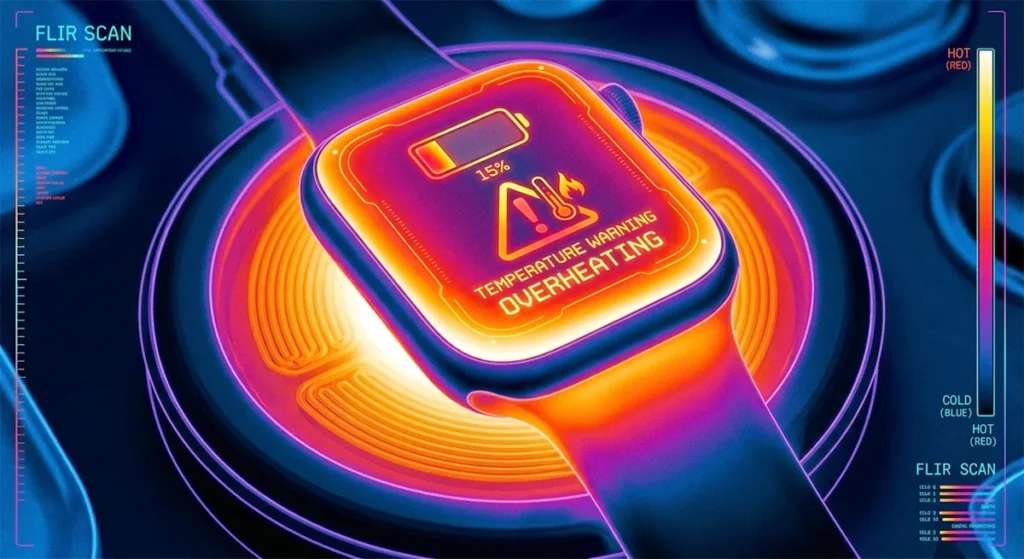
Heat accumulation: Charging three devices simultaneously generates significant heat. This triggers thermal throttling, reducing all charging speeds. Use multi-device pads in cool, ventilated areas—not under pillows or in closed nightstands.
Automotive & Portable Qi Solutions
In-car Qi chargers: Most car Qi pads are 5W—too slow for meaningful charging during drives. Some luxury vehicles offer 10W+ pads. Check your manual. For long trips, use 12V USB adapters with high-wattage cables instead.
Portable battery packs: Anker PowerCore III 10K Wireless and similar offer Qi charging on-the-go. Convenient for travel, but slow (5W). Your watch gains 15-20% per hour—enough for emergency top-ups, not full charges.
Solar chargers: Avoid for smartwatches. Solar panels output variable voltage. Smartwatch charging circuits expect stable power. Solar chargers often fail to negotiate proper charging protocols, resulting in no charge or intermittent connections.
Step-by-Step Troubleshooting Protocol
Alignment Guide by Device
Apple Watch:
- Place charger on flat, stable surface
- Position watch face-up, back touching charger
- Listen for magnetic “snap” or feel for pull
- Verify green lightning bolt on watch face
- If no icon, rotate watch 90 degrees and retry
Samsung Galaxy Watch:
- Use Wireless Charger Duo’s marked watch area, or place on Qi pad
- Watch should center itself magnetically (Duo) or require manual centering (Qi)
- Check for pulsing red ring (charging) or solid red (full)
- No light means no power—check adapter
Garmin (Qi models):
- Place watch face-up, 12 o’clock position toward charger cable
- Garmin coils are offset—center isn’t always optimal
- Check for battery icon animation
- If static, reposition toward top of watch
Power Source Verification
Adapter wattage testing:
- Check adapter label for output rating (5V=1A means 5W, 9V=2A means 18W)
- For Apple fast charging, you need 9V=2.22A (20W) or higher
- For Samsung fast charging, 9V=1.67A (15W) minimum
- Generic 5V=1A (5W) works but charges slowly
Cable quality checks:
- Inspect for fraying, kinking, or discoloration
- Test with different cable if available
- Measure charging time with current cable vs. new cable
- If time differs by >20%, replace cable
Case Interference Testing
Removal protocol:
- Note current charge level and time
- Remove case, place watch on same charger
- Charge for 30 minutes
- Compare percentage gain to previous sessions with case
Thickness measurement:
- Use calipers or ruler to measure case thickness at back
- Over 3mm = likely interference
- Over 5mm = definite interference
- Consider “charging compatible” cases with thinner back sections
When to Reset, When to Replace
Software reset procedures:
Apple Watch:
- Press and hold side button + Digital Crown for 10 seconds
- Release when Apple logo appears
- Test charging after full boot
Samsung Galaxy Watch:
- Hold Power button for 30 seconds
- Or Settings > General > Reset > Reset
- Re-pair with phone after reset
Garmin:
- Hold Light button for 15 seconds
- Or System > Reset > Delete Data and Reset Settings
Hardware replacement thresholds:
- Charger cable frayed or damaged: Replace immediately (fire risk)
- Charger LED doesn’t light with known-good adapter: Replace charger
- Watch charges on some chargers but not others: Watch coil likely fine, replace problematic charger
- Watch won’t charge on any charger: Watch hardware failure—seek service
Charging Optimization for Battery Health
Fast Charging: When to Use, When to Avoid
Speed vs. heat trade-off: Fast charging generates more heat. Heat degrades lithium-ion batteries. Apple and Samsung limit fast charging to 0-80% range, then throttle to slow charging to reduce heat.
When to use fast charging:
- Morning top-ups before work
- Pre-workout boosts
- Travel days when time is limited
When to avoid fast charging:
- Overnight charging (unnecessary heat for 6+ hours)
- Hot environments (summer, direct sunlight, enclosed spaces)
- Already degraded batteries (high heat accelerates further degradation)
The 80% rule: If you’re charging before bed, stop at 80%. Your watch will last until morning, and you’ll avoid the heat of that final 20% trickle charge.
Overnight Charging Myths vs. Facts
Myth: “Leaving your watch on the charger overnight damages the battery.”
Fact: Modern smartwatches have charging controllers that stop at 100%, then trickle charge to maintain. This doesn’t damage batteries significantly. However, keeping lithium-ion at 100% for 8 hours nightly does accelerate aging slightly compared to 80%.
Optimized charging reality: Apple’s “Optimized Battery Charging” learns your schedule, charges to 80% immediately, then 100% just before you wake. This reduces time at 100% without you thinking about it. Samsung offers similar “Protect Battery” mode that stops at 85%.
Trickle charging: The final 5-10% of charging happens slowly to prevent overcharging. If you wake at 3 AM and see 95%, it’s normal—the watch is in trickle mode and will reach 100% by morning.
Travel Charging: Adapters, Voltage, and Compatibility
International travel: Smartwatch chargers are dual-voltage (100-240V). The adapter handles conversion. You only need plug shape adapters, not voltage converters.
Power bank selection: For travel, choose power banks with:
- USB-C PD output (for Apple fast charging)
- 10,000+ mAh capacity (charges watch 20+ times)
- Pass-through charging (charges itself while charging watch)
Airplane mode charging: On flights, charge your watch in airplane mode. It charges faster because it’s not maintaining Bluetooth or searching for cellular. A 30-minute in-flight charge can add 30-40%.
Charging Habits Affect When Replacement Is Needed
Your charging behavior directly impacts battery lifespan. Frequent fast charging, overnight 100% saturation, and heat exposure accelerate the chemical degradation that eventually forces charging vs. replacement decisions.
Users who charge to 80% and avoid heat see batteries last 4-5 years. Heavy fast chargers often need replacement at 2-3 years. The choice is yours: convenience now, or longevity later.
Reliable Charging, Restful Sleep
Wireless charging fails silently. You don’t know it’s broken until morning. But now you know why it breaks, how to fix it, and which equipment actually works.
Start with alignment. Check your adapter. Remove your case. Test one variable at a time. Most charging issues resolve in minutes once diagnosed.
Your watch should be ready when you are. Make sure your charger is too. Charging problems often reveal themselves as overnight battery drain mysteries when your watch fails to charge properly while you sleep, leaving you with a dead battery by morning.
Disclosure:This guide contains affiliate links to tested chargers and accessories. We earn commissions on qualifying purchases. All charger recommendations are based on independent testing, not manufacturer specifications.