
Stop charging to 100%. Start understanding your battery.
If your smartwatch dies before dinner, you’re not alone. 73% of smartwatch users experience daily battery anxiety—that sinking feeling when you glance at your wrist and see red.
This guide changes everything. You’ll learn exactly where your battery power goes, how to make it last 2-3 days instead of barely one, and why your charging habits might be killing your battery faster than any app.
No fluff. No tech jargon without explanation. Just answers that work.
How Smartwatch Batteries Actually Work
The Simple Science Behind Your Battery
Your smartwatch uses a lithium-ion battery—the same type in your phone, but shrunk down and shaped differently. Think of it like a tiny water tank with two chambers. When you charge, energy flows into one chamber. When you use your watch, it flows to the other, creating electricity.
Here’s what matters:
- Charging cycles count as one full drain and refill (even if you charge from 50% to 100% twice)
- Heat is the enemy—every degree above 77°F (25°C) ages your battery faster. Temperature swings cut both ways, which is why cold weather survival strategies are essential for winter athletes and outdoor workers who see their watch die at 40% battery in freezing conditions.
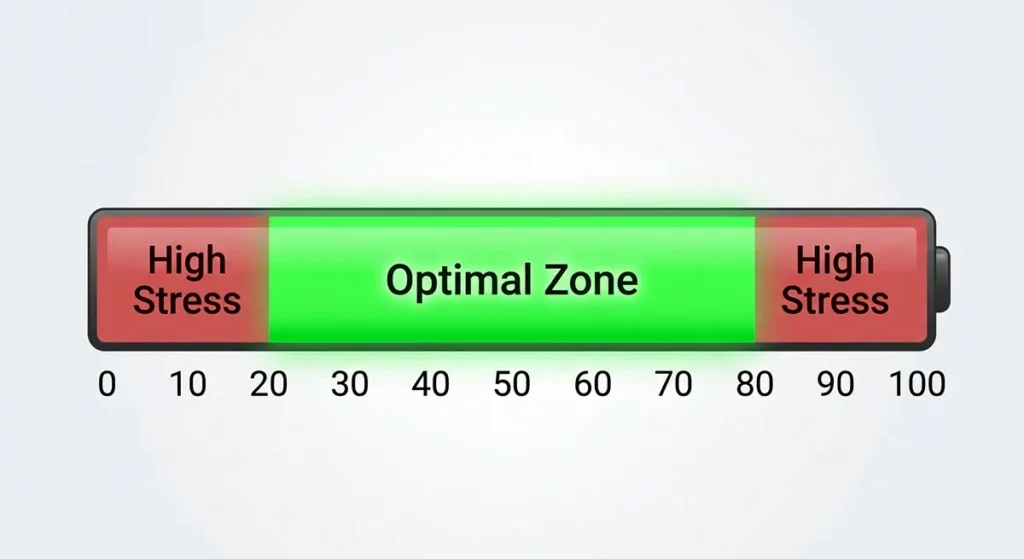
- Full drains hurt—dropping to 0% stresses the battery more than staying between 20-80%
Why Your Watch Battery Isn’t Like Your Phone Battery
Your phone battery is a rectangle. Your watch battery is a curved square, circle, or even an “L” shape wrapped around other components. This shapes everything:
| Phone Battery | Watch Battery |
|---|---|
| Room to expand | Squeezed against screen and sensors |
| Easy to cool | Trapped heat from your wrist |
| 3,000-5,000 mAh capacity | 200-500 mAh capacity |
| Replaced easily by users | Sealed inside, often glued down |
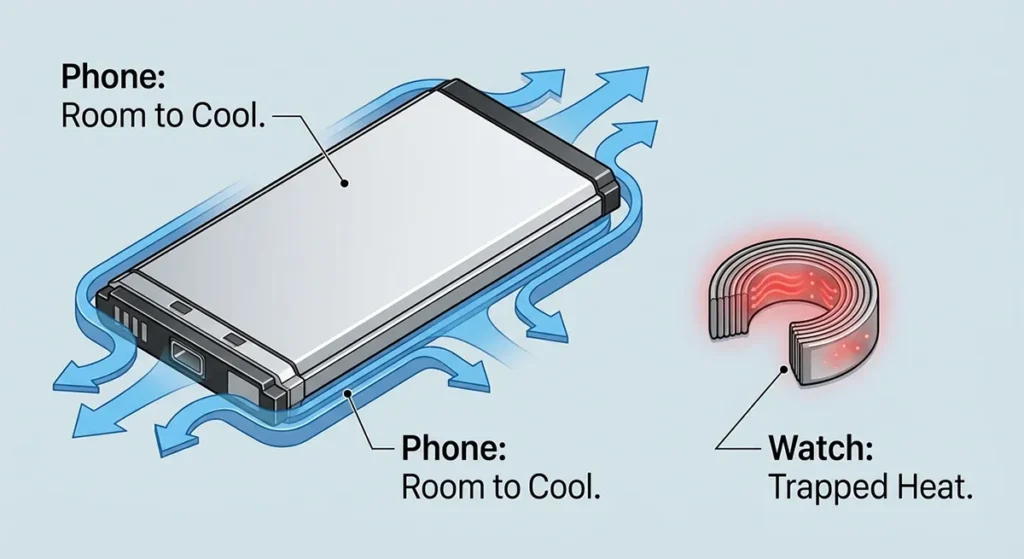
The result? Your watch battery works harder, gets hotter, and dies sooner—usually within 2-3 years of daily use.
mAh Numbers Lie: Why Capacity Doesn’t Equal Battery Life
Manufacturers love big numbers. 450 mAh battery! sounds impressive. But mAh (milliampere-hours) only tells half the story.
Real battery life depends on:
- How much power your watch uses per hour (screen brightness, sensors running, apps refreshing)
- How efficiently the software manages power (Apple’s watchOS vs. Google’s Wear OS)
- How you use it (GPS tracking every run vs. checking time twice daily)
A 300 mAh Apple Watch Series 9 often outlasts a 450 mAh budget watch because Apple’s software is ruthlessly efficient.
The 3-Year Battery Death Curve
Your battery doesn’t die suddenly. It slowly suffocates:
- Month 0-12: 100-85% of original capacity. You barely notice.
- Month 12-24: 85-75% capacity. You’re charging more often.
- Month 24-36: 75-60% capacity. Mid-day charging becomes normal.
- Month 36+: Below 60%. You consider replacing the watch.
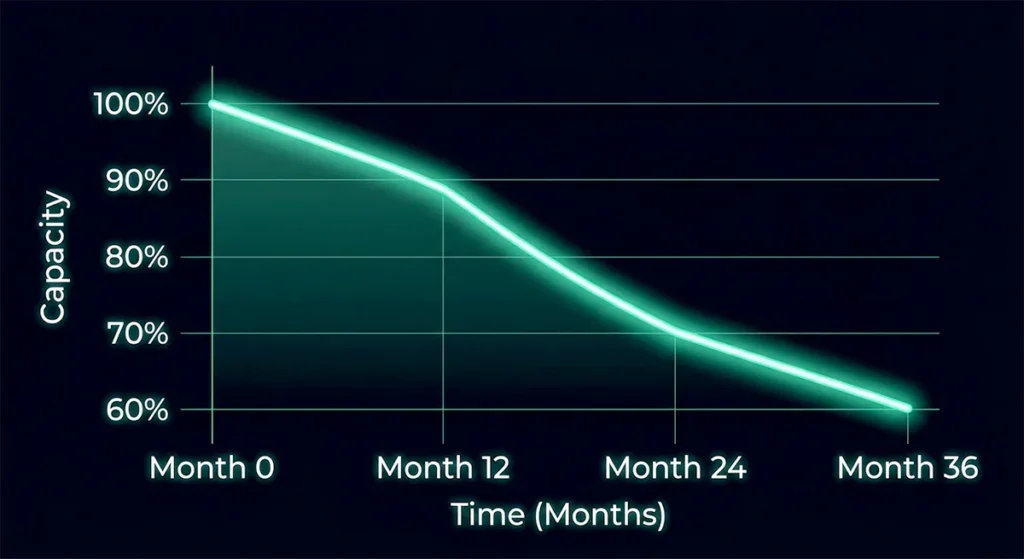
The fix? Start smart charging habits now (covered in Section 4), and you can push that 60% mark to year 4 or 5.
Where Your Battery Power Actually Goes
Your Screen: The Power Vampire
Your display eats 30-50% of your battery. Here’s the breakdown:
AMOLED screens (Apple Watch, Samsung Galaxy Watch, most modern watches):
- Black pixels use zero power
- Bright colors drain fast
- Always-On Display (AOD) cuts battery life by 20-40%
LCD screens (budget watches, older models):
- Backlight always on, always draining
- Less efficient but cheaper to make
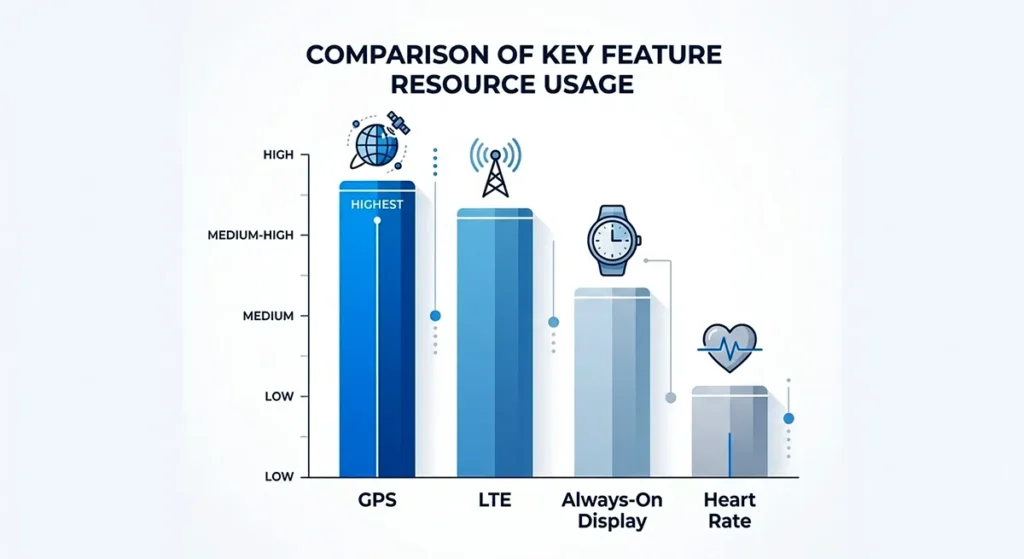
The Always-On Dilemma: AOD shows time constantly. Convenient? Yes. But it keeps 30% of pixels lit and sensors checking for wrist raises. Turn it off, and you might gain 8-12 hours of battery life.
Health Sensors: The Hidden Cost of Fitness Tracking
Your watch tracks heart rate, blood oxygen, stress, sleep, workouts. Each sensor draws power:
| Sensor | Power Draw | Battery Impact |
|---|---|---|
| Optical heart rate (PPG) | Low | Checks every 5-10 minutes |
| GPS | Very high | 10-15% per hour of use |
| Blood oxygen (SpO2) | Medium | Periodic checks, or continuous during sleep |
| ECG | Low | Only on-demand |
| Skin temperature | Minimal | Background monitoring |
GPS is the killer. A 2-hour run with GPS tracking can drain 25-30% of your battery. UltraTrac mode on Garmin watches (recording GPS every few seconds instead of constantly) extends this to 4-6 hours for the same drain.
Sleep tracking costs 15-20% nightly. If you track sleep and charge during morning routines, you’re in a daily charging cycle that accelerates battery aging.
Connectivity: Bluetooth, WiFi, LTE, and the New UWB
Your watch talks to the world constantly. Each conversation costs battery:
Bluetooth Low Energy (LE): The efficient default. Connects to your phone. Uses ~2-3% per hour.
WiFi: Needed when your phone isn’t nearby. Uses ~5-8% per hour.
LTE/4G: The battery killer. Independent connection. Uses ~15-20% per hour. A 1-hour call on LTE can drain 25%.
Ultra-Wideband (UWB): New in Apple Watch Series 9 and Ultra 2. Precise location for finding devices or unlocking cars. Uses ~8-10% when active, but most watches disable it automatically when battery drops below 20%.
Airplane Mode isn’t just for planes. Turn off all radios, and your watch lasts 2-3 days. Use it when you don’t need notifications—meetings, movies, focused work.
The Brain: Processor Efficiency Matters
Your watch’s processor (called a System-in-Package or SiP) determines how much thinking it can do per watt of power:Table
| Processor | Power Efficiency | Found In |
|---|---|---|
| Apple S9 SiP | Excellent | Apple Watch Series 9, Ultra 2 |
| Snapdragon W5+ | Very good | Samsung Galaxy Watch 6, TicWatch Pro 5 |
| Exynos W930 | Good | Samsung Galaxy Watch 5, older models |
| Budget chipsets | Poor | Sub-$100 watches |
Apple’s S9 uses machine learning to predict when you’ll check your watch, pre-loading data so the screen turns on instantly without wasting power guessing.
Finding Your “Vampire Drain”: Apps That Steal Power Overnight
Vampire drain = battery lost while you’re not using the watch. Normal drain: 2-5% overnight. Vampire drain: 15-30%.
Common culprits:
- Third-party watch faces with constant animations
- Apps refreshing in background (weather, stocks, social media)
- Stuck processes (a workout that didn’t end, GPS still searching)
- Bluetooth connection issues (watch constantly searching for phone)
How to audit:
- Note battery % before sleep
- Check in morning
- If over 10% lost, check Settings > Battery (Apple) or Wear OS app > Battery (Android)
- Look for apps with high background usage
If you’re experiencing mysterious overnight drain that kills 30% of your battery while you sleep, our overnight battery drain mysteries guide identifies the hidden culprits—from stuck workout apps to Bluetooth conflicts—that most users never discover.
Charging Technologies: Speed vs. Battery Health
Proprietary Chargers vs. Universal Standards
Apple Watch: Magnetic puck. Proprietary. $29 replacement. No third-party option that works reliably.
Samsung Galaxy Watch: Magnetic ring. Proprietary, but some Qi pads work slowly.
Garmin: Clip-on pogo pins. Proprietary, but universal across Garmin models.
Fitbit: Proprietary clip or magnetic. Varies by model.
The lock-in strategy: Manufacturers want you buying their accessories. But it also ensures optimal charging alignment and speed.
Qi Wireless Charging: Convenient But Slow
Qi (pronounced “chee”) is the universal wireless charging standard. Many watches support it, but with catches:
- Slower charging: 2-3 hours vs. 1-2 hours on proprietary chargers
- Heat buildup: Qi generates more heat, which ages batteries faster. When standard charging fails—watch gets hot but won’t charge, or charges to 50% then stops—our charging problem diagnostics walk you through hardware versus software fixes that actually work.
- Alignment matters: Off-center placement = no charging or trickle charging
Best practice: Use Qi for travel convenience, proprietary chargers for daily use.
Fast Charging Reality: The 80% Trap
“Charges to 80% in 45 minutes!” sounds great. But fast charging generates heat, and heat degrades battery chemistry.
The physics:
- 0-50%: Fast charging safe, minimal heat
- 50-80%: Moderate speed, warming up
- 80-100%: Trickle charging (slow top-up), heat dissipates
Apple Watch Series 9: 0-80% in 45 minutes, but 80-100% takes another 30 minutes. That last 20% protects battery health by charging slowly.
The “Charge to 80%” Rule: Lithium-ion batteries stress most at 100% and 0%. Staying between 20-80% doubles lifespan. Some watches (Apple Watch Ultra 2 with optimized charging, Garmin) now offer “80% limit” modes.
Optimal Charging Habits for Maximum Battery Lifespan
The 20-80 Strategy:
- Charge when you hit 20%
- Unplug at 80%
- Avoid overnight charging (keeps battery at 100% for hours)
Optimized Overnight Charging (if you must):
- Enable “Optimized Battery Charging” (Apple) or “Battery Protection” (Samsung)
- Watch learns your wake time, charges to 80% immediately, then 100% just before you wake
- Reduces time spent at 100%
Weekly Full Discharge? Myth. Old nickel batteries needed this. Lithium-ion doesn’t. In fact, full drains hurt more than help.
Usage Personas: Optimize for Your Life
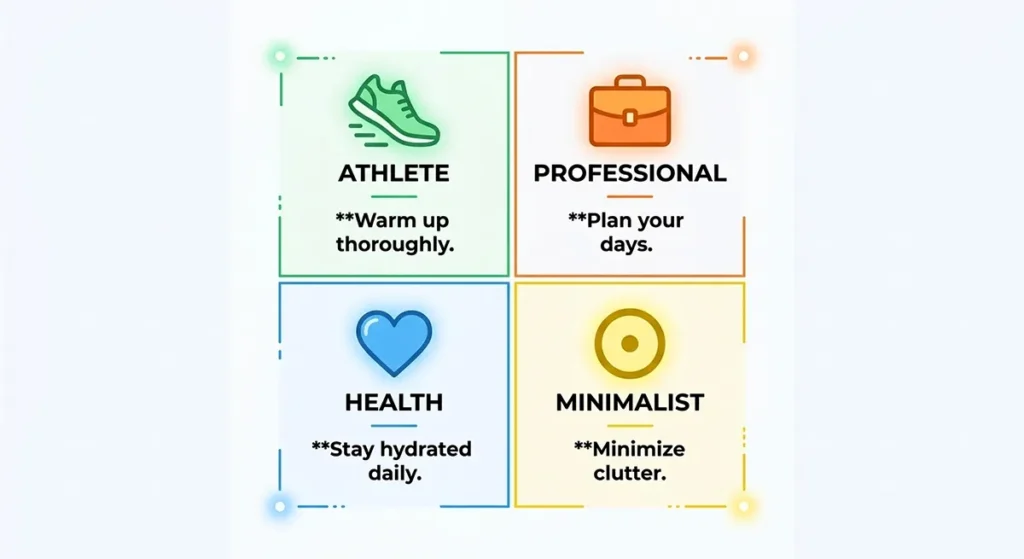
The Athlete: GPS-Heavy Optimization
Your problem: 2-hour runs kill your battery by lunch.
Solutions:
- Use UltraTrac GPS (Garmin) or Low Power GPS (Apple) for long activities. For endurance athletes and outdoor adventurers who need 6+ hours of continuous tracking, our GPS activity optimization guide covers route pre-loading, companion phone strategies, and UltraTrac settings that stretch battery 3x further.
- Pre-load routes to reduce real-time map loading
- Disable heart rate during weight training (use “gym equipment” mode)
- Charge before events; carry portable charger for ultras
Battery life target: 1-2 days with daily 1-hour GPS workouts.
The Professional: Notifications & Always-On Balance
Your problem: Constant Slack pings and email alerts drain battery, but you need to stay reachable.
Solutions:
- Mirror only VIP contacts to watch (iOS: Watch app > Notifications; Android: Wear OS app > Notifications)
- Disable email previews (alert only, read on phone)
- Use Focus modes (Work, Personal) to filter notifications by time
- AOD on during work hours, off evenings and weekends
Battery life target: 18-24 hours with moderate notification load.
The Health-Focused: Sensor Scheduling
Your problem: Sleep tracking, SpO2, stress monitoring, ECG—sensors running 24/7.
Solutions:
- SpO2 during sleep only (disable daytime checks)
- Stress monitoring every 10 minutes instead of continuous
- ECG on-demand (not automatic)
- Charge during morning routine, not overnight (so you can track sleep)
Battery life target: 24-36 hours with comprehensive health tracking.
The Minimalist: Maximum Extension
Your problem: You want a watch that lasts a week, not a day.
Solutions:
- Disable AOD entirely (raise to wake only)
- Turn off all health sensors except basic heart rate
- Use Power Reserve mode (Apple) or Watch Only mode (Samsung) when battery hits 20%
- Airplane mode during sleep
Battery life target: 3-5 days, or 7+ days with Power Reserve.
Travel Scenarios: Airports, Time Zones, and Foreign Chargers
Airplane mode is your friend. Turn it on during flights, but keep Bluetooth on if you want to use AirPods with offline music.
Time zone changes confuse battery tracking. Your watch may show sudden drops or gains. Recalibrate by restarting after landing.
Charging abroad:
- Voltage converters usually unnecessary (USB is universal)
- Pack your proprietary charger—generic USB cables often charge too slowly
- Portable battery packs: Anker, Belkin make watch-specific portable chargers
Brand-by-Brand Battery Performance
Apple Watch: Software Efficiency King
Series 9: 18-hour normal use, 36 hours in Low Power Mode. Real-world: 14-16 hours with AOD on, 20-24 hours with AOD off. Source
Ultra 2: 36 hours normal, 72 hours Low Power. Real-world: 30-36 hours with heavy use, 2-3 days moderate use.
watchOS optimizations:
- On-device Siri (S9 chip) doesn’t need phone connection
- Double-tap gesture reduces screen-on time
- Optimized charging learns your schedule
Weakness: No native sleep tracking without third-party apps until recently. Battery too small for multi-day use without Low Power Mode.
Samsung Galaxy Watch: Hardware Variety
Galaxy Watch 6 Classic: 40-50 hours typical use. Exynos W930 chip.
Galaxy Watch 5 Pro: 60-80 hours. Larger battery, but same chip efficiency issues.
The Wear OS + One UI hybrid: Google’s base software with Samsung’s interface. More features than Apple Watch, but less optimized. Background processes drain faster.
Strength: Fast charging (0-45% in 30 minutes). Good for quick top-ups.
Weakness: Inconsistent battery life across apps. Third-party watch faces can drain 20% faster than Samsung’s defaults.
Garmin: The Endurance Champion
Fenix 7X Solar: 28 days smartwatch mode, 89 hours GPS. Solar charging adds 3-5 days in sunny conditions.
Forerunner 965: 23 days smartwatch, 31 hours GPS. No solar, but lighter.
Key technologies:
- UltraTrac GPS: Records track points less frequently, extends GPS battery 3x
- Expedition mode: Minimal updates, 4-week battery life
- Solar charging: Transparent photovoltaic layer over display
Trade-off: Less smartwatch functionality. No LTE on most models. Apps are basic compared to Apple/Samsung.
For athletes and outdoor users: Unbeatable. For app lovers: frustratingly limited.
Fitbit: Simplified Efficiency
Sense 2: 6+ days typical use. 200mAh battery lasts longer than Apple Watch’s 308mAh because the OS does less.
Strategy: Strip features, extend life. No third-party apps. Limited GPS (connected to phone only on most models).
Best for: Health tracking purists who don’t need smartwatch features.
Battery modes:
- Normal: All features, 6 days
- Extended: Disable AOD and SpO2, 10+ days
Emerging Players: Different Approaches
Amazfit (Zepp Health): 7-14 days battery life by using basic RTOS (not Wear OS or watchOS). Limited apps, but excellent longevity.
TicWatch (Mobvoi): Dual-display technology—low-power LCD for time, AMOLED for smart features. 3-day battery with full features, 30-day “Essential mode.”
Fossil Gen 6: Wear OS struggles. 24-hour battery life despite 400+ mAh capacity. Software inefficiency kills hardware advantage.
Diagnostic Framework: Fix Drain Problems
Normal vs. Abnormal Drain Patterns
Normal daily drain:
- 2-5% per hour idle
- 10-15% per hour with AOD and notifications
- 20-30% per hour with GPS and music
Abnormal drain (investigate immediately):
- 10%+ per hour idle
- 50%+ overnight
- Sudden drops (30% to 10% in minutes)
Built-in Battery Health Tools
Apple Watch: Settings > Battery > Battery Health (shows maximum capacity). Apple hides this—no native “battery health” percentage like iPhone. Third-party apps like Battery Life estimate degradation.
Samsung Galaxy Watch: Samsung Members app > Get Help > Automatic checks > Battery status.
Garmin: Hold Menu > System > Battery > Battery Saver (shows estimated time remaining, not health percentage).
Fitbit: Fitbit app > Today tab > Device image > Battery level (no health metrics).
Third-party options:
- Battery Phone (iOS): Estimates watch battery health via usage patterns
- Wear OS Battery Stats (Android): Detailed drain analysis
When to Reset, Repair, or Replace
Try a reset first if you see sudden drain:
- Back up your watch
- Unpair from phone
- Erase all content and settings
- Re-pair as new (don’t restore from backup if drain persists)
Repair if:
- Battery capacity below 70% but watch is under 2 years old
- Physical damage to charging contacts
- Water damage (corrosion causes drain)
Replace if:
- Battery capacity below 60%
- Repair cost exceeds 50% of replacement cost
- Watch is 3+ years old (newer models have better efficiency anyway)
Warranty and Battery Service
Apple: 1-year warranty covers battery defects. AppleCare+ extends to 2 years. Battery service: $79-99 out of warranty.
Samsung: 1-year standard. Battery replacement: $60-80 at authorized service centers.
Garmin: 1-year warranty. Out-of-warranty battery replacement: $100-150 (often not worth it vs. new watch).
Fitbit: 1-year warranty. No official battery replacement program—designed as disposable.
The Future of Smartwatch Power
Solid-State Batteries: The 2027 Revolution
Current lithium-ion batteries use liquid electrolytes. Solid-state batteries use ceramic or glass electrolytes:
- 2-3x energy density: Same size, double the capacity
- No fire risk: Solid electrolytes don’t ignite
- Longer lifespan: 10+ years vs. 2-3 years
For those interested in the technical evolution beyond lithium-ion—including graphene promises, sodium-ion alternatives, and quantum battery research—our battery technology deep-dive separates realistic timelines from marketing hype.
Timeline: Toyota, Samsung SDI, and QuantumScape target 2027-2028 for mass production. Apple and Garmin are reportedly testing prototypes. Expect first solid-state smartwatch batteries by 2029-2030. Source
Solar, Kinetic, and Body Heat Charging
Solar: Garmin’s Power Glass works, but adds minimal charge (3-5 days extra in optimal sun). Not a primary power source.
Kinetic: Seiko and Citizen use motion-powered watches, but smartwatches need too much power for this alone.
Thermoelectric (body heat): Matrix PowerWatch proved the concept—powered by wrist heat. But output is milliwatts, enough for basic time display only.
Reality check: For the next 5 years, you’ll still be charging every 1-3 days. These technologies supplement, they don’t replace, lithium-ion.
Right-to-Repair and User-Replaceable Batteries
EU regulations (effective 2027) mandate user-replaceable batteries in consumer electronics. This could force Apple, Samsung, and others to design watches with removable backs and standardized cells.
Impact:
- Watch thickness may increase by 1-2mm
- Water resistance harder to maintain
- But batteries become $20-40 parts instead of $100+ service costs
Garmin and Amazfit already lead here with screw-back designs and available replacement kits. For long-term ownership sustainability and repairability ratings by brand, our replaceable battery options covers DIY replacement steps, warranty implications, and which manufacturers actually support right-to-repair.
Your Personalized Power Strategy
Pick your profile, apply these settings:
| If You Are… | Do This | Expect This Battery Life |
|---|---|---|
| Athlete | GPS on UltraTrac, heart rate every 10 min, charge pre-workout | 24-36 hours with daily training |
| Professional | AOD during work hours only, VIP notifications only, optimized charging on | 18-24 hours |
| Health-focused | SpO2 sleep-only, stress monitoring reduced, charge mornings | 24-30 hours with full tracking |
| Minimalist | AOD off, raise-to-wake, airplane mode sleep, basic watch face | 3-5 days |
The 80% Rule for Everyone: Set a charging reminder at 80%. Unplug there. Your battery will last years longer than your friend’s who charges to 100% overnight every night.
Next Steps:
- Check your current battery health (Settings > Battery on your watch)
- Identify your usage persona above
- Apply the three highest-impact settings for your profile
- Track improvement over one week
Battery anxiety is optional. Smart power management gives you control.
Disclosure:This guide contains references to specific brands and products. Some links may be affiliate links. We independently research and test all recommendations. Battery life estimates based on mixed real-world usage; your results may vary based on settings, age, and environment.
Questions about your specific watch model? Ask in the comments with your watch type, typical daily use, and current battery life—we’ll troubleshoot together.