
The Rollo X1040 is the best thermal printer for shipping labels for most Etsy, Shopify, eBay, and Amazon sellers in 2026. It prints one 4×6 label per second at 150mm/s, connects via dual-band Wi-Fi, Bluetooth, and USB without driver installation, and accepts any open-format third-party label roll at $0.02 to $0.05 per label.
The DYMO LabelWriter 5XL is the simplest thermal printer to set up and suits sellers printing fewer than 30 labels per day from a fixed Windows or Mac computer, but its proprietary label rolls cost approximately $0.21 per label and lock you into DYMO’s supply chain.
The Zebra ZD421 is the correct choice for operations printing 200 or more labels per day, running ShipStation or EasyPost with ZPL output, or needing a printer built to sustain heavy daily volume without degrading.
This guide compares all three on the specific criteria that matter for shipping labels: print speed, label cost over 12 months, carrier compatibility, platform integration, and real-world limitations.
If you want to see how Brother fits in alongside these three, or need a printer that handles both 4×6 shipping labels and smaller product labels, see our full comparison of the best thermal label printers including Brother QL-1110NWB tested on print speed, label cost, and platform compatibility.
Quick Comparison: Rollo vs DYMO vs Zebra for Shipping Labels
| Printer | Speed | DPI | Connectivity | Label Format | Label Cost/Year (10K labels) | Best For | Approx. Price |
|---|---|---|---|---|---|---|---|
| Rollo X1040 | 150mm/s (1 label/sec) | 203 | Wi-Fi, BT, USB, AirPrint | Open-format, any 4×6 roll | ~$200 to $500 | Most sellers, wireless printing | ~$280 Check Current Price |
| DYMO LabelWriter 5XL | 53 labels/min | 300 | USB, Ethernet (no Wi-Fi) | DYMO Authentic rolls only | ~$2,344 | Low-volume, single workstation | ~$405 Check Current Price |
| Zebra ZD421 | 6 ips at 203 DPI | 203/300 | USB + optional Wi-Fi/BT | Open-format, ZPL/EPL | ~$200 to $500 | ShipStation users, 200+/day | ~$300 to $450 Check Current Price |
Rollo X1040: Best for Most Shipping Label Workflows
The Rollo X1040 is where most online sellers land after trying an inkjet, a cheaper thermal printer, or an older Rollo model. The X1040 is the wireless version of Rollo’s lineup and the one that matters for most shipping workflows in 2026.
Print Speed, Connectivity, and Label Format
The X1040 prints at 150mm per second, which is one standard 4×6 shipping label per second. In independent testing by Seller Journal, wireless spool time averaged 3.6 seconds per print job, with per-label print times over Wi-Fi averaging 1.6 seconds. For context, that means printing 50 labels takes under 5 minutes total including spool time.
Connectivity covers dual-band Wi-Fi (2.4GHz and 5GHz), Bluetooth (used for initial setup only, not printing), USB, and AirPrint. AirPrint certification means you print directly from an iPhone, iPad, or Mac without installing any drivers. Android, Windows, Chromebook, and Linux also work over Wi-Fi without drivers. According to Rollo’s official product page, the X1040 requires no driver installation for printing from any device, only the initial Wi-Fi setup via the Rollo app on a phone or tablet.
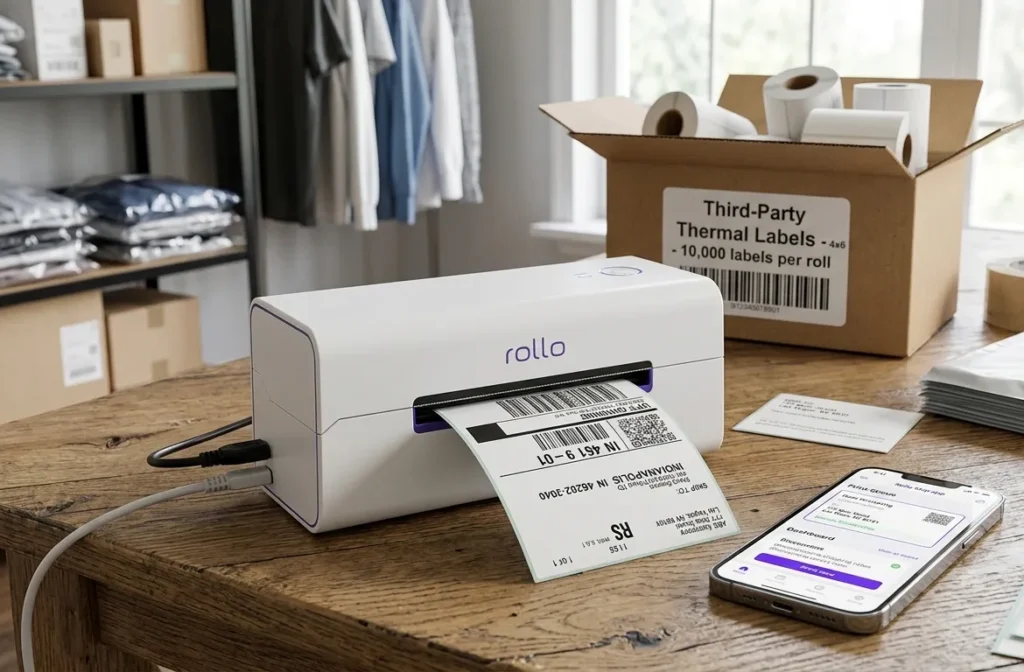
The printhead is rated for approximately 650,000 labels, which is four times the lifespan claimed by comparable printers. At 100 labels per day, that is 17 years of print life at rated capacity.
The X1040 accepts any direct thermal label roll from 1.57 inches to 4.1 inches wide. Third-party 4×6 rolls from Amazon-based suppliers cost $0.02 to $0.05 per label. No RFID chip, no cartridge lock, no proprietary supply chain.
Platform Compatibility and the Rollo Ship App
The Rollo X1040 works with Etsy, Shopify, Amazon, eBay, USPS, UPS, FedEx, DHL, ShipStation, Shippo, ShippingEasy, Pirateship, Stamps.com, WooCommerce, and others. For sellers using Etsy or Shopify natively, the printer prints PDF-format 4×6 labels directly from the browser without any additional software.
The Rollo Ship app is a free shipping platform bundled with the X1040 that imports orders from connected selling platforms, compares USPS and UPS rates, and generates batch labels in one interface. It replaces paid platforms like ShipStation for sellers whose primary need is rate shopping and label generation. For ShipStation users specifically, the Rollo works via ShipStation Connect, though it requires a browser extension to function correctly with wireless printing.
Where the Rollo X1040 Falls Short
The X1040 stores labels externally behind the unit rather than in an internal roll compartment. That means the printer occupies more desk space than competitors when a label roll is loaded. The footprint with labels is larger than the DYMO 5XL or Zebra ZD421. For tight packing stations, this matters.
Wi-Fi connectivity is reliable in most setups but some users report occasional disconnection issues after router restarts, requiring reconnection via the app. These are infrequent but documented.
The X1040 is direct thermal only. It does not support thermal transfer. If you also print product labels, freezer labels, or asset tags that require longer lifespan and chemical resistance, the Rollo is not the right tool for those applications.
DYMO LabelWriter 5XL: Simplest Setup, Highest Label Cost
The DYMO LabelWriter 5XL has one advantage that Rollo and Zebra do not match: it works correctly the first time you plug it in with almost no configuration. For a seller who ships 10 to 20 packages per day from a fixed Windows or Mac desktop, that simplicity has real value.
Why the DYMO 5XL Is Still Recommended for Low-Volume Sellers
The 5XL prints at 53 labels per minute at 300 DPI. That 300 DPI resolution is noticeably sharper than the 203 DPI standard on the Rollo X1040 and most Zebra desktop models. For labels that include small address text, fine barcodes, or dense tracking information, the difference in output clarity is visible.
The 5XL’s Automatic Label Recognition feature reads an RFID chip on every label roll core and displays the label size, type, and quantity remaining. You never run out of labels mid-batch without warning. DYMO Connect software lets you create and customize over 60 label types. Setup involves plugging in USB or Ethernet, installing DYMO Connect, and printing. No calibration, no driver complications, no network configuration.
ShipStation supports the DYMO 5XL natively. According to ShipStation’s official printer setup documentation, DYMO printers are self-calibrating and among the easiest thermal printers to configure for their platform.
The Proprietary Label Problem and What It Costs Per Year
The DYMO LabelWriter 5XL only works with genuine DYMO Authentic LabelWriter labels. The RFID chip on each roll core is required for the printer’s Automatic Label Recognition to function. A roll without the chip produces an error.
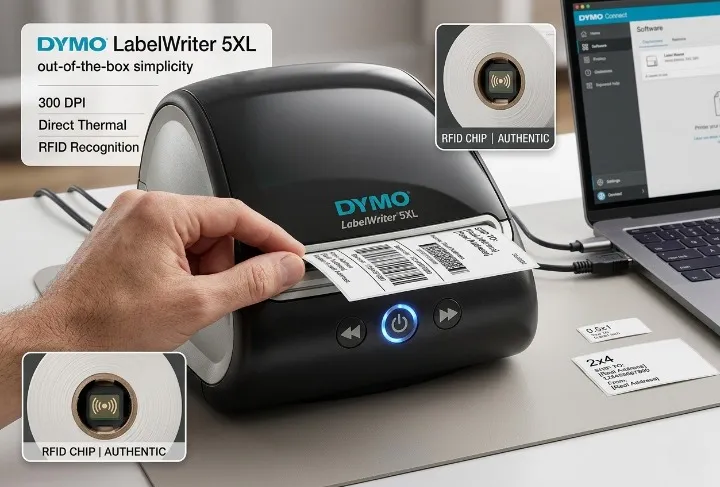
The math on this is significant. Shopify’s 2026 buyer’s guide calculated the first-year total cost of ownership for the DYMO 5XL at 10,000 labels: $209 printer + $2,135.91 in DYMO-branded labels = $2,344.91. The same 10,000 labels on an open-format printer using third-party rolls costs $200 to $500 in label rolls total. The difference at moderate shipping volume is over $1,800 per year.
At low shipping volume, say 5 to 10 packages per day, the annual label cost difference narrows enough that simplicity of setup may genuinely outweigh the cost gap. At 30 or more packages per day, it does not.
DYMO 5XL Limitations for Growing Operations
No wireless connectivity. No mobile printing. USB and Ethernet only, which means the printer must sit physically close to the computer that drives it. For a seller who prints from multiple devices or wants to move the printer between packing areas, that is a hard constraint.
The 5XL also jams more frequently than the Rollo or Zebra ZD421 under sustained high-volume use, according to multiple verified buyer reports on Amazon and Shopify’s hardware store. For sellers printing under 50 labels per day, jamming is rare. For sellers pushing the printer toward its designed capacity, it shows up.
Zebra ZD421: Best for High-Volume Operations and ShipStation Users
The Zebra ZD421 is not designed for someone shipping 20 packages a day. It is designed for operations where the printer runs for hours without stopping, where label format requirements go beyond standard 4×6 shipping labels, and where the shipping software generates ZPL-format labels rather than PDFs.
Print Speed, Dual-Mode, and ZPL Output
The ZD421 prints at 6 inches per second at 203 DPI, the same effective speed as the Rollo X1040. The difference is not raw print speed. It is the architecture underneath. The ZD421 is 30% more powerful than its predecessor, the ZD420 Series, according to Zebra’s official specification sheet. It handles multiple label format operations simultaneously, runs remote configuration via Zebra Print DNA, and sustains heavy workloads without the print quality degradation that can appear in consumer-grade printers after months of heavy use.
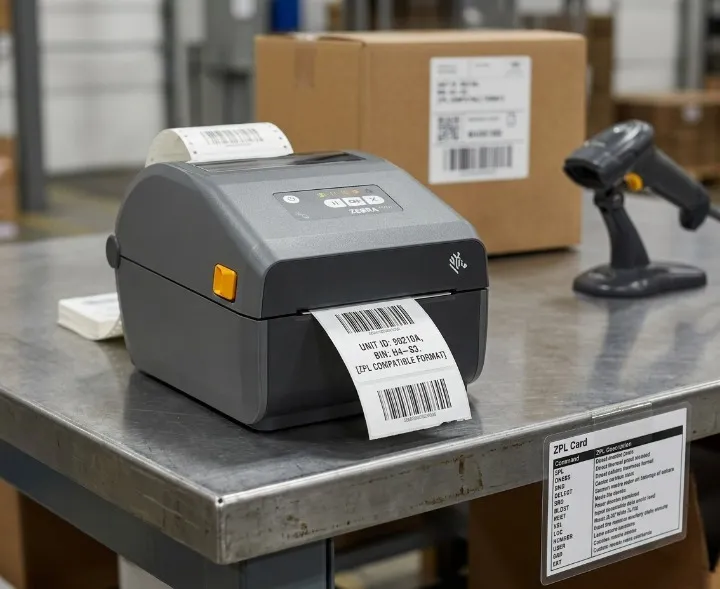
The ZD421 supports both direct thermal and thermal transfer in one unit. For shipping labels, direct thermal mode with no ribbon is all you need. For product labels, asset tags, or freezer labels that require longer lifespan, switch to thermal transfer mode with the appropriate ribbon loaded.
The ZD421 outputs ZPL and EPL label languages natively. ZPL-format labels from ShipStation print with crisper image quality than PDF-format labels because the printer renders the label internally rather than converting a rasterized PDF image. ZPL also eliminates format conversion steps that sometimes cause barcode alignment issues on PDF-based workflows.
The Seagull Scientific Driver Issue
This is the detail that causes most Zebra buyers to lose an afternoon troubleshooting.
Zebra ships its printers with official Zebra drivers, but those drivers have known limitations on Windows when printing shipping labels through third-party platforms. ShipStation’s official Windows printer setup documentation explicitly states that the Seagull Scientific Driver is the one they have found to work best across most Zebra label printer models, and recommends downloading it instead of the standard Zebra driver for Windows users.
The Seagull Scientific Driver is free to download from Seagull Scientific’s website. It provides more label formatting options and resolves the most common alignment and darkness issues that appear with the standard Zebra driver on Windows. If you use a Mac, Zebra’s own driver performs acceptably for most shipping workflows.
You do not need to understand ZPL or printer command languages to use the Zebra ZD421 with ShipStation. You do need to install the correct driver and configure the label size to 4×6 inches in both ShipStation’s settings and Windows printer preferences. ShipStation’s documentation walks through this step by step.
When the Zebra ZD421 Is Worth the Higher Upfront Cost
The ZD421 justifies its price in three situations. First, you print 200 or more labels per day and need a printer that sustains that volume reliably over years without printhead degradation or mechanical failure. Second, your shipping software generates ZPL-format label output and you want the crisper barcode quality that ZPL rendering provides. Third, you run a dual-label operation where the same printer handles both 4×6 shipping labels (direct thermal mode) and longer-life product or asset labels (thermal transfer mode), eliminating the need for two separate printers.
For a deeper breakdown of the full Zebra product line including the ZD221 and ZD621, see our Zebra thermal label printer guide covering ZD221, ZD421, and ZD621 models with setup, ZPL configuration, and label compatibility.
Rollo vs DYMO vs Zebra: The Decision by Daily Volume
Under 30 labels per day: The DYMO LabelWriter 5XL wins on simplicity if you always print from one fixed computer and are not concerned about label cost per year. The Rollo X1040 wins if wireless printing from multiple devices matters or if you want the lower ongoing label cost even at low volume.
30 to 200 labels per day: The Rollo X1040 is the right choice for this entire range. Open-format labels, wireless printing, full platform compatibility, and a print speed that keeps up with this volume without the Zebra’s driver complexity or cost.
200 or more labels per day: The Zebra ZD421. At this volume, the architecture matters. The ZD421 is built for sustained daily use. The Rollo X1040 is not designed for warehouse-scale continuous operation. The Zebra’s ZPL output, remote management via Print DNA, and dual-mode capability make it the correct professional-tier choice.
What Labels Do You Need for Shipping?
All three printers on this page print the standard 4×6 inch shipping label format. That format is the universal standard across USPS, UPS, FedEx, DHL, Amazon FBA, Etsy, Shopify, and eBay. Sorting centers at all major carriers use automated scanners calibrated to this size. Using a non-standard size risks manual processing and delivery delays.
Fanfold vs Roll Labels
Standard label rolls contain 500 to 1,000 labels wound on a core. They load into the printer and feed through automatically. Fanfold labels are the same size but stack flat in a box and accordion-fold through the back of compatible printers. The Rollo X1040 and Zebra ZD421 both support fanfold. The DYMO 5XL requires perforated rolls only and does not accept fanfold.
Fanfold labels cost slightly less per label in bulk and eliminate the roll-swapping step in high-volume workflows. For sellers printing several hundred labels per day, fanfold reduces the frequency of label reload interruptions.
Open-Format vs Proprietary Labels
The Rollo X1040 and Zebra ZD421 accept any standard 4×6 direct thermal label roll. The DYMO 5XL requires DYMO Authentic labels with the RFID chip on the roll core. Buying outside DYMO’s supply chain either causes an error or voids the warranty.
For a full breakdown of which thermal printers work with USPS, UPS, FedEx, Etsy, Shopify, ShipStation, Amazon, and eBay natively, see our thermal label printer platform compatibility guide.
All three printers use direct thermal printing for shipping labels, which means no ink, no toner, and no ribbon is required. For an explanation of when thermal transfer mode becomes necessary for your label applications, see our direct thermal vs thermal transfer guide →.
Frequently Asked Questions
Which thermal printer is best for shipping labels in 2026?
The Rollo X1040 is the best thermal printer for shipping labels for most sellers in 2026. It prints at 150mm per second, accepts any open-format 4×6 direct thermal roll at $0.02 to $0.05 per label, connects wirelessly to any device without drivers, and works natively with Etsy, Shopify, Amazon, eBay, USPS, UPS, FedEx, and ShipStation. For operations printing 200 or more labels per day using ShipStation with ZPL output, the Zebra ZD421 is the correct choice.
Does Rollo work with Etsy and Shopify?
Yes. The Rollo X1040 works with Etsy, Shopify, Amazon, eBay, and all major shipping carriers natively through PDF label output. The free Rollo Ship app also integrates with these platforms for rate shopping and batch printing. For ShipStation users, Rollo works via ShipStation Connect, which requires a browser extension for wireless printing.
Does DYMO 5XL work with third-party labels?
No. The DYMO LabelWriter 5XL uses Automatic Label Recognition technology that reads an RFID chip on genuine DYMO label roll cores. Labels without the chip produce an error. The printer only accepts DYMO Authentic LabelWriter labels, which cost approximately $0.21 per 4×6 label versus $0.02 to $0.05 for open-format alternatives.
Does the Zebra ZD421 work with ShipStation?
Yes, but it requires the correct setup. ShipStation’s official printer documentation recommends installing the free Seagull Scientific Driver for Zebra printers in Windows, rather than the standard Zebra driver. For ZPL-format label output, ShipStation support can configure your account to receive ZPL labels, which produce crisper barcode quality than PDF-format output on Zebra printers.
What label size do I need for USPS, UPS, and FedEx?
4×6 inches (100x150mm) is the universal standard for USPS, UPS, FedEx, and DHL shipping labels in the United States. All three printers on this page print 4×6 labels natively. Sorting facilities at all major carriers use automated scanners calibrated to this size. Using a different size risks manual processing and possible delivery delays.
What is fanfold label format and which printers support it?
Fanfold labels are the same 4×6 direct thermal labels as roll format, but stacked flat in a box and accordion-folded rather than wound on a core. They feed through the back of compatible printers without a roll holder. Fanfold labels cost slightly less per label in bulk and eliminate the roll-reloading step during long print runs. The Rollo X1040 and Zebra ZD421 both support fanfold. The DYMO LabelWriter 5XL requires perforated rolls with the DYMO RFID chip and does not support fanfold format.
Affiliate Disclosure: GadgetsChamp participates in the Amazon Associates program. If you buy through a link on this page, we earn a small commission at no extra cost to you. Kamran Asghar, founder of GadgetsChamp, wrote this guide based on verified manufacturer specifications, independent test data, and ShipStation’s official printer documentation. No brand paid for placement here.