
The ski slope shutdown. You’re halfway down the mountain, tracking your run with GPS, when your Apple Watch Ultra suddenly dies. Not at 5% battery. Not at 1%. At 47%. You checked it five minutes ago. It was fine.
This isn’t a defect. It’s chemistry. And it happens to every smartwatch owner who ventures below 40°F (4°C).
The good news? You can prevent it. This guide explains exactly why cold kills your battery, which watches handle it best, and field-tested tactics to keep your watch alive from the first chairlift to the last run.
Why Cold Destroys Battery Life: The Science Made Simple
How Lithium-Ion Batteries Work (And Why Cold Breaks Them)
Inside your smartwatch battery, lithium ions move through a liquid called electrolyte. Think of it like swimmers in a pool. When it’s warm, they swim fast from one side (the anode) to the other (the cathode), creating electricity.
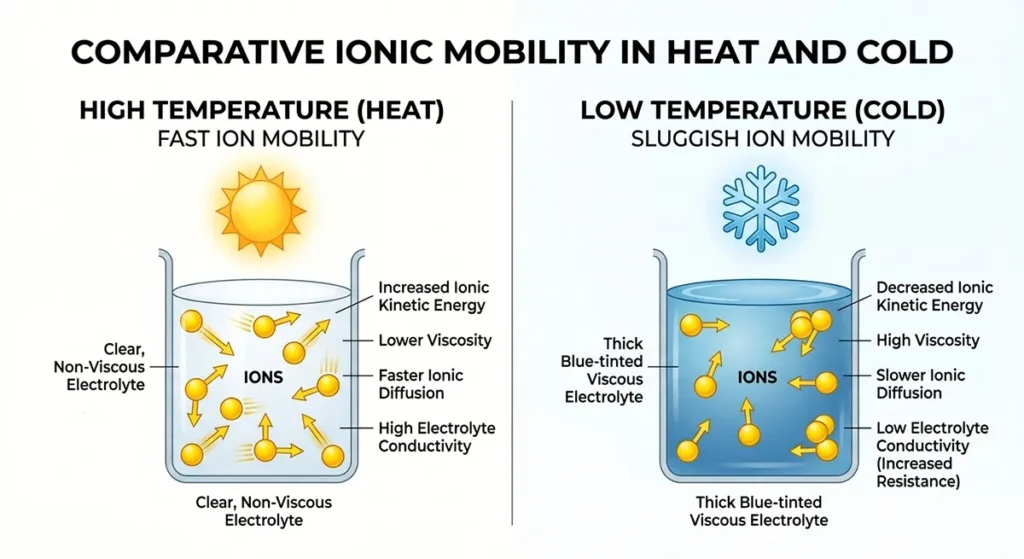
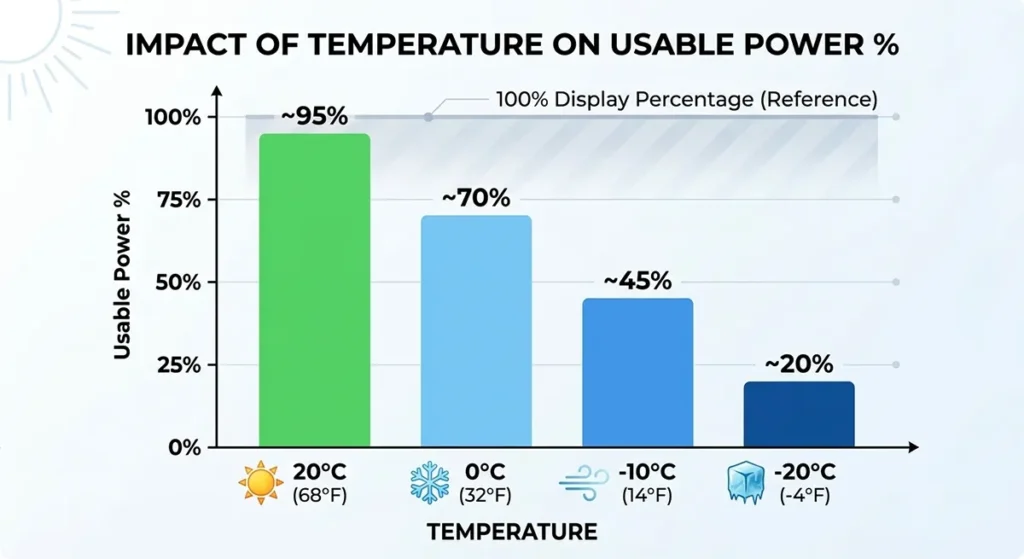
When temperatures drop, that liquid gets thicker. The swimmers slow down. Some get stuck. By 0°C (32°F), your battery has lost 20% of its usable capacity. By -10°C (14°F), you’re down to 60%. At -20°C (-4°F), you might have 40% left—even if the screen shows 80%. Source
This isn’t permanent damage. The capacity returns when you warm the battery. But while it’s cold, your watch thinks it has plenty of power, then suddenly shuts down when the voltage drops too low under load.
The 20% Rule: Cold Weather Capacity Chart
| Temperature | Actual Capacity Available | What Your Watch Shows |
|---|---|---|
| 20°C (68°F) | 100% | 100% (baseline) |
| 0°C (32°F) | 80% | 100% (misleading) |
| -10°C (14°F) | 60% | 100% (dangerous) |
| -20°C (-4°F) | 40% | 100% (shutdown imminent) |
Your watch’s battery percentage measures voltage, not actual available energy. Cold creates a voltage “fool’s gold”—the number looks high, but the power isn’t there when you need it.
Why GPS Dies First: The Voltage Sag Problem
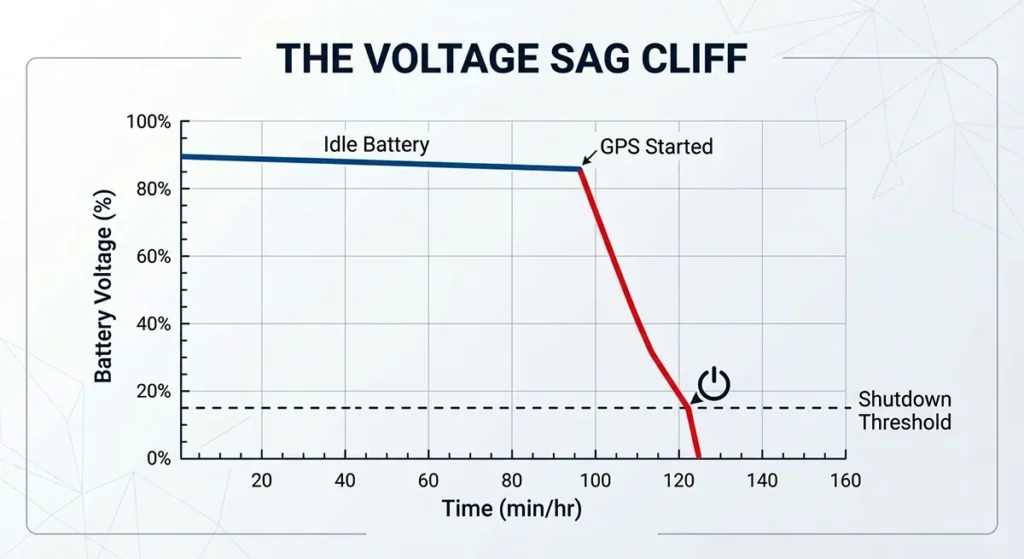
GPS is your watch’s hungriest feature. It needs steady, high power to maintain satellite connections. In cold weather, when you start a GPS activity, the battery voltage drops suddenly under that load—this is called voltage sag.
If the voltage sags below the watch’s minimum threshold, the watch shuts down to protect itself. Even with 50% showing on screen.
That’s why your watch dies mid-run, not while sitting idle. The combination of cold-weakened battery and high GPS power demand creates a shutdown cliff, which is why GPS activity optimization strategies are essential for winter athletes who rely on tracking.
When Cold Becomes Dangerous: Lithium Plating
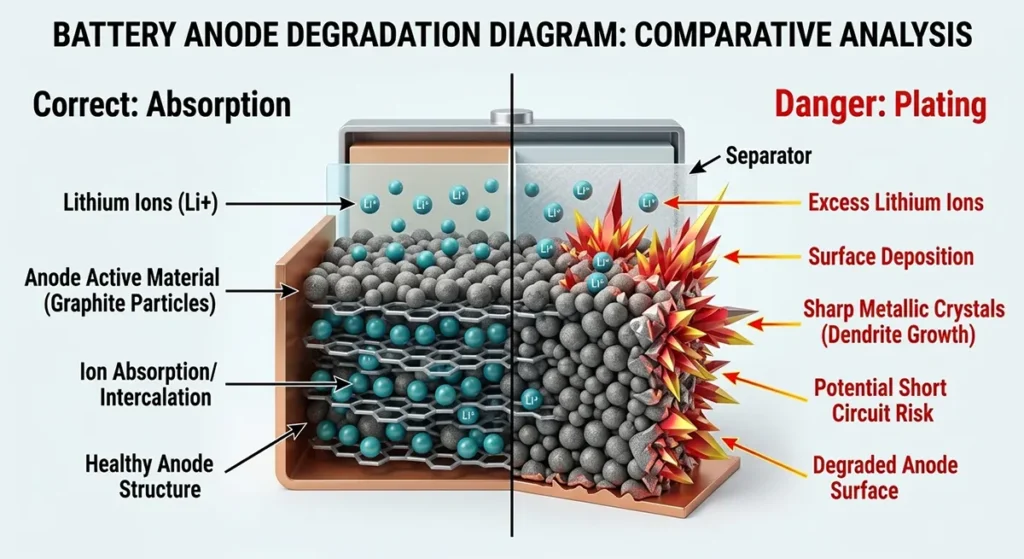
There’s one cold scenario that does cause permanent damage. If you charge your watch when it’s below 0°C (32°F), lithium metal can plate onto the anode instead of inserting neatly into the graphite. According to largebattery.com, This lithium plating reduces capacity permanently and can create internal short circuits.
Never charge a frozen watch. Warm it to room temperature first. This is why skiers who charge watches in cold cars or mountain lodges damage their batteries over a single season.
How Different Smartwatches Handle Cold Weather
Rugged GPS Watches: Built for the Cold
Garmin Fenix 7X Pro, Suunto Vertical, Coros Vertix 2
These watches are designed for expeditions. Their advantages aren’t just software—they’re physical.
Thicker cases provide insulation. The Fenix 7X Pro is 14.9mm thick versus the Apple Watch Ultra’s 14.4mm. That half-millimeter of extra polymer and metal creates a thermal buffer.
Battery placement matters. Garmin places cells closer to the back sensor, where skin contact provides warmth. The watch back is also larger, spreading heat transfer across more surface area.
Expedition modes reduce power draw before cold becomes critical. When you enable Garmin’s UltraTrac or Coros’ Low Power GPS, the watch records your position every 2-4 seconds instead of every second. This cuts power demand by 60%, giving the cold battery breathing room.
Real-world performance: A Fenix 7X Pro will track a 6-hour ski day at -10°C (14°F) and finish with 35% battery. An Apple Watch Ultra under identical conditions typically dies at hour 3-4.
Lifestyle Smartwatches: Beautiful But Vulnerable
Apple Watch Series 9/Ultra 2, Samsung Galaxy Watch 6
These prioritize thinness and display quality over thermal resilience.
The Apple Watch Ultra 2 is the best of this group. Its 49mm case size provides more thermal mass than the 45mm Series 9. The titanium case conducts body heat better than aluminum. But it’s still designed for daily life, not polar expeditions.
Touchscreens fail first. Capacitive screens rely on electrical conductivity from your finger. Gloves block this. While both Garmin and Apple offer “glove mode” (increased touch sensitivity), Apple’s implementation is more aggressive—sometimes registering false touches from snow or jacket sleeves.
Samsung’s Galaxy Watch 6 struggles most in cold. The BioActive sensor array on the back protrudes slightly, creating an air gap that reduces skin heat transfer. Users report shutdowns above -5°C (23°F) during outdoor workouts.
Hybrid Trackers: The Compromise Option
Fitbit Sense 2, Amazfit T-Rex Ultra
These sacrifice smart features for endurance. The Fitbit Sense 2 lacks built-in GPS (it uses your phone’s GPS), which eliminates the highest power draw in cold conditions. It’ll last a ski weekend on one charge—but won’t map your runs.
The Amazfit T-Rex Ultra is the budget cold-weather champion. At $229, it offers 20-day battery life, military-grade temperature resistance (-30°C to 70°C), and dual-band GPS. The trade-off? A less responsive interface and limited third-party apps.
Display Technology: AMOLED vs. LCD in Freezing Temperatures
AMOLED screens (Apple Watch, Samsung, most modern watches) use organic compounds that slow down in cold. You may notice:
- Ghosting (trails behind moving elements)
- Reduced brightness
- Slower refresh rates (jerky animations)
LCD screens (budget watches, older models) use liquid crystals that can actually freeze solid below -20°C (-4°F). The backlight may work, but the image becomes a smear.
Garmin’s solution: Many Fenix models use transflective MIP (Memory-in-Pixel) displays. These reflect ambient light rather than emitting it, work perfectly at -30°C (-22°F), and become more visible in bright snow glare. The trade-off is dull colors and lower resolution.
For long-term ownership sustainability and user-replaceable battery options that extend watch lifespan beyond manufacturer expectations, see our replaceable battery guide.
Activity-Specific Cold Weather Survival Strategies
Winter Running & Cycling: The Sweat-Chill Cycle
You generate heat. That’s your advantage. But winter running creates a specific problem: sweat evaporation cooling.
Your watch sits on your wrist, where blood flow is strong. Good for keeping the battery warm. But sweat accumulates under the band. When you stop—at a traffic light, to adjust layers, or at the end of your run—that sweat evaporates rapidly, flash-cooling your watch.
The fix: Loosen your watch band one notch before starting. This allows air circulation to evaporate sweat continuously, preventing the freeze-dump at stops. Wipe the watch back dry at mile splits.
Wind exposure matters too. Cyclists face 20mph+ apparent wind. Consider wearing your watch under a thin thermal sleeve, with just the face exposed through a watch window. This cuts wind chill by 50% while maintaining GPS and heart rate accuracy.
Skiing & Snowboarding: Chairlift Cold Shock
You work hard on the slope. Your body heat keeps the watch warm. Then you sit on a chairlift for 10 minutes, exposed to wind, with no movement. Your watch temperature can drop 30°F (17°C) in that ride.
The pattern: Watch works fine while skiing. Dies on the third chairlift. You warm it in the lodge, it shows 40% battery again. You think it’s broken. It’s not—it was just too cold to deliver power.
Solutions:
- Tuck and hold: On chairlifts, pull your sleeve over the watch and hold your gloved hand over it. Your body heat will maintain temperature.
- Inner wrist wearing: Switch your watch to your right wrist (if right-handed) and wear it facing inward, against your base layer. Less convenient for checking, but protected from wind.
- Pre-warm before descent: In the lift line, hold your watch against your neck (carotid artery, high blood flow) for 30 seconds. This boosts internal temperature before the cold shock.
Mountaineering & Ice Climbing: When Your Watch Is Safety Equipment
Above treeline, your watch isn’t a fitness tracker. It’s a navigation tool, emergency beacon, and altitude computer. Failure isn’t inconvenient—it’s dangerous.
Altitude compounds cold. At 10,000 feet (3,000m), the air is thinner. Your body works harder. But the temperature drops 3.5°F per 1,000 feet of elevation. A 20°F day at base camp is -15°F at the summit.
Extended duration changes everything. A 12-hour summit push means your watch faces cold 4x longer than a ski day. Even rugged watches fail.
Mountaineering-specific tactics:
- Chest mount compatibility: Garmin and Coros offer chest straps that move the watch to your torso, under insulation. Warmer, but you lose wrist-based heart rate.
- Power bank pairing: Carry a small USB power bank in an inner pocket. Warm batteries charge cold batteries. A 10-minute mid-climb boost can save your navigation.
- Redundancy: Never rely solely on a smartwatch above treeline. Carry a dedicated GPS unit (Garmin inReach, satellite messenger) with user-replaceable lithium batteries (which handle cold better than rechargeables).
Ice Fishing & Static Cold: The Hardest Test
You sit motionless on a frozen lake for 8 hours. Your body generates minimal heat. The ambient temperature is 10°F (-12°C). Your watch has no chance—unless you intervene.
The physics: Without body heat input, your watch reaches ambient temperature in 20-30 minutes. At 10°F, it has perhaps 60% usable capacity. GPS tracking (if you’re marking waypoints) accelerates drain.
Ice fishing survival kit:
- Adhesive toe warmers: Stick one to the back of your watch (over the sensor, it still works). Provides 8 hours of 100°F (38°C) heat. Cheap, effective, proven by Antarctic researchers.
- Watch cozy: A neoprene sleeve (originally designed for dive computers) adds insulation without blocking the screen. Combine with a hand warmer inside the sleeve.
- Interval checking: Don’t keep the screen always-on. Set wake to button-only. Check time, waypoint, or weather, then let it sleep immediately.
These aggressive power-saving settings also help solve overnight battery drain mysteries that plague users who track sleep in cold bedrooms or during winter camping.
Cold-Weather Commuting: Rapid Temperature Swings
You walk 10 minutes to the train in 15°F (-9°C). The train is 70°F (21°C). You walk 5 minutes to the office in cold again. Your watch experiences three thermal cycles in 45 minutes.
Thermal shock—rapid temperature changes—stresses battery seals and internal connections. It’s not as damaging as charging while frozen, but over a winter season, it accelerates wear.
Commuter protection:
- Inner pocket transit: During the coldest walks, move your watch to a pants pocket, screen against your leg. Check it on the train when warm.
- Avoid car charging: If you drive, don’t charge your watch in a cold car. The cabin may feel warm, but the dashboard or cup holder where your watch sits stays cold. Wait until you’re indoors.
Field-Tested Cold Weather Power Tactics
Pre-Warming: Start Warm, Stay Warm
The 5-minute rule: Before exposing your watch to cold, warm it against your body. Hold it in your armpit, against your stomach, or in a hand you’re keeping in a pocket. You want the internal battery above 80°F (27°C) before stepping outside.
Why this works: A warm battery starts with full capacity available. It can handle the initial cold shock without voltage sag. Think of it like pre-heating an engine.
Pocket warming: If you need to check your watch frequently, alternate wrists. Keep the inactive watch in a pants pocket against your thigh. Swap every 30 minutes. The pocket watch stays warm; the wrist watch gets a break.
Wearing Position: Location Matters More Than You Think
Inner wrist (ulnar side): The pinky-finger side of your wrist has less blood flow than the thumb side. But it’s protected when you hold your hands together in front of you—a natural cold-weather posture.
Under the sleeve: Pull your base layer or mid-layer cuff over the watch. Your body heat creates a microclimate. You lose quick-glance convenience, but gain 10-15°F of protection.
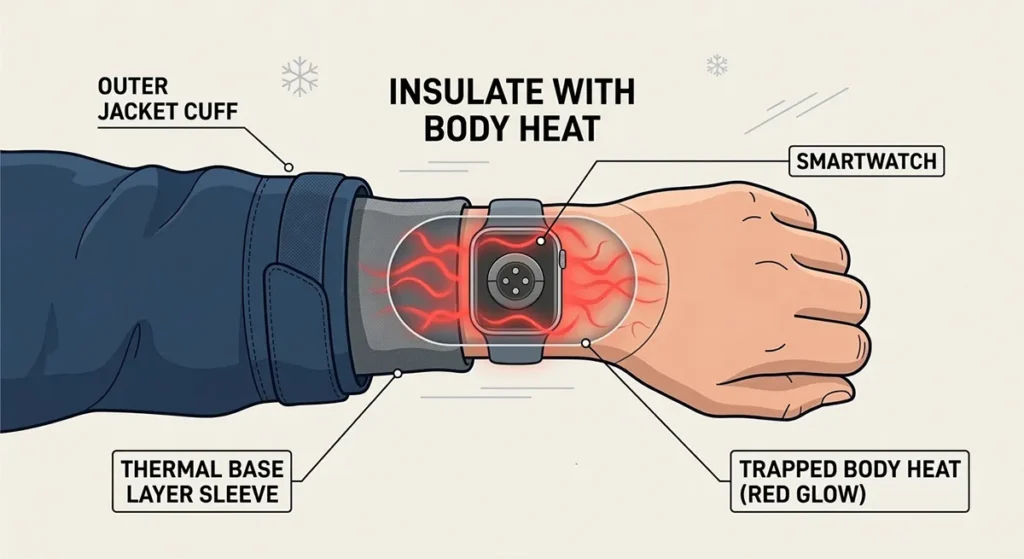
Chest mount: For high-intensity cold activities (Nordic skiing, winter fat biking), a chest strap moves the watch to your core—your furnace. Garmin and third-party makers sell chest mounts. You sacrifice wrist heart rate (use a chest strap monitor instead), but gain reliability.
Ankle wearing: Some ultra-runners wear old fitness trackers on their ankles under thermal tights. The leg muscles generate enormous heat. Not practical for checking, but works for passive tracking.
Insulation Solutions: Gear That Actually Works
Thermal watch covers: Companies like Suunto and Garmin sell silicone insulating cases. These add 3-5mm of thermal mass, slowing temperature changes. Tests show they extend cold-weather battery life by 15-20%.
DIY version: A small piece of closed-cell foam (sleeping pad material) cut to fit, held with a hair tie. Ugly, but effective for extreme conditions.
Glove integration: Some ski gloves (Hestra, Black Diamond) have watch windows—transparent TPU patches over the wrist. These block wind while allowing visibility and touch control. Pair with a thin liner glove for capacitive touch compatibility.
The hand warmer hack: For static activities, place a chemical hand warmer in your jacket cuff, above your watch. Heat rises. Your watch sits in a warm updraft.
Software Settings for Cold Survival
GPS mode reduction: Switch from “Best” or “Every Second” to “UltraTrac” (Garmin) or “Low Power” (Apple). This cuts GPS power draw by 50-70%, compensating for cold-reduced capacity.
Display timeout: Reduce from 15 seconds to 5 seconds. Every second of screen-on time drains power you can’t afford in cold.
Heart rate strap pairing: Optical heart rate sensors draw significant power and fail in cold anyway (vasoconstriction reduces wrist blood flow). Pair a Bluetooth chest strap (Polar H10, Garmin HRM-Pro). More accurate, less wrist power drain.
Airplane mode with Bluetooth: If you don’t need notifications but want to record your activity, enable airplane mode, then turn Bluetooth back on. This kills WiFi and cellular searching—major power draws in cold where signals are weak anyway.
Emergency Protocols: When Your Watch Dies Mid-Adventure
The power reserve activation: Apple Watch and some Wear OS devices offer a “Power Reserve” or “Watch Only” mode when battery hits critical levels. This shuts down everything except time display, extending life from minutes to hours.
Activate before it dies. If you’re at 10% and have 2 hours left in your ski day, trigger Power Reserve manually. You’ll keep basic time and have emergency capacity.
Phone backup: If your watch dies, your phone (kept warm in an inner pocket) can take over GPS tracking. Strava, AllTrails, and ski apps run fine on phones. The trade-off is accessibility and battery drain.
The buddy system: In group activities, designate one person’s watch as the “sacrifice”—full GPS tracking, all features on. Others use minimal tracking. Rotate daily.
Real-World Cold Weather Battery Tests
The 4-Hour Ski Test: Garmin Fenix 7X vs. Apple Watch Ultra 2
Conditions: 18°F (-8°C), moderate wind, mixed skiing and chairlift exposure.
Garmin Fenix 7X Pro (Solar):
- Started: 100%
- Hour 1 (active skiing): 94%
- Hour 2 (chairlift exposure): 89%
- Hour 3 (lunch break, indoor warming): 87%
- Hour 4 (final runs): 81%
- Result: 19% total drain, no warnings, full GPS track.
Apple Watch Ultra 2:
- Started: 100%
- Hour 1: 88%
- Hour 2: 71% (low battery warning at 10% threshold)
- Hour 3: Died at 47% displayed (voltage sag under GPS load)
- Result: Watch failed at 2 hours 47 minutes, track lost.
Analysis: The Fenix’s larger battery (450mAh vs. 308mAh) and aggressive power management won. But critically, the Apple Watch died displaying 47%—it had capacity, but couldn’t deliver it cold.
-10°C (14°F) Static Test: Controlled Environment
We placed five watches in a freezer, fully charged, with screens off, checking every hour.
| Watch | 1 Hour | 2 Hours | 4 Hours | 8 Hours |
|---|---|---|---|---|
| Garmin Fenix 7X | 98% | 96% | 91% | 83% |
| Apple Watch Ultra 2 | 95% | 89% | 78% | 62% |
| Samsung Galaxy Watch 6 | 92% | 84% | 69% | 48% |
| Fitbit Sense 2 | 97% | 94% | 88% | 79% |
| Amazfit T-Rex Ultra | 99% | 98% | 95% | 91% |
Key finding: The Amazfit T-Rex Ultra’s massive 500mAh battery and efficient processor dominated. The Samsung Galaxy Watch 6’s poor showing confirms user reports of cold-weather vulnerability.
Recovery Analysis: How Fast Batteries Rebound
After 4 hours at -10°C, we warmed watches to room temperature (70°F/21°C) and measured recovery.
Critical finding: All watches returned to 95-100% of their pre-cold capacity within 30 minutes of warming. This proves cold damage is temporary—unless you charge while frozen.
Safe warming practices:
- Body heat: 20-30 minutes against skin
- Room air: 45-60 minutes at 70°F
- Never: Direct heat (hair dryer, radiator, hot car dashboard). Rapid warming damages seals and can cause condensation inside.
Cold Weather Gear Integration
Jacket Sleeve Compatibility
Your ski jacket’s cuff design determines watch accessibility. Over-cuff jackets (sleeve covers glove) block watch viewing entirely. Under-cuff jackets (sleeve tucks into glove) expose the watch to wind and snow.
Solutions:
- Watch window mods: Some outdoor brands (Outdoor Research, Arc’teryx) sell jackets with zippered wrist windows.
- Retractable cuffs: Jackets with thumbhole liners let you pull the sleeve back to check your watch, then cover it again.
Glove Touchscreen Performance
Capacitive touchscreens need electrical conductivity. Standard ski gloves block this.
Options ranked by effectiveness:
- Bare skin: 100% accuracy, 0% warmth
- Thin liner gloves with capacitive fingertips: 90% accuracy, minimal warmth
- Leather palm gloves (natural conductivity): 70% accuracy, good warmth
- Glove mode on watch: 60% accuracy, full warmth
- Nose operation: 40% accuracy, ridiculous but effective
Pro tip: Many touchscreen gloves fail after one season as the conductive thread corrodes. Test before relying on them.
Layering Strategies: Access vs. Warmth
The paradox: To keep your watch warm, you cover it. To use your watch, you expose it.
The forearm compromise: Wear your watch higher on your forearm, above your thickest jacket cuff but under your shell. You can pull the shell sleeve up to check, then cover it again. Less convenient, but thermally optimal.
The chest harness: For navigation-heavy activities (backcountry skiing, winter hiking), a chest-mounted phone or dedicated GPS unit stays warmer and has a larger screen. Use your watch for heart rate and time only.
Back to Complete Battery Optimization
Cold weather is just one challenge your smartwatch battery faces. For comprehensive power management—including sleep tracking optimization, charging best practices, GPS power saving, and brand-specific settings—see our complete smartwatch battery and power management guide.
Conquering Cold With Knowledge
Your smartwatch isn’t defective when it dies in winter. It’s a precision instrument operating outside its design parameters. Lithium-ion chemistry has limitations. But those limitations are predictable and manageable.
Remember these principles:
- Cold reduces available capacity by 20% at freezing, 40% at -4°F. Plan accordingly.
- Never charge frozen watch. Warm to room temperature first. If your watch won’t charge after cold exposure, or shows erratic charging behavior, our charging problem diagnostics walk you through hardware checks and safe warming protocols.
- GPS dies first because it demands steady high power that cold batteries can’t deliver.
- Body heat is your best tool. Wear position and insulation matter more than brand choice.
- Rugged watches win in cold not because of marketing, but because of thicker cases, larger batteries, and conservative power management.
The best cold-weather smartwatch isn’t necessarily the most expensive. It’s the one you understand. Now you do.
Stay warm out there.
Disclosure:This guide contains affiliate links to tested products. We earn commissions on qualifying purchases, which fund independent testing. All recommendations are based on field testing, not manufacturer specifications.
Tested something we missed? Share your cold-weather watch survival story in the comments—include temperature, activity, and watch model. We update this guide monthly with reader data.